
When your team’s knowledge lives across tickets, docs, chat threads, meeting notes, and AI prompts, finding the right answer gets slower every week. TOW is built to fix that by bringing company memory, documentation, project management, and reviewable AI into one workspace.
TOW helps startups, internal operations teams, product groups, and larger organizations keep internal knowledge searchable, permission-aware, and usable in daily work. You can run TOW in the cloud or on your own infrastructure, which gives you a practical path to better knowledge management without giving up admin control or data ownership.
TOW knowledge management software keeps company memory inside daily work
Knowledge management works better when your team does not have to switch between a wiki, a project tracker, a separate AI tool, and scattered notes just to understand what happened and what to do next. TOW combines docs, wiki content, workspace memory, search, notifications, issues, boards, goals, roadmaps, and AI-assisted work in one private workspace so your knowledge stays connected to the work that created it.
That matters because company memory is not just a library of static pages. It includes decisions, risks, open questions, recurring processes, project context, and the reasoning behind changes. TOW is designed so those facts become durable workspace context instead of disappearing into chat history or getting stranded in separate tools.
“TOW keeps docs, tasks, decisions, risks, projects, and AI-assisted work in one private workspace.”
If your team already uses AI to find information or summarize internal material, the gap is usually not interest. The gap is trust, context, and governance. TOW addresses that by making internal knowledge searchable and inspectable inside the same system where your team plans work and maintains documentation.
“TOW supports the information-finding and summarization work employees already do with AI, but inside a permission-aware workspace.”
Knowledge management software for teams that need admin control and data ownership
Some teams can use a standard cloud wiki and live with the tradeoffs. Others cannot. If your organization needs tighter control over infrastructure, authentication, permissions, or how AI interacts with internal knowledge, TOW gives you options that many knowledge management tools do not.
TOW offers both self-hosted deployment and cloud deployment. You can run the workspace on your own infrastructure if data location internal policy, or architecture requirements matter to you, or choose the cloud if you want faster rollout with the same unified product model.
That flexibility is especially useful when knowledge management is tied to internal operations, product delivery, engineering documentation, or cross-functional reviews. In those cases, the question is not only whether your team can store information. It is whether your team can govern access, preserve context, and still move quickly.
“TOW can run in the cloud or on your own infrastructure, with self-hosted control and clear data ownership.”
TOW connects docs, wiki content, search, and workspace memory so knowledge is easier to retrieve
The best knowledge management software does more than collect documents. It helps your team retrieve the right context at the moment they need it. TOW is built around that reality with docs and wiki capabilities, workspace memory, searchable docs, references, snapshots, and memory diffs that make changes inspectable over time.
For you, that means less re-explaining the same process, less duplicate documentation, and fewer decisions based on partial context. Instead of asking where something lives, your team can work from a shared workspace where project information and institutional knowledge reinforce each other.
TOW also fits how people already use AI at work. External 2025 research shows workers commonly use AI for doing research or finding information, consolidating information, and summarizing documents or meetings. TOW brings those use cases into a workspace that is grounded in internal context rather than disconnected prompts and uploads.
Reviewable AI for knowledge management software without black-box changes
AI can help your team move faster, but unmanaged AI can also create new problems. In knowledge management, the risk is not just incorrect output. It is undocumented changes, unclear sources, and content that bypasses normal review.
TOW approaches this differently with workspace-aware AI agents and human review. The platform is built around reviewable AI actions, permission-aware context, and inspectable workspace memory, so AI can assist with internal knowledge tasks without becoming an untracked side channel.
That is valuable when you want help summarizing documents, drafting internal content, consolidating information, or surfacing relevant context across projects. TOW makes those tasks easier while preserving the review steps and permission boundaries that serious teams need.
TOW helps replace scattered tools with one workspace for projects and knowledge
A common knowledge management problem is structural, not editorial. Your docs live in one system, your tickets in another, your roadmap somewhere else, and your AI workflow outside all of them. The result is stale pages, duplicated decisions, and a company memory that never fully matches reality.
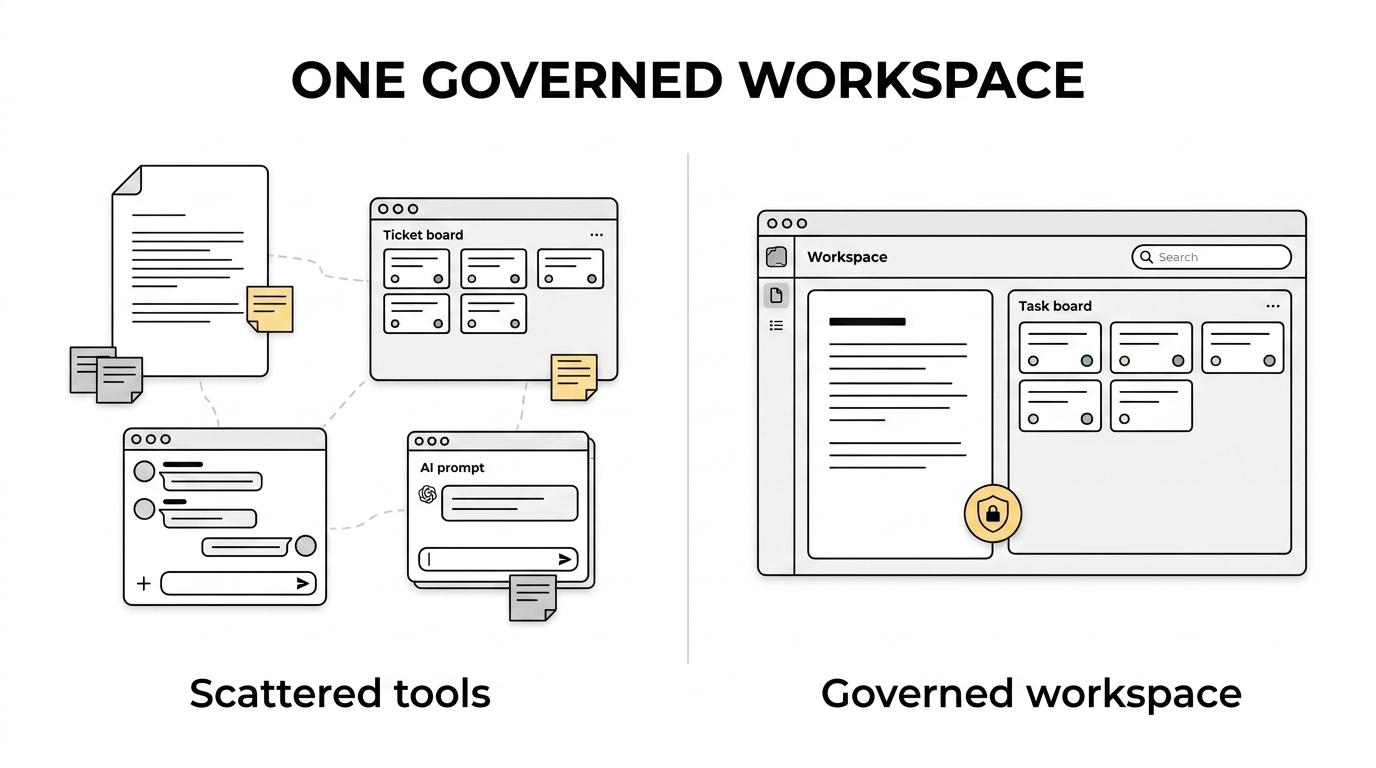
TOW is designed as a unified workspace rather than a standalone wiki. Alongside company memory and documentation, you get issues, boards, goals, roadmaps, collaboration, notifications, search, and admin controls. That lets your knowledge base stay close to execution instead of drifting away from it.
If you are trying to reduce tool sprawl, TOW is especially relevant because it is aiming for parity with Jira, Confluence, Notion, and Linear in a single environment. For many teams, that means fewer handoffs between systems and less effort spent syncing information by hand.
Migration and implementation support for teams moving from Jira, Confluence, or Notion
Switching knowledge management software is rarely only about features. You also need a realistic path from your current stack to a better setup. TOW includes admin, auth, and migration support for teams moving from tools such as Jira, Confluence, and Notion.
That reduces friction at a practical level. Your team can centralize knowledge and project context without starting from zero or forcing every group to rebuild workflows from scratch.
When you evaluate TOW, it helps to think in terms of operational outcomes, not just feature lists. Here is where the platform tends to make the biggest difference:
- Faster retrieval: Searchable docs, memory, and project context reduce time spent asking where information lives.
- Stronger governance: Permission-aware access, reviewable AI, and deployment choice help you manage risk more directly.
- Better continuity: Decisions, risks, and updates stay attached to the workspace instead of disappearing into chat or private prompts.
When TOW is the right fit for knowledge management software
TOW is a strong fit if you need knowledge management software that supports active operations, not just document storage. It works well for teams that want internal knowledge, project execution, and AI assistance connected in one place.
You are likely a good fit for TOW if several of these apply to your organization:
- You need one system for docs and execution: Your team wants knowledge, issues, boards, goals, and roadmaps in the same workspace.
- You care about ownership and control: You need self-hosted deployment or want a clearer model for infrastructure and data control.
- You want AI with review and permissions: Your team sees value in AI for internal knowledge work but does not want unsupervised, context-blind automation.
TOW may be less relevant if you only need a lightweight standalone wiki with no connection to project delivery, no AI review needs, and no infrastructure or admin requirements. But if your knowledge has to stay accurate under real operational pressure, TOW is built for that use case.
Why teams trust TOW for company memory and internal knowledge
Trust in knowledge management software comes from how the system handles real internal context. TOW makes its model explicit: docs, company memory, project work, and AI are part of the same workspace, with permission-aware access and reviewable actions rather than hidden context assembly.
That clarity helps you evaluate the platform on practical terms. You can see where knowledge lives, how it is updated, who can access it, and whether AI outputs are grounded in workspace context. TOW also offers BYOK or TOW-managed AI endpoints, which gives your organization more choice in how AI is configured and operated.
For smaller organizations, TOW also offers a free self-hosted tier. That makes it easier to test the product with your own workflows, your own infrastructure, and your own internal knowledge model before committing to a broader rollout.
If you are looking for knowledge management software that turns company memory into an active, searchable part of how your team works, TOW is built for that job. Explore TOW and see how a unified workspace for docs, memory, projects, and reviewable AI can make your internal knowledge easier to trust, find, and use.