
If you need self-hosted AI because security, deployment control, and operational clarity matter as much as model output, TOW is built for that job. TOW, The Only Workspace, brings project management, documentation, company memory, and reviewable AI into one workspace that your team can run on its own infrastructure or use in the cloud.
TOW is designed for teams and organizations that want integrated projects, docs, and AI without giving up admin controls or clear data ownership. Instead of spreading work across separate project tools, wikis, and standalone AI apps, you get one workspace where context stays connected and AI actions can be reviewed before they change work.
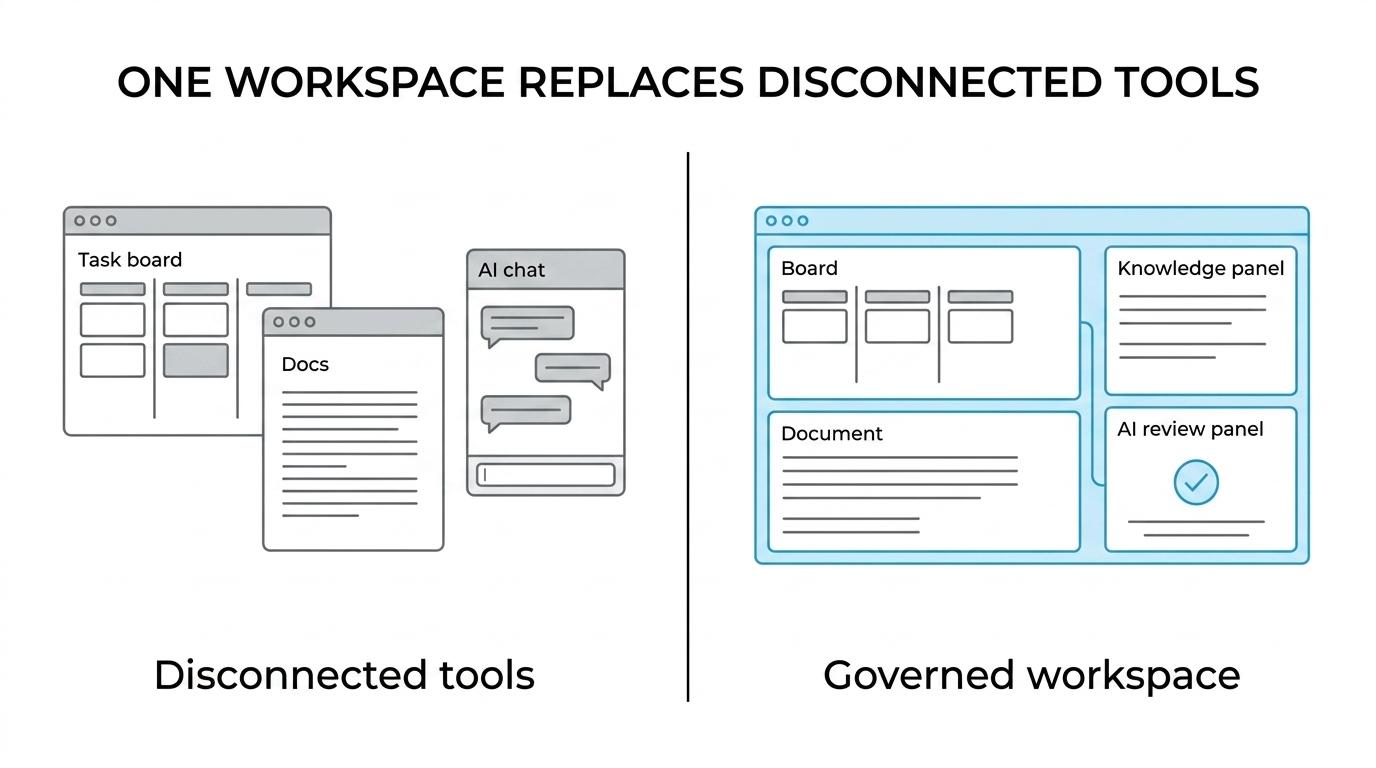
TOW self-hosted AI workspace keeps projects, docs, memory, and operations together
TOW combines issues, boards, goals, and roadmaps with docs, wiki pages, workspace memory, search, collaboration, and notifications. That matters because self-hosted AI is more useful when it can work inside the same system where your team already plans, documents, and decides.
“TOW combines project management, docs, workspace memory, and reviewable AI in one self-hosted workspace.”
With TOW, your team does not have to move between a task tool, a knowledge base, and a separate AI surface just to answer routine questions or prepare work for review. We keep the operating context in one place, so AI can work with your workspace content instead of relying on disconnected prompts and copied text.
TOW’s workspace includes the core functions secure teams usually need in one product:
- Project management: Issues, boards, goals, and roadmaps for day-to-day execution and planning.
- Docs and company memory: A wiki-style documentation layer tied to searchable workspace knowledge.
- AI built into the workspace: Reviewable, permission-aware AI agents that work with the same workspace context your team uses every day.
TOW governed AI controls support privacy, access control, and review
TOW’s self-hosted AI position is not just about where the app runs. It is also about where AI state lives and how requests are handled. According to TOW’s deployment and security documentation, the backend uses the OpenAI Responses API for reasoning and the embeddings API for semantic search, centralizes Responses API calls in the backend with store=false, and does not use OpenAI Conversations, Assistants, Threads, or Vector Stores as hosted application memory.
“TOW centralizes OpenAI Responses API calls in the backend with
store=falseand does not use OpenAI Conversations, Assistants, Threads, or Vector Stores as hosted application memory.”
For your team, that translates into clearer operational boundaries. TOW says AI state remains in your deployment database and configured storage rather than in hosted OpenAI memory, which is a practical difference when your buyers, security leads, or internal stakeholders ask where workspace context lives.
This is also where TOW aligns with the direction of current AI governance. NIST’s AI Risk Management Framework focuses on trustworthiness considerations in the design, development, use, and evaluation of AI systems, and its Generative Artificial Intelligence Profile highlights the need for gen-AI-specific risk controls. A self-hosted AI workspace with reviewable actions, permission awareness, and clearer data boundaries gives you a more workable foundation for those requirements than a loose collection of external AI tools.
IBM’s 2025 Cost of a Data Breach Report found that 13% of organizations reported breaches of AI models or applications, and 97% of those compromised said proper AI access controls were missing. TOW helps you bring AI into the same governed workspace where projects, docs, and permissions already live, which is exactly the kind of control surface many organizations are trying to build now.
“TOW brings reviewable AI into a governed workspace at a time when IBM reported 13% of organizations had AI model or application breaches, and 97% of those lacked proper AI access controls.”
TOW helps teams adopt self-hosted AI without adding another disconnected system
TOW is a fit for organizations that want AI to support real operations, not sit beside them. Startups, internal product teams, engineering groups, and larger enterprises can use TOW when they need integrated projects, documentation, and AI with strong admin controls and data ownership.
TOW also reduces the switching cost that often slows secure AI adoption. The platform includes admin, auth, and migrations from Jira, Confluence, and Notion, which makes TOW relevant if your current stack is split across planning, documentation, and knowledge tools and you want to consolidate that work into one workspace.
If you are evaluating self-hosted AI for a smaller organization, TOW gives you a lower-risk starting point. TOW’s pricing states that free self-hosted use is available for organizations under $10M ARR and under 50 employees.
“TOW offers free self-hosted use for organizations under $10M ARR and under 50 employees.”
That gives smaller teams a realistic path to test a self-hosted AI workspace in their own environment before committing to a larger rollout. For larger organizations, TOW’s deployment choice, admin controls, and unified workspace model make it easier to assess fit across security, operations, and daily team use.
When TOW is the right self-hosted AI workspace
TOW is the right fit when you want self-hosted AI to improve real operating work, not just produce text in a separate tool. In practice, that usually looks like this:
- You need one operational system: Projects, docs, memory, and AI should work together instead of living in separate apps.
- You need deployment choice: Your team wants to run on its own infrastructure or use the cloud without changing the core workspace model.
- You need governed AI use: Reviewable, permission-aware AI actions matter because access control and approval are part of your operating requirements.
- You need control over AI endpoints: BYOK or TOW-managed AI endpoints should fit your procurement, security, or infrastructure preferences.
- You need a migration path: Moving from Jira, Confluence, Notion, or a fragmented stack should be practical, not a rebuild.
If that is your situation, TOW gives you a self-hosted AI workspace built around operational control, connected knowledge, and reviewable automation. Talk with TOW about your deployment model, migration needs, and AI governance requirements, and we can help you evaluate the fastest path to a secure workspace your team will actually use.