

[Self-hosted project management makes sense when your team needs tighter control over where work data lives, how access is managed, and how new tooling fits internal security requirements. TOW](https://tow.dev/)[ builds The Only Workspace](https://tow.dev/), a unified platform for project management, documentation, company memory, and reviewable AI that you can run on your own infrastructure or in the cloud.
Instead of spreading work across a ticketing tool, a wiki, and a separate AI assistant, TOW brings projects, docs, memory, search, collaboration, notifications, and admin controls into one workspace. For secure teams from startups to enterprises, that means fewer blind spots between planning, execution, documentation, and review.
Self-hosted project management for secure teams that need infrastructure control
For many security-conscious organizations, self-hosting is not just a deployment preference. It is a governance decision tied to procurement, internal policy, customer commitments, or supply chain risk management.
NIST’s Secure Software Development Framework states that secure software practices should be integrated into each SDLC implementation. TOW supports that kind of working model by keeping issues, goals, roadmaps, docs, and workspace memory together, so decisions and delivery work stay connected inside the environment you choose to control.
“TOW brings project management, documentation, company memory, and reviewable AI into one workspace you can run on your own infrastructure.”
That matters when cloud-only tools create friction with review processes or data handling expectations. TOW gives you a self-hosted option for stronger deployment control, while still offering a cloud path if you decide that vendor-managed operations are the better fit for part of your organization.
TOW unifies self-hosted project management, docs, and workspace memory
TOW is built for teams that do not want project work isolated from documentation. When your roadmap, issue tracking, specs, and team knowledge live together, it becomes easier to move from decision to execution without hunting through separate systems.
TOW combines issues, boards, goals, roadmaps, docs, wiki-style knowledge, search, collaboration, and notifications in one workspace. You spend less time syncing tools and more time working from a shared source of truth.
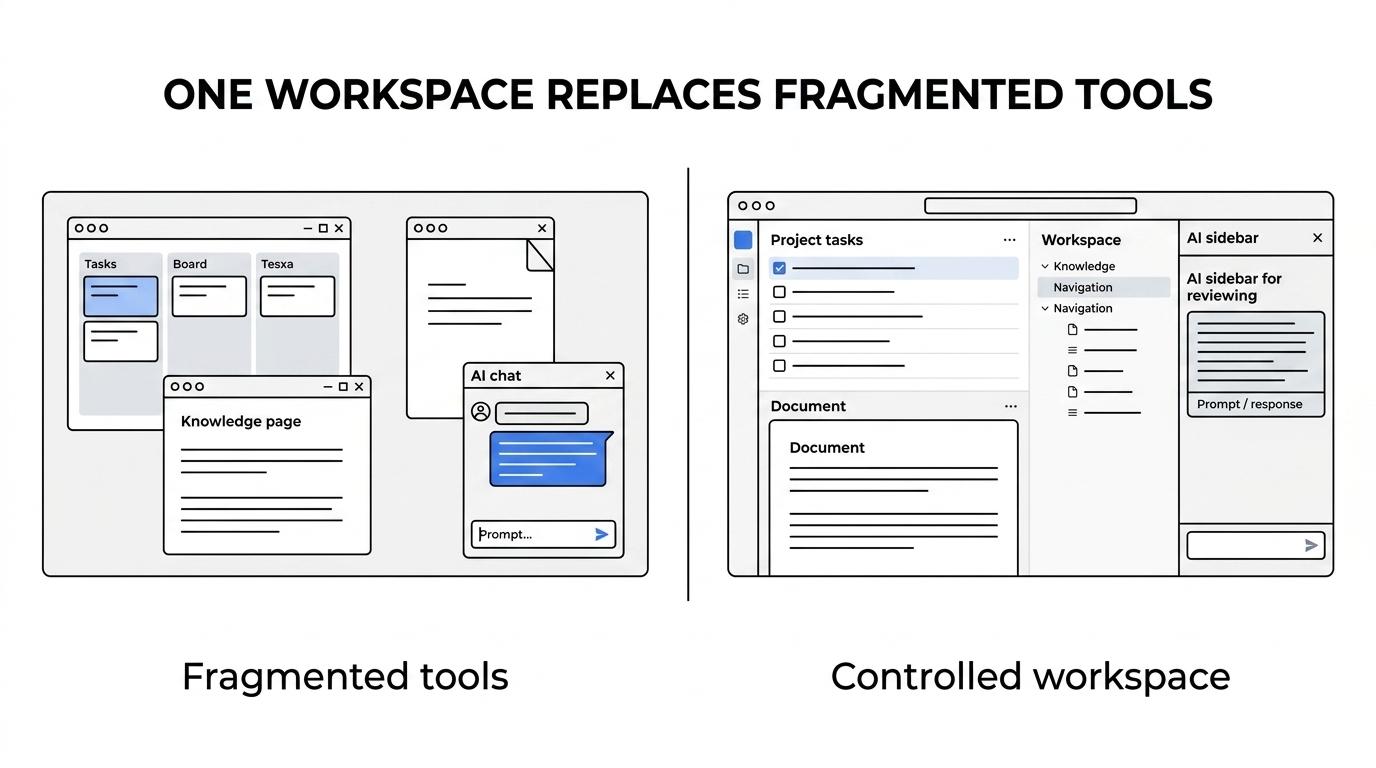
“TOW combines issues, boards, goals, roadmaps, docs, and workspace memory in a single workspace.”
Here is what that looks like in practice:
- Project management: Track issues, manage boards, define goals, and plan roadmaps in the same workspace your team uses every day.
- Documentation and memory: Keep docs and wiki content attached to the work they support, while building company memory that stays searchable and reusable.
- AI with controls: Use workspace-aware AI agents with human review, so automation can help without bypassing oversight.
- Operational continuity: Search, collaboration, and notifications help teams stay aligned without depending on a patchwork of disconnected apps.
- Administration and change management: TOW includes admin, auth, and migration paths from Jira, Confluence, and Notion.
Reviewable AI and admin controls for teams that cannot treat AI as a black box
Secure teams often want AI help, but not at the cost of unclear permissions or uncontrolled actions. TOW addresses that directly with reviewable, permission-aware AI actions that operate within workspace context instead of outside it.
TOW also gives you a choice between BYOK and TOW-managed AI endpoints. That gives your team a clearer way to match AI usage to internal policy, vendor review requirements, and data handling preferences.
“TOW gives teams a choice between BYOK and TOW-managed AI endpoints, with reviewable, permission-aware AI actions.”
Self-hosting still comes with responsibility. Running project management on your own infrastructure gives you more control over deployment and data handling, but your team remains responsible for hardening, maintenance, access policy, and operational upkeep. TOW is a strong fit when you want that control and want the workspace itself to support disciplined review rather than bypass it.
TOW helps teams replace fragmented Jira, Confluence, and Notion setups
A lot of teams start looking for self-hosted project management because the current stack has become too fragmented. Tickets live in one place, documentation in another, tribal knowledge in a third, and AI somewhere else entirely.
TOW includes migrations from Jira, Confluence, and Notion, which makes consolidation more realistic than starting from a blank workspace. If you are trying to reduce tool sprawl without losing context, that matters.
“TOW includes migrations from Jira, Confluence, and Notion, plus a free self-hosted tier for small organizations.”
TOW is also aiming for parity with Jira, Confluence, Notion, and Linear. For buyers, that signals a practical direction: one workspace built around the real combination of planning, documentation, and execution work that modern teams already manage across several products.
When TOW is the right self-hosted project management platform
TOW is a strong fit when your team needs more than a self-hosted issue tracker. It is especially relevant if you want one controlled workspace for delivery, knowledge, and AI.
You are likely a good fit for TOW if:
- You need deployment choice: Self-hosted control matters, but you may also want the option to use cloud for some teams or stages.
- You want fewer systems to govern: Projects, docs, memory, and AI belong in one workspace, not four separate tools.
- You need AI with oversight: Permission-aware, reviewable AI is more useful to your team than open-ended automation.
- You are replacing multiple products: Jira, Confluence, Notion, and similar tools have created too much switching, syncing, or duplicate admin work.
- You want a lower-risk starting point: The free self-hosted tier gives small organizations a practical way to evaluate fit.
[If you want a tool that removes all infrastructure responsibility, self-hosting may not be the best deployment model for you. In that case, TOW Cloud](https://tow.dev/) may be the simpler entry point, while keeping the same unified workspace approach.
Start with TOW on your infrastructure and bring projects, docs, and AI into one controlled workspace
If your team is evaluating self-hosted project management because security, governance, or data ownership matter, TOW gives you a more complete option than a standalone tracker. You can run TOW on your own infrastructure, keep project work and documentation together, and add AI in a reviewable, permission-aware way.
Choose the deployment model that fits your environment, then evaluate whether TOW can replace the mix of tools your team is managing today. If you want self-hosted project management with stronger control and less fragmentation, TOW is the next step.