

Product organizations rarely struggle because they lack another ticket board. They struggle because delivery, specs, decisions, and AI work are split across too many systems. TOW builds The Only Workspace as project management software that combines issues, boards, goals, roadmaps, docs, company memory, and reviewable AI in one place.
If you need structured project tracking with stronger admin control and clear data ownership, TOW is designed for you. We offer a self-hosted and cloud workspace for product teams that want project management, documentation, search, collaboration, notifications, and AI agents without separating operational work from the context that explains it.
TOW project management software brings product delivery, docs, and AI into one workspace
TOW gives product organizations a single workspace for planning work, assigning ownership, documenting decisions, tracking progress, and using AI with human review. Instead of forcing your team to stitch together a project tracker, a wiki, and separate AI tools, we keep projects, docs, memory, and AI connected inside the same operational system.
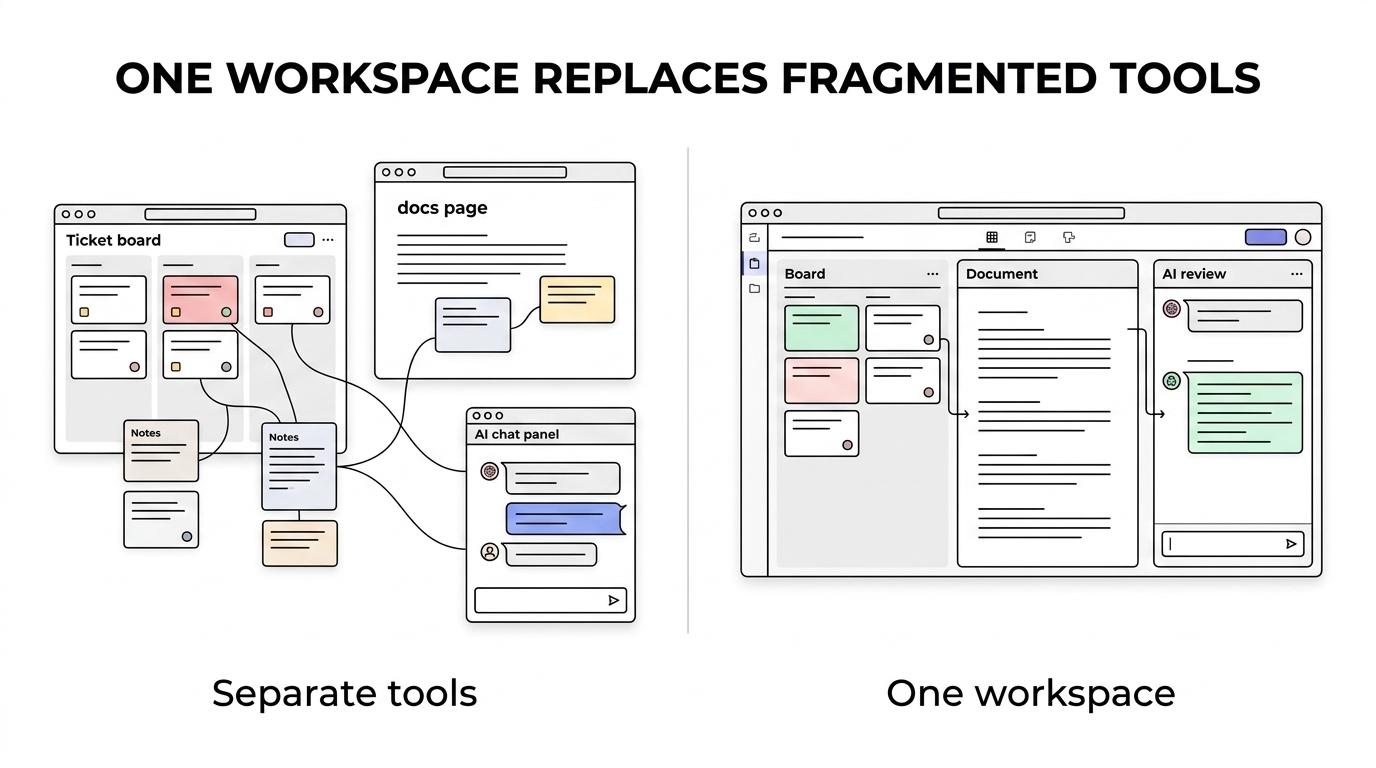
“TOW combines projects, docs, memory, and reviewable AI in one workspace you can run on your own infrastructure.”
That matters when roadmap changes, design decisions, implementation tasks, and release questions all affect each other. TOW makes those relationships easier to follow because the work record and the written context live together, not in different tabs owned by different vendors.
Within TOW, your team can work with:
- Issues, boards, goals, and roadmaps for day-to-day execution and planning
- Docs and wiki pages that capture product decisions, requirements, and team knowledge
- Workspace memory and search so people can find prior decisions and relevant context
- Reviewable AI agents that act with permission awareness and human oversight
TOW helps product teams track real work with tickets, workflows, and visible audit trails
For product organizations, project management software needs to do more than hold a backlog. TOW uses tickets as the operational record for work that needs ownership, status, dates, comments, blockers, or a visible audit trail, which helps you manage product delivery, bug handling, customer work, implementation tasks, and decision follow-up in one system.
“TOW gives each project ticket a stable issue key such as APP-42, making work easier to reference across comments, handoffs, and delivery reviews.”
That structure is useful when work moves across product, engineering, QA, operations, and leadership. A stable issue key, clear ownership, and tracked status reduce ambiguity when someone needs to answer what changed, who owns it, and what is blocking release.
TOW also supports workflow templates for different operating models, so you are not forced into a one-board-fits-all process. Available templates include simple delivery, scrum, bug triage, customer support, product discovery, epic roadmap planning, story design-to-delivery, subtask execution, QA verification, release readiness, and change approval.
A practical detail matters here: TOW resolves a ticket’s workflow from its issue type when the ticket is created, edited, moved from the action menu, or dragged on a board. That helps your team preserve process consistency without adding manual cleanup every time work changes state.
Self-hosted project management software with clear data ownership and reviewable AI
Some product teams can use any cloud project tool. Others cannot. If your organization needs to run project management software on its own infrastructure, control auth and admin settings directly, or choose how AI endpoints are handled, TOW is built for that operating model.
“TOW offers a free self-hosted tier for organizations under $10M ARR and fewer than 50 employees.”
TOW supports both self-hosted and cloud deployment, along with BYOK or TOW-managed AI endpoints. That gives you flexibility if you want to adopt workspace-aware AI without handing over all infrastructure decisions or treating AI as an ungoverned add-on.
Reviewable, permission-aware AI is a key difference. In TOW, AI actions are designed to be reviewable and aware of workspace permissions, which is important when your project system contains roadmap discussions, internal docs, delivery status, and company memory that should not be exposed or acted on blindly.
TOW project management software fits product organizations migrating from Jira, Confluence, or Notion
If your current setup is split between a project tracker, a documentation tool, and ad hoc AI usage, TOW gives you a path to consolidate. We support migrations from Jira, Confluence, and Notion so your team can move toward one workspace instead of maintaining separate systems for tickets, docs, and knowledge.
TOW is also explicit about where it is headed. We are aiming for parity with Jira, Confluence, Notion, and Linear, while keeping the advantage of a unified workspace and self-hosted control. For many product organizations, that means you do not have to choose between structured execution and ownership of your operating environment.
The benefit is less tool switching and less context loss. When a roadmap item becomes a ticket, a bug becomes a release blocker, or a product decision needs documentation, TOW keeps those records close together so your team spends more time shipping and less time reconstructing history.
TOW is the right fit for product organizations that need control, clarity, and AI they can govern
TOW is a strong fit when your project management requirements are broader than backlog management alone. We are especially relevant if your product organization needs one system for planning, execution, documentation, and controlled AI use.
You will likely get the most value from TOW if you need:
- A project management workspace that combines boards, issues, goals, roadmaps, docs, and search
- Self-hosted deployment or stronger control over infrastructure, admin, auth, and data ownership
- AI support that is reviewable, permission-aware, and connected to your actual workspace context
- A migration path away from separate Jira, Confluence, Notion, or similar tool stacks
TOW is also practical for smaller organizations that want to start with self-hosting before committing to a larger rollout. The free self-hosted tier for organizations under $10M ARR and fewer than 50 employees lowers the barrier to testing the workspace with a real product workflow.
Why TOW matches where project management and product operations are heading
External market data points in the same direction as TOW’s product design. In APM’s 2025 survey, carried out by Censuswide with 1,000 project professionals, 36% said their organization was using AI in 2023, and in construction 75% reported AI use in projects in 2025. AI is already part of project operations, which makes governance and reviewability more important, not less.
Product organizations are also under pressure to improve strategic clarity. ProductPlan’s 2025 survey of nearly 400 product professionals found that 39% identified product strategy as the most important area of investment, while 36% said senior leadership defines product strategy in their organizations. TOW supports that need by connecting strategy artifacts, delivery work, and company memory inside the same workspace instead of scattering them across separate systems.
PMI’s 2025 to 2035 forecast adds another useful signal: project-professional demand is expected to keep rising globally. When teams are stretched, the value of TOW is straightforward. We reduce the friction of chasing status across multiple tools and make it easier for people to find the work record, the decision record, and the next action in one place.
Start with TOW in your own environment
If your product organization needs project management software that does more than track tickets, TOW is worth a closer look. We can help you evaluate a self-hosted or cloud setup, map your current Jira, Confluence, or Notion workflow, and show how projects, docs, memory, and reviewable AI work together in one workspace.
The next step is simple: talk with TOW about your team’s current stack, your control requirements, and the workflows you need to support. We will help you see whether one workspace can make planning, execution, and product decision-making easier to run.