
TOW builds The Only Workspace, a unified platform for project management, documentation, company memory, and reviewable AI. For teams evaluating SSO and SCIM-based access management, TOW gives you the workspace side of the equation: documented OIDC support, admin authentication controls, and a single permission surface across projects, docs, search, and AI-assisted work.
If your goal is centralized workspace access, sign-in is only one part of the decision. SCIM 2.0 is the standard many identity teams use to create, update, and remove users and groups through a SCIM endpoint, while SSO through OpenID Connect or SAML handles authentication. TOW matters because those identity decisions affect the actual place your team plans work, stores knowledge, and uses AI.
TOW gives security-conscious teams one workspace to secure
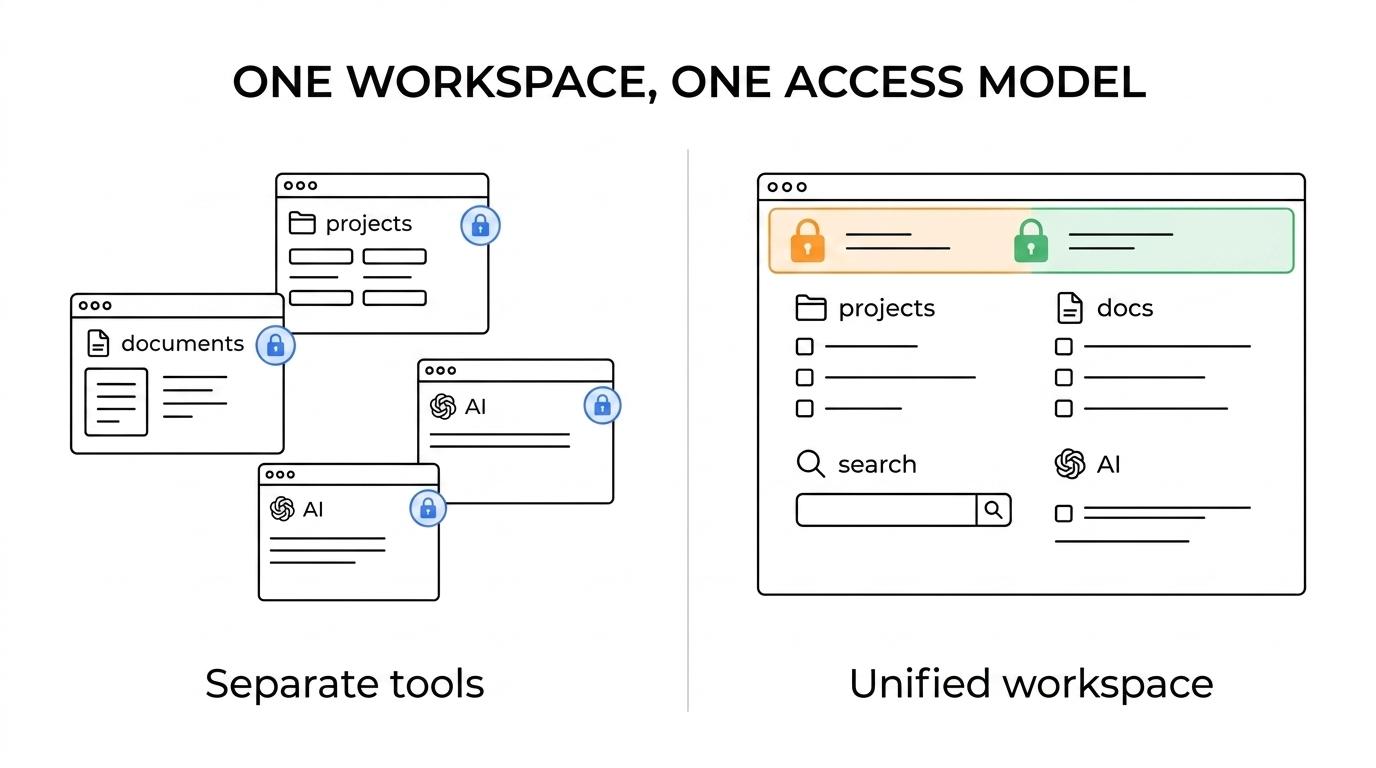
Many organizations do not need another isolated login integration. They need one controlled workspace where issues, boards, goals, roadmaps, docs, collaboration, search, notifications, and AI all live under the same operational umbrella. TOW brings those functions together so your access model applies where work actually happens.
TOW also supports self-hosted and cloud deployment. In the self-hosted workspace, TOW documents SSO and admin settings, including Authentik OIDC, per-organisation authentication method support, and provider logout, which gives your admins a clearer starting point for managed access.
“TOW documents Authentik OIDC, per-organisation authentication methods, and provider logout in its self-hosted workspace.”
That changes the buying decision in a practical way. Instead of evaluating identity controls for separate project, wiki, and AI tools, you can evaluate one workspace that already combines delivery, documentation, memory, and reviewable AI.
SCIM provisioning and SSO solve different workspace access problems
For joiner-mover-leaver automation, you need both lifecycle control and sign-in control. SCIM 2.0 is built around standard REST endpoints such as /Users and /Groups to create, update, and remove user and group objects, while SSO handles the login flow itself.
“TOW brings projects, docs, workspace memory, and AI into one workspace, so access reviews cover fewer disconnected systems.”
When TOW is part of your environment, that distinction helps you plan access more cleanly. Your identity team can decide whether the immediate priority is automatic provisioning, group-based access, sign-out behavior, or all three, instead of treating “SSO” as a catch-all requirement.
TOW is especially relevant when access changes have real operational impact. A user in this workspace can touch project planning, internal documentation, searchable company memory, notifications, and AI-assisted work, so provisioning and authentication choices affect more than a single app session.
TOW supports controlled OIDC sign-in, logout, and permission-aware AI
TOW documents OpenID Connect support in its self-hosted workspace, including Authentik OIDC and provider logout. That gives your administrators a cleaner path for central sign-in and sign-out, reducing the friction that appears when the identity provider and the workspace do not close sessions consistently.
“TOW pairs documented OIDC support with provider logout, helping admins keep workspace sign-in and sign-out behavior aligned.”
TOW also makes identity decisions matter inside the product, not just at the front door. Because the platform includes workspace-aware AI agents with human review and permission-aware AI actions, your authentication and access model affects what AI can see, suggest, and do inside the workspace.
For teams balancing control with usability, TOW adds deployment flexibility to that equation. You can run the workspace on your own infrastructure or in the cloud, and you can choose BYOK or TOW-managed AI endpoints, which helps keep identity, infrastructure, and data ownership decisions aligned.
What administrators improve when they centralize workspace access around TOW
When TOW replaces a spread of separate project and documentation tools, admins usually improve a few specific parts of the access model:
- One workspace surface for issues, boards, goals, roadmaps, docs, search, and collaboration
- Per-organisation authentication methods instead of one blanket setup
- Provider logout for cleaner sign-out behavior
- Reviewable, permission-aware AI actions inside the same workspace
TOW turns those capabilities into simpler access reviews and fewer blind spots. Instead of checking who still has access across multiple tools with different rules, you can align your identity controls with one operational workspace and reduce uncertainty about where former users may still retain context.
TOW fits teams consolidating tools and tightening identity control
TOW serves teams worldwide, from startups to enterprises, that want integrated projects, docs, and AI with strong admin controls and clear data ownership. If your current environment is split across Jira, Confluence, Notion, or Linear-style workflows, TOW gives you one platform to evaluate for workspace execution and access governance together.
TOW also supports migrations from Jira, Confluence, and Notion. That matters when access cleanup is happening at the same time as tool consolidation, because your team can address workspace structure, authentication, and knowledge migration as part of one rollout instead of several separate projects.
“TOW supports migrations from Jira, Confluence, and Notion, and offers a free self-hosted tier for small organizations.”
Small organizations can start with TOW’s free self-hosted tier to validate admin workflows, authentication fit, and deployment preferences before expanding. If SCIM provisioning is part of your requirements, that evaluation is the right time to confirm your identity provider, provisioning scope, and group model alongside TOW’s documented OIDC and admin capabilities.
Start with your IdP, your deployment model, and the workspace you actually want to control
If you are evaluating TOW for workspace access, bring your identity provider, deployment preference, and provisioning expectations into the conversation early. We can help you map documented OIDC sign-in, admin settings, deployment options, and the role of SCIM in your broader access architecture against the way your team actually works.
Talk with TOW about the systems you want to replace, the access model you need to enforce, and the level of data ownership you expect. If you want one workspace for projects, docs, company memory, and reviewable AI with clearer control over who gets in and what they can do, TOW is a strong next step to evaluate.