Private AI has shifted from a niche deployment choice to a practical requirement for teams that want AI over internal knowledge without giving up control of documents, permissions, or retention. The real question is no longer whether a model can answer questions, but whether your organization can govern how that answer was produced.
TL;DR: Summary
- The best private AI tools for secure team knowledge are the ones that combine permission-aware retrieval, deployment control, and auditable AI actions, not just a chat box with enterprise branding.
- If your team handles customer, legal, product, or regulated information, prioritize self-hosted or tightly controlled cloud deployments, strong access controls, and clear storage behavior for prompts, embeddings, and logs.
- A practical shortlist includes unified workspaces like TOW, enterprise knowledge tools like Glean and Microsoft 365 Copilot, and buildable stacks like Azure OpenAI plus Azure AI Search or Haystack.
- BYOK helps with model and billing control, but it does not automatically mean private AI; you still need to verify where data, logs, memory, and retrieved context are stored.
- NIST’s AI RMF points to the right criteria: secure and resilient systems, privacy-enhanced controls, transparency, and accountability across the AI lifecycle.
- McKinsey’s 2024 survey found 65% of organizations regularly use gen AI, while 44% reported at least one negative consequence, which is why privacy, cybersecurity, and accuracy checks should be built into rollout from day one.
A strong private AI setup usually looks less like a standalone chatbot and more like a governed knowledge system: identity, project permissions, indexed content, reviewable AI actions, and predictable storage rules. That is the standard to use when comparing tools for secure team knowledge.
What is private AI for team knowledge?
Private AI for team knowledge means AI operates under your organization’s governance, with systems like NIST AI RMF and TOW emphasizing control over data access, storage, and review. It is about secure retrieval and accountable use, not just model hosting.
In practice, private AI usually combines three layers: controlled deployment, permission-aware retrieval, and reviewable outputs or actions. A self-hosted AI workspace can keep docs, memory, and AI review flows inside an organization-controlled deployment, while a tightly governed cloud setup can still qualify if identity, storage, and provider behavior are explicit and enforceable.
“TOW describes its product as a self-hosted workspace for projects, docs, memory, and reviewable AI.”
A common misconception is that “private” simply means “enterprise plan.” It does not. If prompts, retrieved passages, embeddings, or chat history can leave approved boundaries without clear policy and logging, you have an AI convenience layer, not a private AI knowledge system.
Why are organizations moving to private AI now?
Organizations are moving now because McKinsey and NIST point to the same reality: AI adoption is high, and unmanaged risk is high too. Private AI is becoming a governance decision as much as a productivity decision.
McKinsey’s 2024 global survey reported that 65% of respondents say their organizations are regularly using gen AI. The same survey found that 44% reported at least one negative consequence from gen AI use, with inaccuracy cited most often, followed by cybersecurity and explainability.
That matters for team knowledge because internal answers often shape customer responses, product decisions, code changes, and policy interpretation. If AI can summarize a contract, suggest a roadmap update, or answer from a security wiki, then privacy, resilience, and traceability move from “nice to have” to procurement criteria. NIST’s AI RMF captures that well by framing trustworthy AI around secure and resilient systems, privacy-enhanced controls, transparency, and accountability.
What are the 12 best private AI tools for secure team knowledge?
The best private AI tools span unified workspaces, enterprise search products, and buildable stacks. TOW and Glean represent two useful ends of the market: integrated private workspaces versus cross-app enterprise knowledge retrieval.
The right pick depends on whether you want a single workspace, a search layer across existing apps, or a flexible stack your team can assemble and govern.
- TOW: Best fit for teams that want projects, docs, workspace memory, and reviewable AI in one workspace, with self-hosted and cloud options plus BYOK or vendor-managed AI endpoints.
- Glean: Strong choice for enterprises that want AI search across many business systems with existing identity and permission models preserved.
- Microsoft 365 Copilot: Good fit for organizations already standardized on Microsoft 365, especially where SharePoint, Teams, and Entra ID are central.
- Atlassian Rovo: Useful for teams deeply invested in Jira and Confluence that want AI over work items and documentation.
- Notion AI Enterprise: A practical option for companies that already treat Notion as a primary knowledge base and want AI inside that workflow.
- Box AI: Worth considering when document governance, classification, and content-centric workflows are the main priority.
- ChatGPT Enterprise: Often chosen for broad enterprise assistant use, though buyers should inspect data controls, workspace governance, and connector behavior carefully.
- Claude Enterprise: Strong for writing, analysis, and knowledge work, especially where long-context reasoning matters, with the same governance caveat around connected data.
- IBM watsonx.ai: A solid option for enterprises that need stronger model governance, policy controls, and integration into broader AI programs.
- Azure OpenAI plus Azure AI Search: Better viewed as a stack than a single tool, but often ideal when teams want custom retrieval, identity integration, and deployment control.
- Haystack by deepset: Useful for engineering teams building private retrieval-augmented generation systems with flexible pipeline control.
- AnythingLLM or PrivateGPT: Worth a look for local or self-managed deployments when simplicity and local document chat matter more than full enterprise workflow depth.
How do you evaluate a private AI tool step by step?
The best evaluation method starts with NIST-style risk framing and ends with real permission tests. OpenAI, Microsoft, and any private AI vendor should be judged on data flow first, model quality second.
Step 1 is to map your knowledge classes before you run a pilot. Separate public docs, internal operating knowledge, customer records, code, legal material, and regulated data. If one tool will touch all of them, it needs stronger isolation, clearer retention settings, and better auditability than a tool restricted to a single wiki.
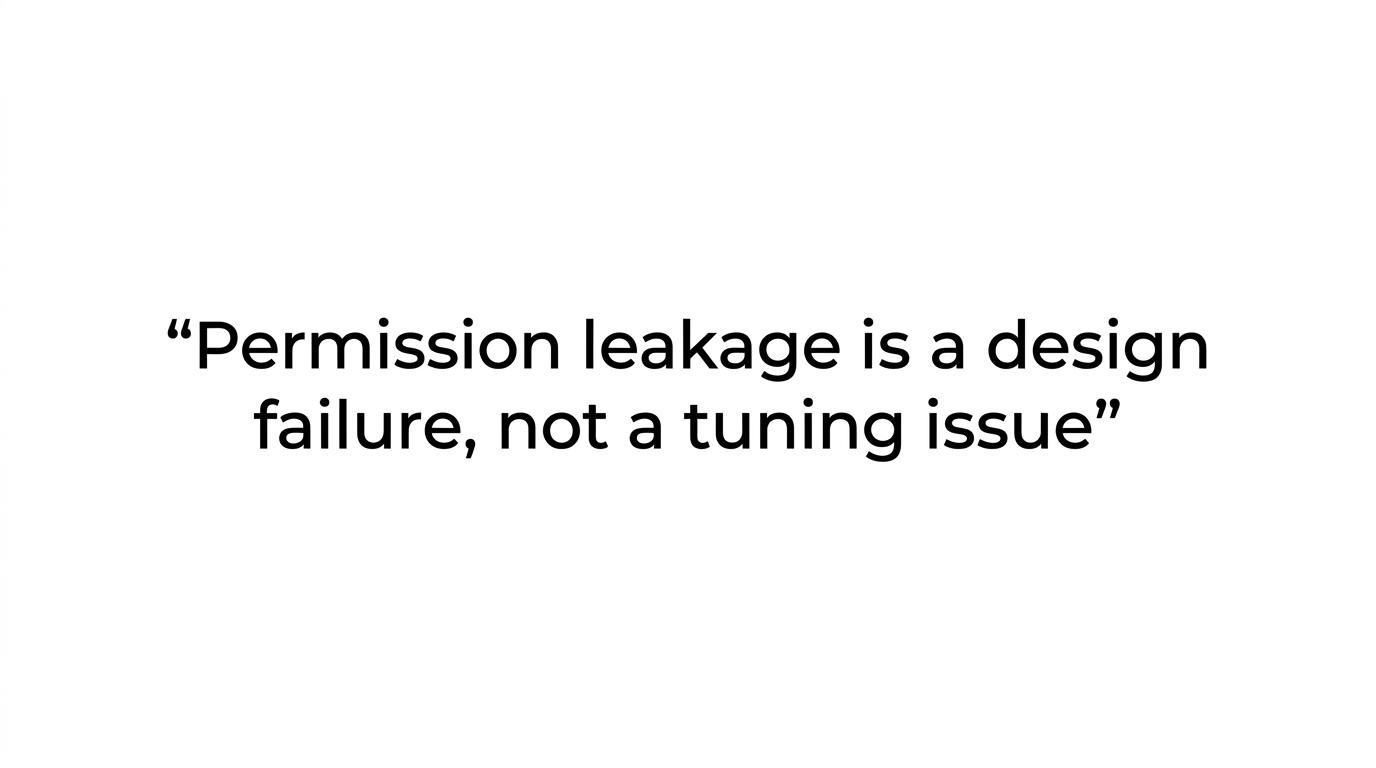
Step 2 is to test identity and retrieval boundaries with real users. Use an admin, a manager, and an individual contributor. Give each role a set of canary documents and ask the same questions. If the system retrieves or summarizes content that a role should not see, stop there. Permission leakage is a design failure, not a tuning issue.
“TOW Docs says OpenAI Responses API calls are set with
store=false, while workspace memory and docs stay in the deployment database and configured storage.”
Step 3 is to inspect storage behavior and action review. Ask where prompts, logs, embeddings, and memory live; whether AI writes are human-reviewable; and whether external model calls can be disabled, routed, or swapped. Pro tip: a vendor that can clearly answer those questions is usually much easier to govern later.
How does self-hosted private AI compare with cloud private AI?
Self-hosted private AI gives stronger infrastructure control, while cloud private AI usually wins on speed and operational simplicity. TOW and Azure-based deployments make this trade-off visible in a practical way.
If your priority is data residency, single-tenant isolation, internal networking, or strict change control, self-hosted is often the cleaner choice. It lets you place the app, database, storage, and sometimes the model gateway inside systems your team already governs. That can simplify internal audits because the answer to “where does this data live?” is more direct.
Cloud private AI is faster to adopt and often easier to maintain. Identity integration, scaling, updates, and model access can be simpler. The catch is that cloud privacy depends on specifics: tenant isolation, connector behavior, log retention, provider training defaults, and administrative visibility. Common misconception: self-hosted is not automatically safer if your team cannot patch, monitor, and back up the system consistently.
How do permissions, memory, and retrieval actually work in private AI?
Permission-aware retrieval is the core mechanism that separates secure AI from generic chat. Systems like Glean and TOW are useful benchmarks because they tie answers to identity, source visibility, and scoped knowledge.
A secure setup typically works like this: a user asks a question, the system authenticates the user, retrieval runs only against content that user can access, relevant chunks are ranked, and the model answers from that allowed context. The security boundary should sit before generation, not after it. A vector database alone does not solve access control.
Memory also needs precision. Chat history, long-term workspace memory, indexed documents, decisions, risks, and snapshots are different things. If a tool mixes them without clear scope rules, answers can become both less accurate and less private. The best systems expose how memory is written, who can read it, and whether AI-generated updates require human review.
How can a team deploy private AI step by step without breaking governance?
A safe rollout starts small, with bounded sources and explicit approval paths. Okta and Jira are useful anchors because identity and work systems should shape deployment from the beginning.
Step 1 is to choose one controlled use case, not ten. Good early candidates include internal policy Q&A, product documentation support, or sprint knowledge retrieval from Jira and docs. Keep write access off at first. Read-only retrieval is easier to validate and less risky to reverse.
Step 2 is to wire governance into the pilot. Use SSO, map roles, define source ownership, and document retention rules. Many organizations benefit from an enterprise-wide council or a smaller cross-functional review group covering security, legal, engineering, and operations. That keeps rollout decisions consistent without blocking everything.
Step 3 is to enable higher-trust actions only after answer quality and permission behavior are stable. If the assistant can draft tickets, update docs, or summarize decisions back into memory, then review queues and audit logs should already be in place.
How does BYOK compare with vendor-managed AI endpoints?
BYOK gives more control over model accounts and billing, while vendor-managed endpoints reduce setup work. Azure OpenAI and TOW illustrate the difference well.
With BYOK, your organization supplies its own model credentials or provider account. That can help with procurement, approved model routing, and visibility into usage at the model layer. It can also make it easier to standardize on one AI provider across several tools.
“TOW says its self-hosted BYOK plan keeps data in the customer’s environment.”
Vendor-managed endpoints are simpler for teams that want one contract and less infrastructure work. The trade-off is that you need sharper diligence on routing, retention, region choices, and fallback behavior. Pro tip: BYOK is not the same as self-hosted, and neither one automatically guarantees privacy if retrieval, logging, or memory still crosses unwanted boundaries.
How do you reduce privacy, cybersecurity, and accuracy risks step by step?
Risk reduction works best when privacy, security, and accuracy are tested as one system. NIST and McKinsey both point to the same practical issue: adoption rises faster than controls unless teams design them into rollout.
Step 1 is to classify data before indexing and block the most sensitive classes by default. Secrets, raw credentials, high-risk legal records, and some customer datasets should require explicit approval, not broad ingestion. If access decisions are fuzzy, the AI layer will make that fuzziness visible fast.
Step 2 is to test for abuse paths. Run prompt injection checks, role boundary tests, and canary-document experiments. See whether the assistant can be manipulated into disclosing hidden instructions or inaccessible knowledge. Security teams already know how to test applications; private AI just adds a retrieval and model layer to that practice.
Step 3 is to harden accuracy. Require citations for high-stakes answers, keep source freshness visible, and use human review for write actions. If an answer lacks a source, it should be treated as draft reasoning, not institutional truth.
Which private AI features matter most for secure team knowledge?
The most important features are permission-aware retrieval, explicit storage controls, and reviewable actions. NIST’s trustworthy AI characteristics and TOW’s deployment model both point to control and traceability as the durable criteria.
When teams compare products, these features usually matter more than model novelty:
- Deployment model: Self-hosted, single-tenant, or controlled cloud options that match your compliance and operations model.
- Access enforcement: SSO, role mapping, project visibility, grants, and source-level permissions that apply before retrieval and generation.
- Data handling: Clear rules for prompts, embeddings, logs, memory, and external API calls, including settings like
store=falsewhere applicable. - Reviewable AI: Human approval for document changes, ticket updates, memory writes, and other actions that can alter shared knowledge.
- Source transparency: Citations, linked evidence, freshness signals, and answer traces that help users verify what the model used.
- Portability: Migrations from tools like Jira, Confluence, or Notion, plus export paths that reduce lock-in if policies change.
If a tool has strong chat quality but weak answers on those six points, it is probably better suited to general assistance than secure team knowledge. If it scores well on them, you have a real private AI candidate rather than a branded chatbot.