
When your team stores SOPs in one tool, decisions in chat, specs in a wiki, and project context somewhere else, document management gets slow fast. TOW builds The Only Workspace, a unified document management platform that brings docs, company memory, search, and reviewable AI into one workspace you can run on your own infrastructure or in the cloud.
TOW is built for teams that need more than file storage. If you want document management software with strong admin controls, clear data ownership, workspace-aware AI search, and documentation that lives beside the work it supports, we give you a tighter system for running day-to-day operations.
TOW document management software for searchable, controlled team knowledge
A document system should help your team find answers, not just store files. Industry research has found that knowledge workers can spend nearly 20 percent to more than 25 percent of their time searching for information, which is exactly where fragmented docs, disconnected wikis, and scattered project notes start to cost you.
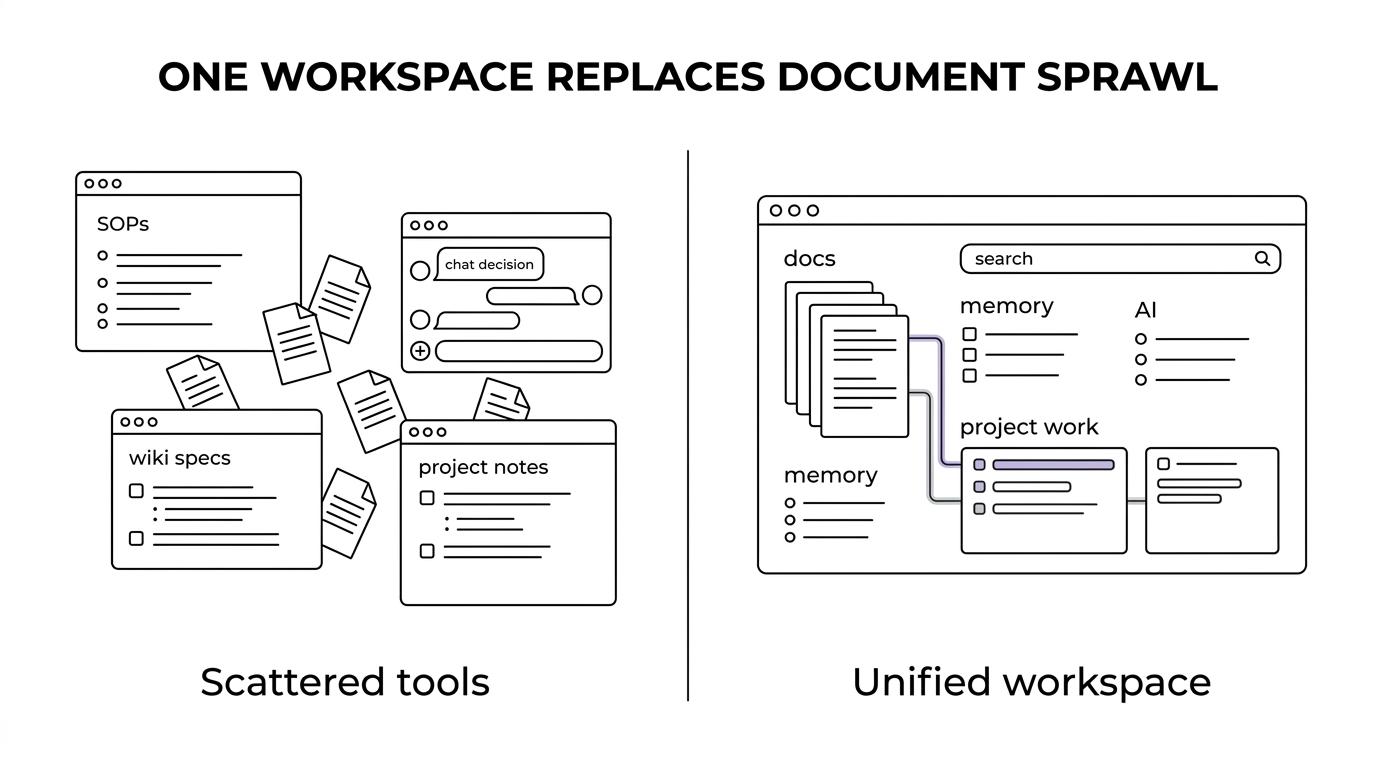
TOW reduces that drag by combining documentation, workspace memory, search, and project context in one place. Instead of asking people to remember which tool holds the latest answer, we make specs, decisions, runbooks, references, tasks, risks, and project work available in the same workspace.
“TOW brings docs, search, memory, and reviewable AI into one workspace, a practical response to the 20% to 25% of time knowledge workers often lose to search.”
TOW keeps specs, decisions, runbooks, and references beside project work
TOW document management software is designed for operating documents, not just static archives. Our docs and wiki support the materials teams actually use every day, including specs, decisions, runbooks, and reference pages that need to stay connected to current delivery work.
That matters because documents are easier to keep current when the people shipping work are already in the same system. TOW connects docs with issues, boards, goals, and roadmaps, so your documentation stays tied to execution instead of drifting into a separate knowledge base that goes stale.
TOW also gives you tools to keep context inspectable over time. Memory, Memory diffs, Snapshots, and Search and references help your team review what changed, preserve working context, and understand why a document, decision, or process looks the way it does today.
“In TOW, specs, decisions, runbooks, and references live beside delivery work instead of in a separate wiki.”
Permission-aware AI search in TOW gives grounded answers your team can review
AI is useful in document management only if it can answer from the right context and respect permissions. TOW uses permission-aware workspace context and references to support grounded answers in AI chat, so your team can search across docs and memory without losing control over who can see what.
TOW also makes AI actions reviewable by humans. That helps you move faster without turning document workflows into a black box, and it gives teams a better way to use AI for retrieval, drafting, and workspace tasks while keeping approval in human hands.
For organizations that care about access control, this is not a small detail. NIST guidance treats logical access to files and records as a core control area, and TOW supports that reality with permission-aware access, admin controls, authentication, and AI behavior that is shaped by workspace permissions rather than broad, unscoped access.
“TOW pairs permission-aware AI with human review, so workspace answers stay grounded in accessible context instead of guessing across hidden records.”
Self-hosted or cloud document management with clear data ownership
Some teams need cloud convenience. Others need to run document management on their own infrastructure. TOW supports both, which gives you a practical deployment choice when security, internal policy, procurement, or customer requirements rule out a one-size-fits-all SaaS model.
TOW also supports BYOK or TOW-managed AI endpoints. That gives you more control over how AI is provisioned inside your document workflows, which is useful when your team has specific vendor, security, or ownership requirements.
If your buying decision includes admin visibility, auth, and deployment control, TOW is built with those concerns in mind rather than treating them as add-ons after rollout.
Archive history and retention-aware document workflows in TOW
Document management is not only about search. It is also about keeping history reviewable and handling records with discipline. TOW archive behavior keeps history available for review while removing items from normal lists or search results, which helps teams reduce clutter without erasing important context.
That is especially relevant when your organization has formal retention practices. Electronic records are still subject to retention periods, just like paper records, so TOW gives you a workspace where active docs, archived items, and review history can be managed with more clarity.
“TOW archive keeps history available for review while removing items from normal lists or search results.”
Migrate from Jira, Confluence, or Notion into one document and project workspace
If your current setup splits documentation from execution, migration risk is often the reason teams wait too long to fix it. TOW includes migrations from Jira, Confluence, and Notion, so you can move toward a unified workspace without rebuilding every process from scratch.
That makes TOW a strong option for teams replacing a stack that grew tool by tool over time. You can consolidate docs, project tracking, company memory, search, collaboration, notifications, and AI-assisted work in one system instead of continuing to patch together separate products.
TOW is also working toward parity with tools such as Jira, Confluence, Notion, and Linear, which makes the product familiar in the places that matter while giving you a more unified operating model.
When TOW is the right document management software for your team
TOW is a strong fit when your document system needs to do more than hold files. Teams usually choose us when they need one or more of these outcomes:
- Unified work and documentation: You want docs, decisions, tasks, risks, and project plans in one workspace.
- Controlled AI search: You want AI answers grounded in workspace context with references and human review.
- Deployment flexibility: You need self-hosted document management, cloud deployment, or control over AI endpoints.
- Data ownership and admin control: You care about permissions, auth, and clear ownership of company knowledge.
- Migration from existing tools: You are moving away from a split setup centered on Jira, Confluence, Notion, or similar platforms.
For smaller organizations evaluating self-hosted document management, TOW also offers a free self-hosted tier, which gives you a lower-risk way to test fit before expanding adoption.
If you are looking for document management software that combines searchable team knowledge, permission-aware AI, and deployment control, talk with TOW about your workspace. We can help you evaluate self-hosted or cloud setup, plan a migration path, and see how your docs, memory, and AI search can work together in one system.