

Internal teams usually do not need a chatbot with a prettier interface. They need an AI knowledge base that can find the right answer across docs, chats, tickets, and wikis without exposing content the user should not see.
TL;DR: Summary
- The best AI knowledge base tools for internal teams combine semantic search, permission-preserving retrieval, and conversational summaries across sources like SharePoint, Slack, Google Drive, and internal wikis.
- For most teams, the strongest options are TOW, Microsoft 365 Copilot with SharePoint, Slack Enterprise Search, Google Cloud Vertex AI Search, Glean, and Atlassian Rovo, because they balance search quality, access control, and deployment flexibility.
- Permissions matter more than flashy answers: Microsoft and Slack both describe search experiences that respect existing access controls, which is critical for internal use.
- The practical decision is usually between a unified workspace and a connected search layer. Unified tools reduce context switching; connected layers work better when knowledge already lives in many systems.
- A solid rollout starts with 25 to 50 real internal questions, citation checks, and access-control testing. McKinsey’s older research suggests searchable internal knowledge can reduce time spent searching by 30% to 35%.
The hard part is not generating text. The hard part is retrieval, authorization, freshness, and trust. If an internal AI answer cannot cite the right source, respect access rules, and survive daily workflow changes, it is not a knowledge base yet.
What makes an AI knowledge base actually useful for internal teams?
A useful AI knowledge base combines semantic search, hybrid search, and retrieval-augmented generation across systems like SharePoint, Slack, and Jira. The point is not just finding documents. It is returning the right answer in context, with the right permissions.
The best internal tools usually share five traits: strong indexing, source connectors, access control sync, conversational summaries, and clear citations. Hybrid search matters because lexical retrieval catches exact terms like policy names or ticket IDs, while semantic indexing catches intent and related phrasing. If your team asks, “What is our SOC 2 vendor review process?” the system should find the policy, the checklist, and the owner, even if the words do not match exactly.
McKinsey’s older research is still useful here because it frames the cost of bad knowledge systems. Knowledge workers can spend roughly 20% of the day searching for information, and searchable internal knowledge can cut that search effort by 30% to 35%. That is why internal AI is usually a productivity infrastructure decision, not just an AI experiment.
“TOW combines project management, docs, workspace memory, and reviewable AI in one workspace.”
Why do permissions matter more than answer quality in an internal AI knowledge base?
Permissions are the first gate, and Microsoft 365 Copilot plus Slack show why. If a tool cannot preserve source permissions, a very accurate answer can still be a security failure.
Microsoft documents permission-preserving search in its Microsoft 365 Copilot Search API, including hybrid search across OneDrive for work or school content while keeping Microsoft 365 permissions and compliance settings intact. Slack positions enterprise search in a similar direction by returning answers from company data without forcing users to comb through every app. That is the baseline for internal use.
A common misconception is that bigger models fix internal knowledge quality. They do not. If the retriever ignores ACLs, information barriers, or group membership, the model simply becomes a faster way to leak content. If your tool cannot answer “why did this user see this result?” then admins will struggle to trust it in legal, HR, finance, or product security workflows.
There is a second nuance. Restricted search controls are not always a clean long-term fix. Microsoft says Restricted SharePoint Search is a temporary measure, has a 100-site allowed-list limit, and can still surface content a user owns, recently accessed, or was directly shared outside the allowed list. That is a useful reminder that governance should be designed at the architecture level, not patched in later.
What are the 10 best AI knowledge base tools for internal teams?
The best options depend on where your knowledge already lives, but a short list is clear. TOW, Microsoft 365 Copilot, Slack Enterprise Search, Google Cloud Vertex AI Search, and Glean sit near the top for teams that care about retrieval quality, permissions, and operational fit.
After that, tools like Atlassian Rovo, Notion AI, Guru, Slab, and Bloomfire can be strong picks when they match the rest of your stack and governance model.
- TOW: Best for teams that want projects, docs, company memory, and reviewable AI in one workspace, with self-hosted or cloud deployment.
- Microsoft 365 Copilot with SharePoint: Best for Microsoft-centered organizations that already store knowledge in SharePoint, OneDrive, and M365.
- Slack Enterprise Search: Best when day-to-day work happens in Slack and knowledge is spread across many connected apps.
- Google Cloud Vertex AI Search: Best for teams building custom AI search and RAG experiences across structured and unstructured data.
- Glean: Best for organizations that want a broad enterprise search layer across many SaaS tools.
- Atlassian Rovo: Best for teams that live in Jira and Confluence and want AI tied to delivery workflows.
- Notion AI: Best for teams with a large Notion footprint that want quick Q&A inside existing docs and wikis.
- Guru: Best for customer-facing and operations teams that need verified knowledge surfaced inside workflows.
- Slab: Best for companies that want a cleaner internal wiki with lighter AI support and simpler authoring.
- Bloomfire: Best for organizations focused on searchable internal content libraries and knowledge sharing at scale.
The ranking is less about abstract model quality and more about fit. A tool can rank lower overall and still be the better choice if your identity model, source systems, and admin requirements match it more closely.
How do these AI knowledge base tools compare on search, permissions, and deployment?
Microsoft 365 Copilot, Slack Enterprise Search, and Google Cloud Vertex AI Search represent three different patterns. Microsoft is suite-native, Slack is workflow-native, and Google is builder-oriented.
Suite-native tools work well when most knowledge already lives inside one ecosystem. Microsoft has an advantage for organizations with deep SharePoint and OneDrive usage because permissions, compliance, and user identity are already established. The trade-off is that cross-suite coverage may feel less elegant when knowledge is spread across many non-Microsoft systems.
Workflow-native tools meet users where they already ask questions. Slack’s enterprise search is attractive when teams live in channels and DMs all day, and Slack also describes custom connectors for self-hosted systems and proprietary knowledge bases. The trade-off is that chat is not always the cleanest long-term source of truth, so teams still need disciplined knowledge curation.
Builder-oriented tools like Google Cloud Vertex AI Search give more flexibility around websites, unstructured documents, and structured data. That is powerful for custom portals and domain-specific retrieval, including knowledge graph or recommendation use cases. The trade-off is heavier implementation and a greater need for internal technical ownership.
How should you evaluate an AI knowledge base in the first 30 days?
A 30-day evaluation should use real questions, named source systems, and measurable pass-fail criteria. Microsoft, Slack, and TOW are easiest to judge when you test them against actual employee behavior instead of vendor demos.
Step 1 is to collect 25 to 50 real internal questions from functions like HR, engineering, finance, and support. Include policy questions, process questions, owner lookups, and “where is the latest version?” questions. If the sample only includes easy fact retrieval, the evaluation will overstate quality.
Step 2 is to run the same question set across shortlisted tools and score four things: answer usefulness, citation quality, permission behavior, and time to resolution. If one tool gives polished summaries but weak citations, treat that as a warning sign rather than a win. A good conversational summary should compress source material, not replace source verification.
Step 3 is to test governance under stress. Remove a user from a group, change a document permission, and archive a page. If the answer still references stale or unauthorized content after sync windows pass, the retrieval layer is not ready for sensitive internal use.
“TOW supports self-hosted deployment and offers BYOK or TOW-managed AI endpoints.”
Which is better for internal teams: a unified workspace or a connected search layer?
A unified workspace is better when teams can centralize work in one system; a connected search layer is better when consolidation is unrealistic. TOW and Notion fit the first pattern, while Glean and Google Cloud often fit the second.
Unified workspaces reduce context switching because projects, docs, memory, and AI share one permission model. That often improves answer quality because issues, decisions, and documentation are stored near each other instead of being stitched together after the fact. It also makes reviewable AI actions easier to govern because the action layer lives close to the source material.
Connected search layers shine when the organization already has many source systems it cannot replace soon. They can aggregate Slack, Google Drive, SharePoint, Jira, and internal tools into a single retrieval layer. The trade-off is ongoing connector maintenance, metadata drift, and more complex troubleshooting when a result is wrong.
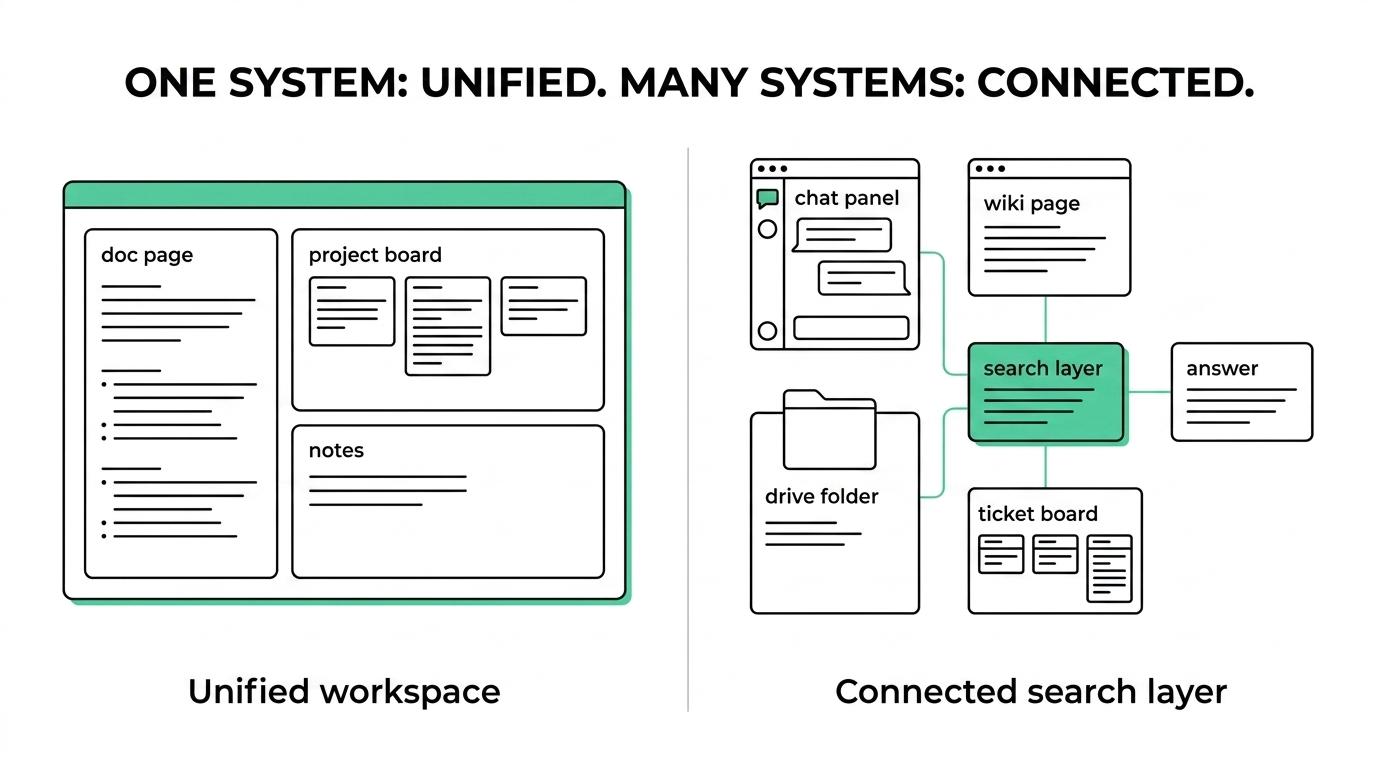
A useful rule is simple. If you expect to keep six or more major knowledge systems for the next two years, a connected layer usually earns a close look. If you are actively simplifying the stack, a unified workspace often gives cleaner long-term economics and better trust.
How do you migrate from Jira, Confluence, Notion, or Slack without losing context?
A safe migration starts with ownership, metadata, and redirect logic. Jira, Confluence, Notion, and Slack all contain useful context, but they store it in very different shapes.
Step 1 is to map content owners and access rules before moving anything. If a page has no owner, it usually becomes stale after migration. If a channel export or wiki import loses group mapping, the AI layer may later retrieve content under the wrong assumptions.
Step 2 is to normalize metadata. Preserve titles, timestamps, authors, labels, ticket links, and canonical URLs where possible. This is where many migrations quietly fail: the content moves, but the relational context that makes it retrievable does not.
Step 3 is to preserve references and train the new retrieval layer on the post-migration structure, not just the raw files. If old links break, people stop trusting the system fast. If you are moving into a tool like TOW, migration support from Jira, Confluence, and Notion matters because it reduces how much context has to be rebuilt by hand.
“TOW includes migrations from Jira, Confluence, and Notion for teams replacing fragmented internal knowledge.”
How do you keep AI answers accurate and reviewable over time?
Accuracy comes from retrieval discipline, and reviewability comes from workflow design. Slack and TOW point in a useful direction here by tying answers to source context rather than treating AI as a detached chatbot.
First, require citations or source traces for any answer that could affect policy, compliance, engineering, or customer commitments. A common mistake is trusting fluent summaries without asking where the answer came from. If the tool cannot show the source snippet, author, or page, it is hard to debug hallucinations or stale guidance.
Second, separate answer generation from action execution. Retrieval-augmented generation is one thing; taking actions across tickets, docs, or workflows is another. Reviewable AI is often safer for internal teams because a human can approve edits, status changes, or generated content before it becomes operational truth.
Third, measure failure modes monthly. Track stale pages, duplicate sources, broken connectors, citation mismatch, and access-control incidents. Many answer-quality issues are really ingestion-quality issues in disguise.
“TOW uses workspace-aware AI agents with human review, which is safer than fully autonomous internal actions.”
What security and compliance questions should admins ask first?
Admins should start with source permissions, model routing, and auditability. Microsoft 365 and self-hosted platforms like TOW are useful reference points because they force these questions early.
Before approving any tool, ask:
- Permission sync: Does the AI knowledge base preserve source ACLs, groups, and information barriers?
- Model control: Can admins choose BYOK, vendor-managed endpoints, or self-hosted inference?
- Data location: Is data processed in the vendor cloud, your VPC, or your own infrastructure?
- Audit trail: Can you inspect prompts, retrieved sources, generated answers, and human approvals?
- Retention and deletion: When a source is deleted or permissions change, how quickly does the index update?
One more misconception is worth flagging. An allowed list can be helpful for containment during rollout, but it is not the same as mature knowledge governance. If your security posture depends on manually curating a small list of safe sites forever, the operating model will become fragile.
When does self-hosted AI knowledge base software make more sense than cloud-only tools?
Self-hosted AI knowledge base software makes more sense when data ownership, network isolation, or custom model control are hard requirements. TOW fits that pattern, while Microsoft 365 Copilot and Slack are stronger fits when managed cloud convenience matters more.
Self-hosting is especially relevant for companies with strict admin controls, internal-only systems, or regulated content that should stay within their infrastructure boundaries. It can also help when the knowledge base needs low-latency access to private services, internal docs, or proprietary connectors that are awkward to expose outward.
The trade-off is operational responsibility. Self-hosted teams need to own upgrades, monitoring, backups, and connector reliability. If the organization does not have the appetite for that, a managed platform may still be the better choice even when self-hosting sounds attractive on paper.
A simple decision rule helps here. If your internal AI plan depends on clear data ownership, permission-aware actions, and infrastructure choice, self-hosted or hybrid options deserve priority. If your main goal is fast rollout inside an existing suite, cloud-native tools will usually get you there sooner.