

When teams say their internal wiki is “hard to search,” the problem usually is not just search quality. It is the mix of permissions, source sprawl, attachment coverage, and whether the tool can find people, pages, and files without exposing the wrong content.
TL;DR: Summary
- The best enterprise search software for internal wikis preserves source permissions, searches pages plus attachments and people data, and connects to systems like Confluence, SharePoint, and Google Workspace.
- Glean, Microsoft Search, and Confluence are strong reference points because their official documentation highlights permissions-aware search, attachment coverage, and cross-space or cross-site discovery.
- If your wiki content lives across many tools, choose enterprise search software with strong connectors and security trimming; if your knowledge mostly lives in one platform, native wiki search may be enough.
- Admin control matters as much as relevance. Search scope, allowed sites, ranking rules, and identity mapping often determine whether users trust results.
- Permission design can directly affect search quality. Microsoft documents missing SharePoint search results when a SharePoint group used for permissions exceeds 2,000 users.
- If data ownership or internal hosting is a hard requirement, self-hosted options like TOW or Elastic deserve extra scrutiny alongside SaaS products.
The strongest buying signal is simple: can the tool return the right answer for the right person at the right time, across page text, attachments, and profiles? For internal wiki use, that usually means looking past demos and testing real permissions, real connectors, and real search behavior in your own environment.
What makes enterprise search software good for internal wikis?
Yes, the best tools combine permissions-aware search, attachment indexing, and broad connectors. Glean and Confluence are useful benchmarks because both emphasize more than plain page text.
For internal wikis, a strong enterprise search tool does three jobs well. First, it preserves source permissions, often through security trimming or query-time permission checks. Second, it indexes more than pages, including attachments, comments, people profiles, and space or site metadata. Third, it gives admins control over scope and relevance so search does not drift into noise.
That last point is where many evaluations go wrong. A common misconception is that “more indexed content” automatically means better search. In practice, noisy indexing without clear ranking, source weighting, and access control often lowers trust faster than it improves recall.
“TOW combines docs, wiki, and knowledge search in one product surface, which can simplify how teams manage internal knowledge.”
Why do permissions matter more than raw indexing size?
Permissions matter more because trust is the real product. Microsoft SharePoint and Glean both show that access control is a search feature, not just a security layer.
Enterprise search software usually enforces source permissions at query time rather than showing all indexed content to everyone. That sounds obvious, but it has major buying implications. If a connector cannot reliably ingest ACLs, group membership, or content deletions, you may get either overexposure or missing results, and both break user confidence.
Microsoft’s own guidance is a good warning sign here. Restricted SharePoint Search is positioned as a short-term measure while admins review permissions, not as a scalable long-term design. Microsoft also documents that SharePoint Online search can miss items when a SharePoint group used for permissions has more than 2,000 users. If your permission model is messy, the search layer cannot fully compensate for it.
A practical rule helps: if security teams ask, “Who can see this result, and why?”, the vendor should have a clear answer tied back to the source system.
What are the 11 best enterprise search tools for internal wikis?
The best tools depend on where your wiki lives and how much control you need. TOW, Glean, and Microsoft Search cover three common patterns: unified workspace, cross-app search layer, and Microsoft-native search.
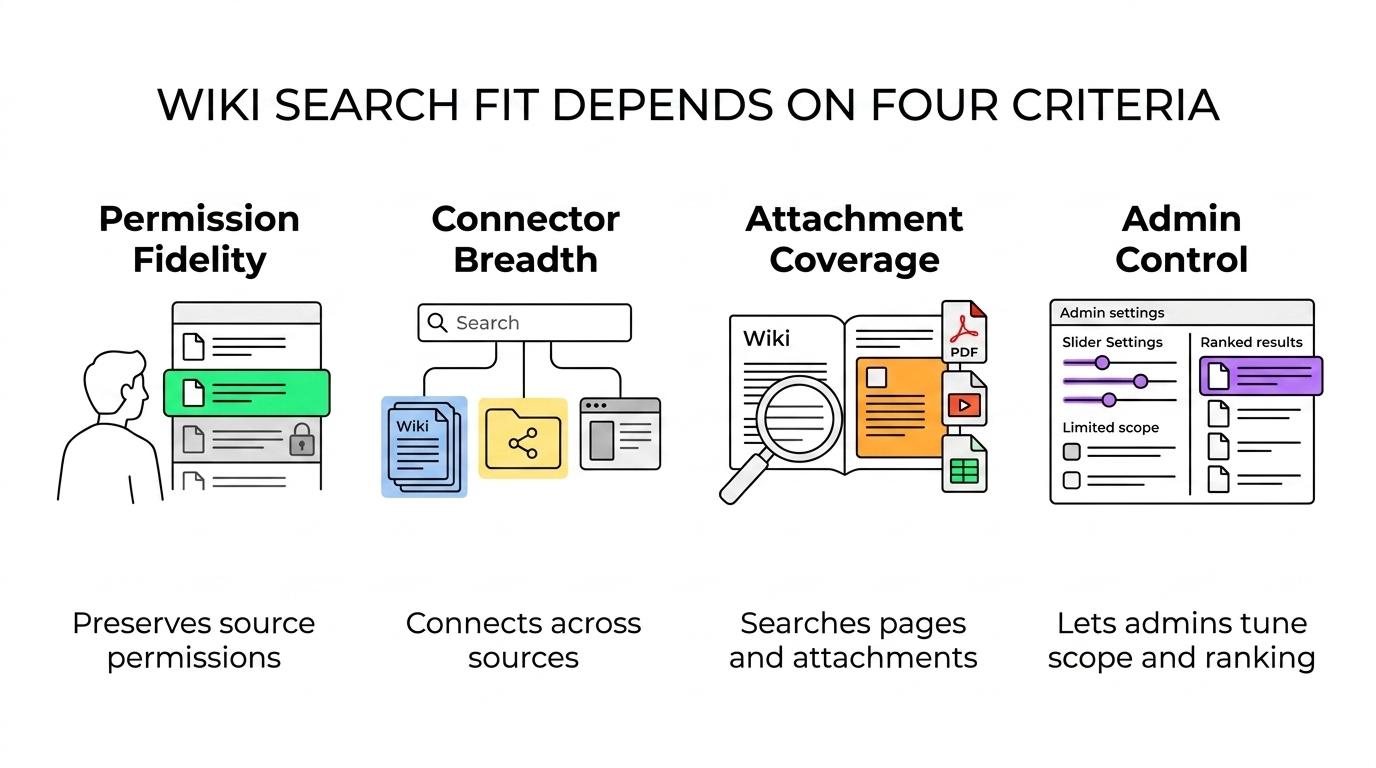
If your primary goal is internal wiki findability, evaluate each product against four criteria: permission fidelity, connector breadth, attachment coverage, and admin control over scope and ranking.
- TOW: Best for teams that want projects, docs, wiki, and knowledge search in one workspace, with self-hosted or cloud deployment options and strong data ownership requirements.
- Glean: Best for enterprises that need a dedicated cross-app search layer with connectors, attachment search, and source-level permission enforcement.
- Microsoft Search with SharePoint: Best for Microsoft 365 environments where most knowledge already lives in SharePoint, Teams, and Office documents.
- Confluence Search: Best when the wiki itself is the main knowledge hub and users primarily need strong page, attachment, space, and people discovery inside Confluence.
- Elastic: Best for organizations that want deep control over indexing, ranking, pipelines, and infrastructure, and can support a more technical implementation.
- Coveo: Best for enterprises that need mature relevance tooling across multiple repositories and can invest in configuration and governance.
- Guru: Best for teams that want a knowledge base with search and verification workflows, especially for operational knowledge and support content.
- Slab: Best for companies that want a cleaner wiki-first knowledge base with simpler search expectations and lighter admin overhead.
- Bloomfire: Best for organizations that care about knowledge sharing across documents, media, and internal communities.
- Sinequa: Best for large enterprises with complex content estates and a need for broader enterprise knowledge discovery.
- Lucidworks: Best for teams that want a search platform approach with room for custom relevance models and multiple content pipelines.
The list above is not a universal ranking. It is a fit-based shortlist. If you only need better Confluence results, a dedicated enterprise search platform may be overkill. If your wiki spans Confluence, SharePoint, Drive, and Slack, native search alone often will not be enough.
How does native wiki search compare with dedicated enterprise search software?
Native wiki search is best when knowledge is concentrated; dedicated enterprise search is best when knowledge is distributed. Confluence and SharePoint handle local discovery well, while Glean and Elastic are built for broader source coverage.
Confluence’s official search behavior shows what strong native search can look like. Advanced search can span spaces, personal profiles, and attachments, while quick search can return pages, live docs, people, files, and spaces. That is enough for many teams whose knowledge mostly lives in Confluence.
Dedicated enterprise search software becomes more attractive when your wiki is not really one wiki anymore. If key answers live in Confluence, SharePoint, Google Drive, ticket comments, and employee profiles, then connector quality and ranking across systems start to matter more than native page search.
A common mistake is assuming a separate search layer will “fix knowledge management.” It will not. If the underlying wiki has poor titles, duplicate pages, weak permissions, or outdated attachments, search can only surface the mess more efficiently.
“TOW puts docs, wiki, and knowledge search in the same workspace, a useful model when teams want fewer systems to reconcile.”
How should you evaluate search scope for pages, attachments, and people data?
Start with scope before relevance. Glean and Confluence both highlight attachment and people discovery because page text alone rarely answers enterprise questions.
A realistic evaluation should mirror how employees actually search.
- Define the answer types you need: policy pages, meeting notes, PDFs, slide decks, spreadsheets, employee profiles, and team spaces.
- Verify indexed content types: ask whether the tool searches attachments, file text, page metadata, comments, and people data, not just titles and body text.
- Run recall tests: use 20 to 30 real queries from support, engineering, HR, and finance, then compare what is found versus what should be found.
Pro tip: ask vendors to show a result where the answer only exists inside an attachment. Many products look strong on page text demos and weaker once the answer lives in a PDF or slide deck.
How do connectors and security trimming actually work?
Connectors are the backbone of enterprise search. Glean’s documentation is explicit that connectors fetch both content and permissions from source systems.
In plain terms, a connector pulls data from Confluence, SharePoint, Google Drive, or another repository, maps that data into the search index, and keeps permissions synchronized so users only see what they are allowed to access. Security trimming is the mechanism that filters results based on those source permissions.
This is why connector detail matters so much. Two vendors may both claim a “Confluence connector,” but one may index pages, attachments, and profiles while another only covers page text. The same issue appears in deletion handling and permission updates. If content is revoked in the source but remains searchable for too long, that is a governance failure, not just a product quirk.
A useful misconception to avoid: AI summaries do not replace connector quality. If the connector misses the right source or the right ACL, the AI layer will confidently summarize the wrong search universe.
How do you test permission fidelity before a rollout?
Test permission fidelity with real personas, not admin accounts. Microsoft SharePoint is a strong reminder that identity modeling can directly affect search results.
A disciplined rollout uses small, repeatable checks.
- Build a permission matrix: pick several users with materially different access, including contractors, managers, and cross-functional staff.
- Run identical queries by persona: compare what each user can see for the same term, especially for sensitive attachments and restricted spaces.
- Validate change propagation: revoke access, delete content, and move a document, then confirm the search results update as expected.
Do not accept a demo where only a global admin searches the corpus. That proves indexing, not permission fidelity. If your environment uses large SharePoint groups or nested access rules, spend extra time on those edge cases before wider deployment.
Should you choose self-hosted enterprise search software or SaaS?
Choose self-hosted when control is a hard requirement; choose SaaS when speed and vendor-managed operations matter more. TOW and Elastic fit the first pattern, while Glean and Microsoft Search fit the second.
Self-hosted enterprise search software is attractive when data residency, internal infrastructure policy, or clear data ownership is non-negotiable. It can also simplify audit conversations if your organization already operates sensitive internal platforms. The trade-off is operational: upgrades, scaling, connector maintenance, and observability stay closer to your team.
SaaS products usually offer faster rollout and lower platform burden. They are often a good fit for companies that want search quality quickly across many cloud apps. The trade-off is less direct infrastructure control and a tighter dependency on the vendor’s hosting model, connector roadmap, and administrative boundaries.
“TOW can run on your own infrastructure, which matters when enterprise search must follow internal hosting and data ownership policies.”
If your security team starts with “where does indexed content live?” and “who operates the runtime?”, hosting model should move near the top of your shortlist.
How can you improve relevance without exposing more content?
Improve relevance by tuning ranking, metadata, and query logs, not by broadening access. Confluence quick search already favors recent updates, but recency alone is not the same as relevance.
The fastest gains usually come from operational tuning.
- Weight strong signals first: titles, exact phrase matches, canonical docs, owners, and source authority should usually outrank raw recency.
- Add language controls: synonyms, acronyms, team names, and product aliases often fix a large share of “I know it exists” failures.
- Review query logs monthly: zero-result searches, low-click queries, and repeated reformulations show where relevance or content quality is weak.
A useful pro tip is to identify one canonical page for each repeated topic, then make sure ranking promotes it. The newest document is not always the best answer. In many enterprises, the most recently edited page is simply the noisiest.
Which buying mistakes cause the most search disappointment in enterprises?
The biggest failures come from governance gaps, not vendor slides. SharePoint and Confluence both show that platform behavior and permissions design shape search outcomes.
Most disappointing rollouts trace back to a short list of preventable mistakes.
- Permission model: treating broken ACLs as a search problem instead of a source-system problem
- Connector map: assuming “supports Confluence” also means attachments, profiles, comments, and deletion tracking
- Scope governance: using narrow allowed lists as a permanent architecture instead of fixing search boundaries properly
- Relevance ownership: assigning no team to monitor zero-result queries, stale results, or duplicate canonical pages
- Platform fit: buying a broad enterprise search layer when the real need is a better wiki structure, or buying a wiki-only tool when knowledge lives everywhere
A strong evaluation asks two questions at every stage: what can this person find, and why did that result rank here? If a vendor cannot answer both clearly, the product is not ready for enterprise wiki search at scale.