

When your backlog spans multiple teams, issue types, review steps, and planning horizons, a basic board stops being enough. TOW is built for that reality. We bring kanban boards, project workflows, docs, company memory, and reviewable AI into one workspace you can run in the cloud or on your own infrastructure.
TOW helps product organizations manage day-to-day execution without splitting work across separate tools for tickets, wikis, search, and AI. You get boards for active flow, roadmaps and goals for planning, docs for decisions, and admin controls that support clear data ownership from startup teams to enterprise environments.
TOW kanban software for backlog management across teams and work types
TOW gives you a board-based kanban workflow backed by configurable project workflows, not a fixed three-column model. Default ticket statuses include Backlog, Todo, In progress, Blocked, In review, Done, Canceled, and Archived, and each project can customize labels, order, categories, board mappings, and restricted transitions so your board matches how work actually moves.
“TOW gives product teams 8 default ticket statuses, from Backlog to Archived, and lets each project customize workflow labels, order, categories, board mappings, and restricted transitions.”
That matters when your backlog is not one queue and one delivery path. TOW resolves valid workflow states by issue type, so a bug, feature, or other work item can follow the right path, and if a ticket changes type, TOW remaps status by category when the original status is no longer valid. You spend less time cleaning up boards after triage and less time explaining why a card is in the wrong lane.
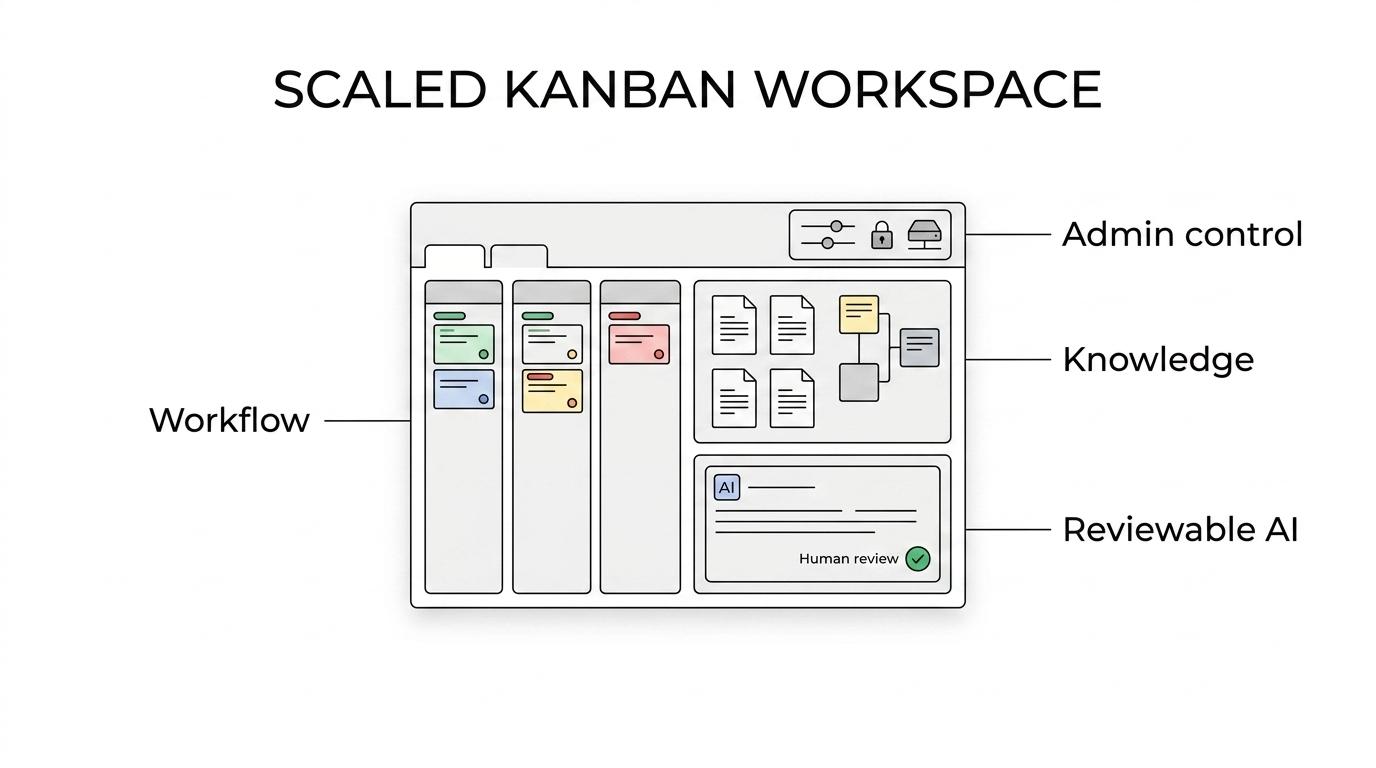
Product teams also need more than card movement. In TOW, tickets can carry ownership, status, dates, comments, blockers, and a visible audit trail, and saved boards give your team repeatable views for triage, blocked work, release readiness, or leadership review without rebuilding filters every time.
“TOW tickets can carry ownership, status, dates, comments, blockers, and a visible audit trail, while saved boards reduce setup time for repeated reviews.”
If your kanban practice relies on pull-based flow, replenishment, or explicit commitment points, TOW gives you the workflow structure to model those policies clearly. When a ticket is moved into a board column, TOW sets the ticket to that column’s default status, which keeps board movement aligned with the underlying workflow instead of turning your board into a visual layer disconnected from real execution.
Self-hosted kanban software with admin control and clear data ownership
TOW is a strong fit for teams that want kanban software without giving up deployment control. You can run TOW self-hosted on your own infrastructure or use the cloud version, and the platform includes admin, authentication, search, collaboration, notifications, and migrations from Jira, Confluence, and Notion so the workspace is operational from day one.
“TOW supports both cloud and self-hosted deployment, and self-hosted paid starts at $10 per seat per month for 21 or more users.”
That deployment choice is not a side feature. TOW combines boards, docs, memory, and AI in the same workspace, which means your team can keep project execution close to the knowledge that explains it, while your admins keep control over access patterns and data location.
Pricing and plan structure are also easier to evaluate than a stack of separate tools. TOW states that all current product capabilities are included on every plan, and there is a free self-hosted tier for small organizations, which helps you test your workflow model before committing to a larger rollout.
Reviewable AI inside your kanban workflow, not bolted on beside it
TOW includes workspace-aware AI agents with human review, so AI can operate inside the same environment as your issues, docs, and company memory. For teams that want assistance with drafting, summarizing, or retrieving context without losing oversight, TOW makes the review step explicit rather than hiding it behind uncontrolled automation.
“TOW combines workspace-aware AI agents with human review, plus BYOK or TOW-managed AI endpoints, so teams can control how AI is used in project work.”
That is especially useful when backlog management depends on context that lives outside the card itself. A ticket often makes sense only when you can see linked decisions, prior discussions, roadmap intent, or documentation history. TOW connects those layers in one workspace, which reduces the handoff friction that shows up when the board and the knowledge base live in different products.
You also have flexibility in how AI is delivered. TOW supports BYOK or TOW-managed AI endpoints, which helps organizations line up their AI usage with internal policies instead of forcing one hosting model or one provider path.
TOW helps product organizations run kanban at scale without splitting tools
As backlogs grow, the real challenge is not just visualizing work. It is keeping planning, execution, documentation, and team memory connected closely enough that people can make decisions without hunting across systems. TOW addresses that by keeping the core operating model in one place.
Here is what that looks like in practice:
| Need in a scaled kanban environment | TOW capability | What improves for your team |
|---|---|---|
| Different workflows for different work types | Type-based workflow resolution and per-project customization | Fewer broken workflows and less manual cleanup |
| Repeatable views for triage and reviews | Saved boards | Faster recurring reviews and shared alignment |
| Better visibility into blockers and handoffs | Ticket ownership, blockers, comments, dates, audit trail | Clearer accountability and easier follow-up |
| Docs that stay connected to execution | Docs, wiki, and workspace memory in the same platform | Less context switching and fewer lost decisions |
| AI with oversight | Reviewable, permission-aware AI actions | Safer use of AI in operational work |
| Need for hosting control | Self-hosted and cloud deployment options | Better alignment with security and ownership requirements |
TOW is particularly relevant if your current setup has grown into separate systems for backlog management, documentation, and knowledge retrieval. Instead of maintaining a kanban tool, a wiki, an internal search habit, and a disconnected AI layer, you can consolidate those workflows into a single workspace that product and engineering teams can actually run every day.
When TOW is the right kanban software choice
TOW is a good fit when your team needs more than lightweight task tracking. If you need configurable statuses, issue-type-specific workflows, review steps, docs tied to execution, and deployment choices that include self-hosting, TOW is built for that operating model.
You are likely to get the most value from TOW if these points sound familiar:
- Your backlog crosses teams or functions: You need shared workflow rules, saved operating views, and audit visibility.
- Your board is only part of the story: You also need docs, goals, roadmaps, and company memory connected to delivery work.
- Your AI usage needs control: You want reviewable AI actions and the option to use BYOK or TOW-managed endpoints.
- Your infrastructure choices matter: You want cloud convenience or self-hosted control without changing products.
- You are consolidating tools: You are moving away from a fragmented stack that includes Jira, Confluence, Notion, or similar systems.
If you only need a personal three-column board with no admin requirements, no linked documentation, and no interest in self-hosting, TOW may be more workspace than you need. But if backlog management at scale means coordinating real delivery work across planning, execution, review, and knowledge capture, TOW is designed for that level of complexity.
Start with one real workflow in TOW
The easiest way to evaluate TOW is to map one live backlog into a real project workflow. Set up your statuses, create a saved board for triage or delivery review, connect the supporting docs, and decide whether cloud or self-hosted fits your environment.
If you want kanban software that keeps backlog management, documentation, company memory, and reviewable AI in one controlled workspace, take a closer look at TOW and build your first operating board around the way your team already works.