

Fast product teams rarely struggle because they have too few ideas. They struggle because too many ideas compete for attention at once.
That is why backlog management matters. A healthy backlog gives teams a way to capture demand without letting demand run the roadmap. It creates clarity about what matters now, what needs refinement, and what should wait. When that discipline is in place, execution speeds up without turning chaotic.
What backlog management means for product teams
A backlog is not just a list of feature requests or bug reports. In modern product delivery, it is the ordered body of potential work that helps a team improve the product over time. Scrum guidance describes the Product Backlog as an emergent, ordered list tied to a Product Goal. That framing is useful because it turns the backlog into a strategic tool, not just an intake bucket.
For fast-moving teams, the word ordered is doing a lot of work. Backlogs grow naturally. New customer feedback arrives, incidents interrupt plans, sales teams raise requests, and internal improvements compete with outward-facing work. Without active ordering, the backlog becomes a noisy archive. With clear ordering, it becomes a working instrument for prioritization.
The strongest teams also treat the backlog as a living system. It changes as the market changes, as assumptions are tested, and as delivery capacity shifts. That does not mean the backlog should be unstable. It means the backlog should stay current enough that the next decision is easy.
Backlog structure that supports speed
A fast team needs more than a large pool of ideas. It needs a structure that shows which items are rough concepts, which are being shaped, and which are ready for execution. When everything sits in one undifferentiated list, urgent work crowds out important work, and planning sessions get heavier every week.
One practical way to reduce that friction is to define clear backlog layers.
| Backlog layer | Purpose | Typical exit criteria |
|---|---|---|
| Captured | Record the work so it is not lost | Basic summary and owner assigned |
| Prioritized | Placed in order against goals and current demand | Relative importance is clear |
| Refined | Shaped enough for discussion and estimation | Scope, assumptions, and dependencies are visible |
| Ready | Suitable for near-term execution | Acceptance details are defined and blockers addressed |
| In progress | Actively being worked | Team has committed capacity |
This kind of structure helps teams avoid a common mistake: treating all backlog items as equally real. They are not. Some are signals. Some are candidates. Some are nearly executable. That distinction is where speed comes from.
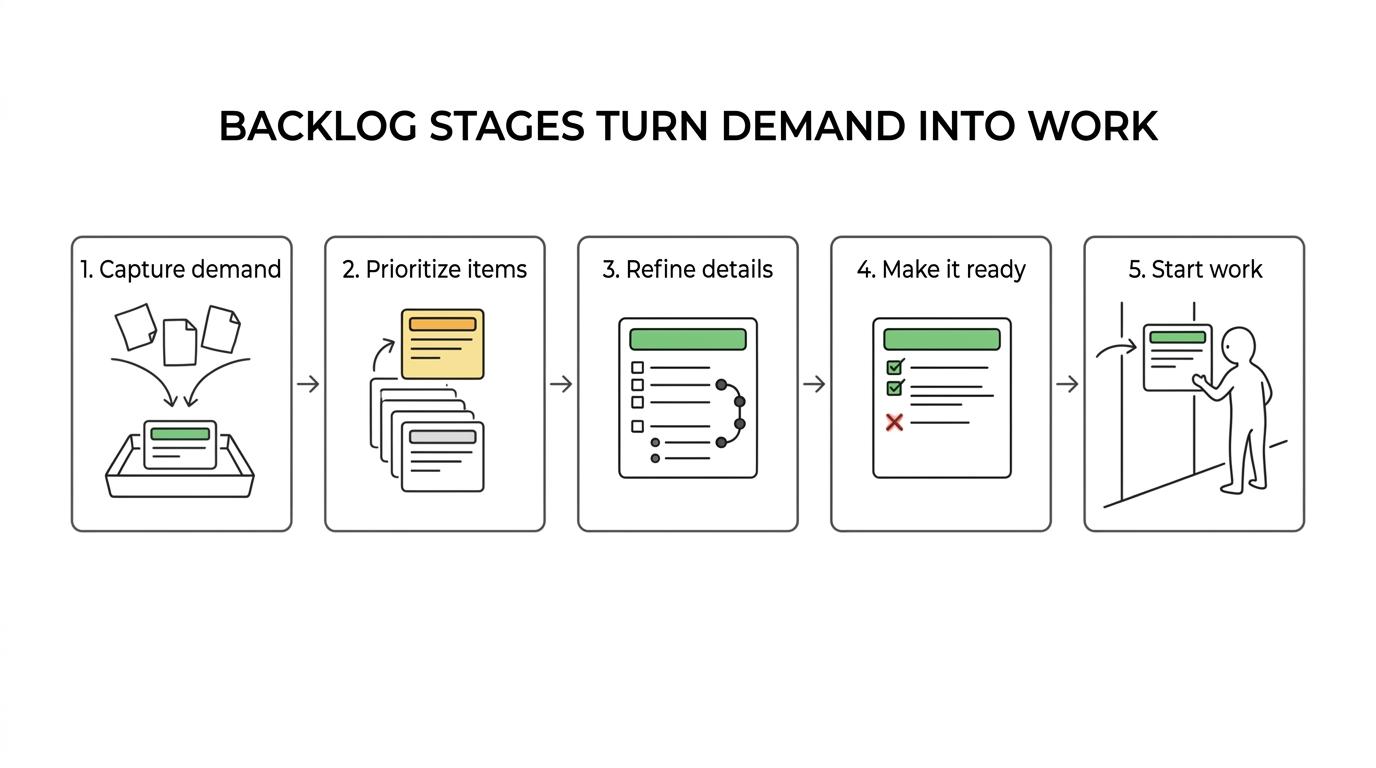
In tools that support workflow customization, backlog can also be treated as its own status rather than just the leftmost column on a board. That matters because captured work is not necessarily ready work. Separating those states keeps intake from contaminating execution planning.
Backlog refinement routines that keep work ready
Refinement is where backlog management becomes operational. It is the recurring process of updating, prioritizing, and preparing items for upcoming work. Teams that skip refinement usually end up paying for it during sprint planning, standups, or mid-sprint interruptions.
A good refinement routine is lightweight but consistent. The goal is not to perfect every item. The goal is to keep the backlog current enough that the team can move with confidence. For many teams, that means reviewing new demand weekly, checking top-priority items at least once per sprint, and pruning outdated work on a regular cadence.
Refinement works best when it is tied to real choices. If a team reviews items without deciding priority, readiness, or fit with the Product Goal, the backlog still decays. Product leaders, engineering leads, and delivery owners should leave refinement with sharper order and less ambiguity than they had going in.
A useful refinement discussion often covers a few predictable questions:
- Why now: Does this item support the current product goal or a pressing operational need?
- What changed: Has new customer evidence, technical discovery, or business context altered priority?
- What is missing: Do we need clearer scope, acceptance criteria, estimates, or dependency mapping?
- Who decides: Is there a clear owner for the next step?
- When is it ready: What signals tell the team this item can move into active planning?
The healthiest backlogs also lose items regularly. Removal is not failure. It is proof that the team is making choices instead of preserving every request forever.
Work in progress limits improve backlog flow
Backlog management is not only about what enters the system. It is also about how much work leaves the backlog at once.
Kanban guidance is especially useful here. Work in Progress limits set the maximum amount of work allowed in a given workflow state. That constraint helps reduce context switching, which is one of the fastest ways to slow a capable team. When too many items move from backlog into active delivery, throughput often drops even though effort increases.
This is one reason fast teams do not measure backlog health by the number of tickets created or started. They look at flow. How long does work sit before it begins? How long does it take once started? Where does work accumulate? Those questions reveal whether the backlog is feeding the system at the right pace.
When WIP is controlled, the backlog becomes a buffer, not a pressure cooker.
 Teams can focus on finishing valuable work instead of juggling half-complete commitments.
A few warning signs usually show up when backlog flow is overloaded:
- Too many items in “in progress”
- Frequent reprioritization mid-cycle
- Rising carryover from one sprint or week to the next
- Long delays between start and completion
- More status updates than completed outcomes
Backlog prioritization that connects work to product goals
A backlog should reflect strategy in motion. If the ordering does not map back to product goals, customer needs, or operational risk, then the backlog is just a record of internal noise.
Scrum’s connection between the Product Backlog and the Product Goal gives teams a useful anchor. Every item does not need a perfect business case, though the top of the backlog should tell a coherent story about what the team is trying to achieve. This keeps teams from optimizing locally while drifting strategically.
Prioritization also benefits from a clear mix of work types. Many teams need a balance of customer-facing features, technical debt, defects, platform maintenance, and compliance work. When one class dominates the backlog without intent, delivery becomes reactive.
A simple prioritization frame can help:
- Goal fit: direct support for the current product objective
- Customer impact: expected value, urgency, or problem severity
- Delivery confidence: clarity of scope, risk, and dependency profile
- Operational need: reliability, security, or internal enablement
- Opportunity cost: what gets delayed if this moves up
The point is not to force every decision into a rigid scoring model. The point is to make prioritization legible enough that the team can act quickly and explain tradeoffs clearly.
Workflow controls that improve backlog quality
Speed improves when the path out of backlog is disciplined. That does not mean adding bureaucracy. It means adding just enough structure to prevent low-quality work from entering execution.
In workflow systems like TOW, backlog can be defined as a distinct status for work that has been captured but is not ready for immediate action. Teams can also tune how statuses appear on boards, which statuses stay hidden, and which transitions are allowed. Those controls are valuable because they turn process rules into visible team habits.
Required fields are especially helpful when used carefully. A large body of work may need an associated epic, a problem statement, or dependency notes before it can leave backlog. At the same time, if teams require too much information too early, people often fill in weak data just to move the ticket. That adds noise instead of readiness.
Well-chosen controls often look like this:
- Distinct backlog status: separate captured work from ready work
- Restricted transitions: prevent items from skipping critical review steps
- Required fields before exit: ask for essential detail only when work is close to execution
- Board mappings: show the workflow clearly without exposing every internal status
- Hidden statuses: keep the board readable while preserving process depth where needed
The aim is straightforward: lower the chance that fuzzy work reaches engineers at the moment when focus matters most.
Scrum and Kanban approaches to backlog management
Scrum and Kanban handle planning differently, but both reward disciplined backlog management.
In Scrum, the backlog supports sprint planning by keeping near-term work refined and ordered. The team needs enough clarity at the top of the backlog to make a realistic sprint commitment. If top items are vague, planning becomes negotiation under pressure.
In Kanban, the emphasis shifts from batch planning to continuous flow. The backlog still matters, though it is managed with more attention to pull signals, lead time, cycle time, and capacity constraints. Work enters the system as space becomes available, not just because a calendar event says it should.
Many teams now blend these approaches. They may use Scrum-style planning rhythms with Kanban-style WIP limits and flow metrics. In a unified workspace, that mix can work especially well because the same system can house backlog ordering, documentation, status rules, and AI-assisted review without splitting context across multiple tools.
That integration matters more than it first appears. When product context, technical notes, decisions, and active work live together, refinement becomes faster and cleaner. Teams spend less time hunting for background and more time deciding what should move next.
Metrics that show backlog health
A backlog can look organized while still slowing the team down. Metrics help expose that gap.
Lead time and cycle time are useful starting points. Lead time shows how long work takes from request to completion. Cycle time looks at how long work takes once it has started. If lead time is growing while cycle time stays flat, the backlog may be overcrowded or poorly prioritized. If cycle time is growing, WIP or execution flow may need attention.
A few practical backlog metrics deserve regular review:
- Backlog age for top-priority items
- Percentage of “ready” items near the top of the list
- Carryover rate across sprints or planning cycles
- Time spent in backlog before entering active work
- Ratio of completed items to newly added items
Metrics should support decisions, not punish teams. If people feel measured instead of helped, they will optimize appearances. A backlog health review should feel like a process check, not a performance trap.
Backlog management as a daily operating discipline
The best backlog management systems are not elaborate. They are clear, repeatable, and respected.
Teams move faster when they keep backlog work ordered, refine it regularly, and limit how much enters active execution at once. They also move better when their tools reinforce those habits with explicit statuses, sensible field requirements, and workflow rules that protect focus.
A strong backlog does not remove uncertainty from product development. It gives uncertainty a place to live until the team is ready to act on it. That is a powerful advantage for any product organization that needs to move quickly without losing its grip on priorities.