

When your intranet is just a page library, people still end up hunting through chat, tickets, separate docs, and disconnected AI tools to find what they need. TOW builds The Only Workspace as a secure intranet software option for organizations that want internal knowledge, project execution, and AI-assisted work in one place.
TOW is designed for teams that need more than a basic portal. We combine docs and wiki, project tracking, workspace memory, search, collaboration, and reviewable AI in a single workspace that you can run on your own infrastructure or use in the cloud, with explicit admin controls, SSO, and clear data ownership.
Secure intranet software that keeps internal knowledge connected to work
TOW gives you an intranet that does more than publish internal pages. Your team can manage issues, boards, goals, and roadmaps in the same workspace where specs, decisions, runbooks, and documentation live, so knowledge stays attached to the work it supports instead of drifting into separate systems.
“TOW combines docs/wiki, project tracking, memory, search, and reviewable AI in one workspace.”
That matters when people need answers they can act on right away. TOW keeps docs, specs, decisions, and operational knowledge connected through native documentation, smart references, and knowledge search, which makes internal information easier to trust, easier to update, and easier to use in the moment.
TOW intranet software for teams that need access-controlled internal knowledge
TOW is a strong fit for organizations that handle internal knowledge with different audiences, approval paths, or sensitivity levels. If your intranet needs to reflect team structure, project boundaries, or document sensitivity, TOW supports shared knowledge records at organization, group, user, and project scopes so information can be shared intentionally instead of broadly by default.
“TOW supports organization, group, user, and project scopes for shared knowledge records.”
That approach matches the real security problem most growing teams face. NIST guidance on access control notes that many systems need more than a simple password model, and that authorization often has to follow organizational structure or document sensitivity. TOW is built around that reality, which helps you create an intranet people can use without flattening every permission into one global access rule.
TOW also separates responsibilities for normal users, project admins, organization admins, and server admins. That role clarity helps your operations, IT, and team leads manage the workspace without mixing everyday editing, project administration, and deployment-level control into the same account behavior.
What your team can run inside a TOW internal workspace
A TOW intranet is useful because it covers the actual flow of internal work, not just the publishing layer. In one workspace, your team can manage:
- Internal docs and wiki: Policies, onboarding material, specs, decisions, runbooks, and team knowledge with workspace memory and search.
- Project management: Issues, boards, goals, and roadmaps tied directly to the documentation behind them.
- AI-assisted work: Workspace-aware AI agents with human review, so AI actions are permission-aware and reviewable before they become part of the record.
- Collaboration and updates: Search, notifications, and shared context that reduce repeated questions and version confusion.
For teams replacing a stale intranet, the advantage is practical. TOW turns internal knowledge into something operational, so your documentation, decisions, and active work stay part of the same system your team uses every day.
Self-hosted intranet deployment with explicit security and AI controls
TOW is built for organizations that want deployment choices and clear ownership boundaries. You can run TOW as a self-hosted intranet on infrastructure you control or use the cloud, and you can choose BYOK or TOW-managed AI endpoints based on your internal security, compliance, and procurement requirements.
“TOW documents HTTPS deployment and uses HTTP-only, same-site lax session cookies.”
That flexibility matters when internal knowledge includes sensitive plans, operating procedures, or project discussions that should not be scattered across multiple vendors. TOW’s deployment guidance explicitly tells server administrators to review deployment, security, and AI data controls before rolling out the workspace, which gives your technical team a defined place to evaluate hosting, AI routing, and data handling choices.
TOW’s security documentation also gets concrete at the implementation level. It documents HTTP-only and same-site lax session cookies, and recommends setting session_cookie_secure: true in tow.yaml for HTTPS deployments. For buyers, that is useful because it shows TOW treats intranet security as a deployable system with explicit settings, not just a marketing promise.
Why TOW is different from a wiki-only intranet or a disconnected tool stack
Many companies end up with one system for tickets, another for docs, another for notes, and another for AI experimentation. That creates version drift, duplicated permissions, and a familiar problem where internal knowledge exists somewhere, but nobody is sure which copy is current.
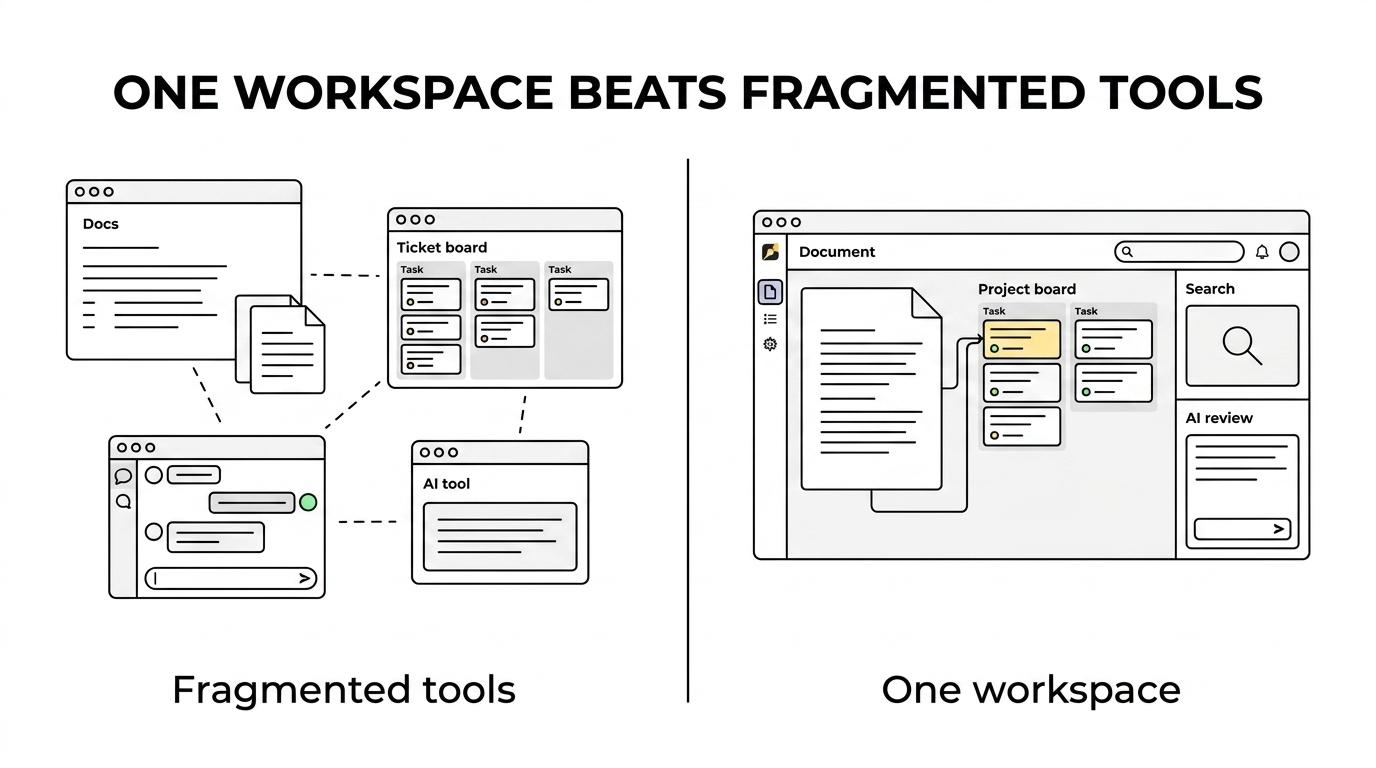
TOW addresses that by bringing projects, docs, company memory, and reviewable AI together in a single workspace. TOW is also aiming for parity with tools like Jira, Confluence, Notion, and Linear, which makes it relevant for teams that want fewer moving parts without giving up structured project management or documentation depth.
If you are comparing options, these are the buying questions TOW answers clearly:
- Implementation: TOW includes migrations from Jira, Confluence, and Notion, which helps reduce rework when moving your internal knowledge into one system.
- Ownership: TOW supports self-hosted control, so your infrastructure choice can match your internal governance model.
- AI risk: TOW uses workspace-aware, permission-aware AI with human review rather than unchecked automation against internal content.
- Team size and rollout: TOW offers a free self-hosted tier for small organizations, which can make an initial deployment easier to test before broader adoption.
When TOW is the right intranet software for your organization
TOW is a strong fit when your team wants one internal system for knowledge and execution, not a homepage that links out to five other tools. It is especially relevant if your buyers care about admin controls, explicit deployment security, access-scoped sharing, and whether AI can work inside the same permission model as the rest of the workspace.
You are likely a good fit for TOW if your organization wants to replace a fragmented wiki and tracker setup, keep internal docs tied to project delivery, or run an intranet on infrastructure you control. TOW also makes sense when IT, operations, engineering, product, or cross-functional teams need a shared workspace where documentation, decisions, risks, tasks, and AI-assisted work stay in one private environment.
If your priority is a public-facing corporate portal or a lightweight announcement board with minimal structure, TOW may be more than you need. But if your intranet needs to support real operating work, controlled knowledge sharing, and reviewable AI inside the same system, TOW is built for that job.
Start with a TOW intranet plan that matches your security and workflow needs
The fastest way to evaluate TOW is to map your current internal knowledge flow against the workspace you actually want. We can help you look at deployment model, access scopes, documentation structure, AI controls, and migration paths from your existing stack so you can see how TOW would work in your environment.
If you want intranet software that keeps internal knowledge secure, usable, and connected to daily work, explore TOW and start designing the workspace your team can rely on.