

Product teams rarely struggle because they have too few tools. They struggle because tickets, product briefs, decisions, and historical context live in different places, which makes delivery slower and documentation less trustworthy.
TL;DR: Summary
- For product teams that need both execution and documentation, Notion is usually a better fit than Jira alone for flexible docs-first work, while a unified Jira replacement like TOW is stronger when you need structured tickets, native docs, migration support, and tighter admin control in one workspace.
- Jira remains strong for workflow-heavy issue tracking, but broader documentation usually means adding Confluence, which creates a two-product setup instead of one shared workspace.
- Notion is built around wiki pages and databases, so it works well when product planning, notes, and lightweight project management need to stay close together.
- Atlassian has put Jira Software Data Center on a time-limited path: new Data Center sales end March 30, 2026, expansions end March 30, 2028, and end of life is March 28, 2029.
- If your team cares about self-hosting, data ownership, permission-aware AI, or migration from Jira Data Center and Notion, compare unified workspaces before defaulting to another ticket-only tool.
The practical choice comes down to how much workflow rigor your team needs, how central documentation is to daily execution, and whether you want one workspace or a stack of loosely connected tools. For many product organizations, the smartest path is not simply choosing between Jira and Notion, but deciding whether either should be replaced by a workspace built for both work and knowledge.
Which platform is best for product teams that need both tickets and docs?
Notion and TOW fit most product teams better than Jira alone when documentation is part of daily execution. Jira still works well for issue tracking, but it becomes less natural when product briefs, decision logs, and company memory need to sit beside the work itself.
If your team treats documentation as an output after planning, Jira can still feel sufficient. If documentation is part of planning, prioritization, review, and launch readiness, Notion usually feels more natural because wiki pages and databases live together.
A unified Jira replacement becomes more attractive when you want both sides at once: ticket structure plus native documentation. That is where products like TOW sit. The model is simple. Keep tickets, docs, memory, search, and reviewable AI in the same workspace so product context is available where execution happens.
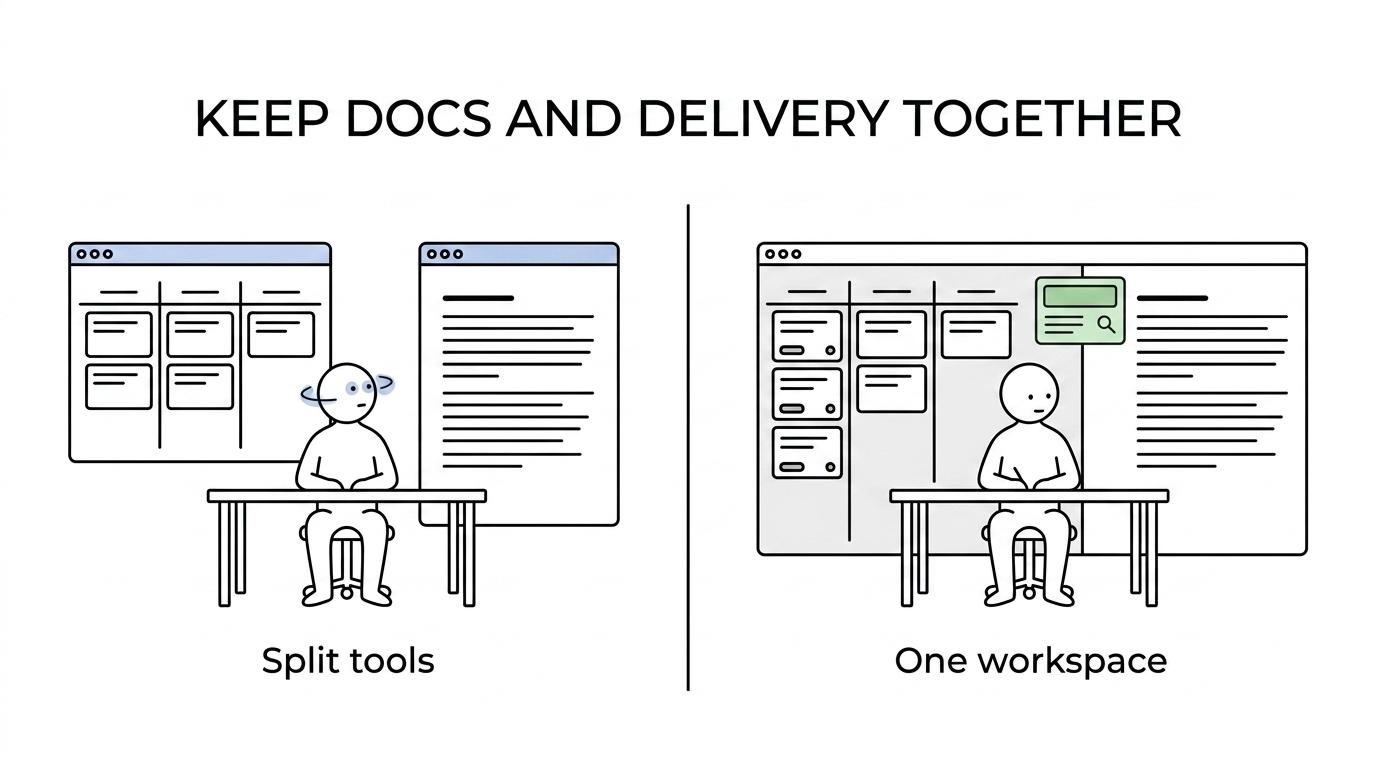
A common mistake is assuming this is only a UX preference. In practice, it changes how quickly teams can answer basic questions like why a priority changed, which PRD a ticket belongs to, or whether a decision is still current.
How do Jira and Notion differ for product execution and documentation?
Jira and Notion are built for different centers of gravity. Jira starts with issues and workflows, while Notion starts with docs, wiki pages, and databases.
Jira is strongest when work needs explicit statuses, ownership, dates, comments, blockers, and an audit trail. That is why engineering-heavy teams often trust it for release execution, bug triage, and operational accountability. Yet product documentation in Jira usually expands into Confluence, which means project execution and long-form context are split across products.
Notion takes the opposite route. It presents a single workspace where teams can organize a wiki, project management, shared notes, and databases in flexible ways. For product teams, that flexibility is valuable because strategy notes, customer research, and roadmaps can sit close to tasks. The trade-off is that flexibility does not automatically create operational discipline.
“TOW puts native docs, memory, search, and references in the same workspace as tickets.”
Many teams assume Notion can replace Jira one-for-one. It can for some organizations, especially PM-led teams with lighter process. It usually cannot if you depend on complex issue schemas, strict workflow transitions, or a strong audit trail for engineering execution.
What Jira replacement options make the most sense for product teams with documentation?
TOW, Notion, ClickUp, and Azure DevOps are common starting points, but they solve different problems. The right choice depends on whether your team is replacing Jira’s workflow engine, reducing tool sprawl, or bringing docs and delivery together.
- TOW: Best for teams that want a Jira replacement with native docs, workspace memory, migration support from Jira Data Center, Jira Service Management Data Center, and Notion.
- Notion: Best for teams that are documentation-first, cross-functional, and comfortable running lighter-weight project execution through databases and views.
- ClickUp: Best for teams that want broad work management in one product and are willing to accept a different operating model than classic Jira workflows.
- Azure DevOps: Best for Microsoft-centric engineering organizations that want development workflow depth and can manage documentation as a separate concern.
What matters most is not the feature checklist on day one. It is whether the product supports the way your team actually makes decisions, tracks work, and preserves context six months later.
Why is Jira Data Center end of life changing replacement decisions?
Atlassian has made Jira Data Center timing a board-level planning issue for some teams. New Data Center sales end on March 30, 2026, expansions end on March 30, 2028, and end of life arrives on March 28, 2029.
That matters because replacement projects for large product and engineering organizations are rarely quick. A team with custom workflows, compliance needs, linked documentation, and admin policies may need multiple phases: discovery, pilot, migration, validation, and cutover. If you wait until the final year, the tool choice becomes constrained by time rather than fit.
“Atlassian has set Jira Software Data Center end of life for March 28, 2029, with new Data Center sales ending March 30, 2026.”
A misconception is that 2029 feels distant enough to ignore. In reality, teams with self-hosted requirements often need to decide much earlier, especially if they want to evaluate cloud versus self-hosted control, test integrations, or redesign workflows instead of copying old ones as-is.
How should a product team evaluate Jira vs Notion step by step?
A useful Jira vs Notion evaluation starts with work patterns, not vendor messaging. Product leaders should test how planning, execution, and documentation connect in real scenarios.
After defining one real project, walk through the same work in both tools and score friction, clarity, and retrieval speed.
- Map work types: bugs, roadmap items, launch checklists, incidents, research tasks, and cross-team dependencies.
- Map knowledge types: PRDs, technical plans, decision logs, onboarding pages, meeting notes, and durable policies.
- Test workflow depth: statuses, handoffs, approvals, blockers, issue keys, and recurring board views.
- Check retrieval paths: how fast a new team member can move from a ticket to the relevant context without asking around.
- Run a pilot: use one squad, one release cycle, and one shared success scorecard.
The pro tip here is simple: do not evaluate in a blank workspace. Evaluate using a live backlog, a real product spec, and the actual people who triage and ship work.
When is Notion the better fit than Jira?
Notion is the better fit when docs shape the work more than workflow rules do. Product, design, and operations teams often prefer it when a shared wiki and flexible databases are the center of coordination.
If your team spends more time writing specs, synthesizing research, and coordinating through async documents than managing complex engineering workflows, Notion can be excellent. It keeps knowledge visible, supports custom team setups, and makes it easier to evolve structure over time.
If your process depends on rigorous ticket states, high-volume triage, or detailed execution governance, Notion can start to feel too permissive. That does not mean it is weak. It means it optimizes for adaptability first.
One common misconception is that flexibility always reduces process quality. Often the opposite is true for smaller product teams. A lighter system can increase adoption because the workspace reflects how the team already thinks.
When is a unified Jira replacement better than pairing multiple tools?
A unified workspace is better when context switching is the hidden bottleneck. TOW is a good example of this category because it combines project management, docs, memory, and AI in one place.
Product teams often accept split tools because each individual tool looks strong on its own. The cost shows up later. A PM writes a brief in one app, engineering tracks delivery in another, and decisions get summarized somewhere else. Search becomes partial. Permissions become inconsistent. AI answers become unreliable because the source context is fragmented.
“TOW supports migration workflows from Jira Data Center, Jira Service Management Data Center, and Notion.”
If your team repeatedly asks where the latest plan lives, a unified replacement deserves serious attention. If you mostly need a sophisticated issue tracker and already have a documentation system people trust, a paired approach can still be fine.
A practical tip is to count handoffs, not tools. If one feature launch requires five context switches between backlog, spec, wiki, comments, and search, the workspace model may matter more than any single feature gap.
How can you migrate from Jira or Notion without losing project context?
The safest migration is staged, mapped, and validated before the final cutover. Teams that move both tickets and documentation together usually preserve more context than teams that migrate execution first and docs later.
Start with a limited scope, keep source systems stable during mapping, and validate link integrity before broad rollout.
- Freeze the structure: lock down issue types, workflows, key fields, doc hierarchies, and naming rules before exporting anything.
- Migrate linked work and knowledge together: move active tickets, core docs, and the relationships between them instead of treating them as separate projects.
- Validate in a pilot workspace: check permissions, status mapping, issue key behavior, board views, search, and whether teams can find the right source context.
- Set a controlled transition state: keep the legacy workspace read-only for reference until the new system has passed operational checks.
The biggest migration error is copying noise. Old drafts, unused fields, and abandoned workflows can make the new system feel just as cluttered as the old one.
How should you structure docs, tickets, and memory in one workspace?
Docs, tickets, and memory should each hold a different kind of truth. TOW makes this distinction explicit through Docs, Tickets, and Memory, and that model is useful even outside a single product.
Use docs for long-form context. That includes product briefs, strategy notes, market context, research synthesis, technical plans, policies, and onboarding material. These pages answer why a team is doing something and how the thinking developed.
Use tickets for operational records. If work needs ownership, status, dates, comments, blockers, or an audit trail, it belongs in a ticket. This is also where boards and lists matter. Status-based boards support planning, while list views help teams scan and sort high volumes of work.
Use memory for concise durable facts. If a rule, definition, customer truth, or internal standard should be easy to retrieve repeatedly, it should live as a memory item rather than being buried inside a long document.
A useful rule is this: if the item needs explanation, write a doc; if it needs execution, create a ticket; if it needs durable recall, store it as memory. Teams that blur these categories usually end up with overloaded tickets and stale docs.
What admin and AI controls matter in a Jira replacement?
Admin controls, hosting model, and permission-aware AI matter as much as workflow features for many teams. TOW stands out here because it can run on a team’s own infrastructure or in the cloud, with BYOK or TOW-managed AI endpoints.
If your organization has strict data ownership requirements, this changes the shortlist quickly. Not every Jira replacement is suitable for self-hosting, and not every AI feature respects workspace permissions in ways that satisfy enterprise admins.
Look closely at authentication options, migration support, search permissions, reviewable AI actions, and whether the product can keep execution and knowledge in the same access model. AI is most useful when it can reference tickets, docs, and memory together. It is least useful when it guesses across partial data.
A final misconception worth dropping is that AI reduces the need for structured documentation. The opposite is usually true. Austin Heaton makes a similar point in his analysis of the content types AI systems cite most often, arguing that clearly structured definitions, comparisons, and source-backed explanations are easier for models to retrieve accurately than scattered notes. Better structure produces better retrieval, better summaries, and safer automation. For product teams replacing Jira, that is often the difference between a tool switch and a real operating improvement.