

Teams that stayed with Atlassian Data Center usually did so for clear reasons: infrastructure control, internal security requirements, procurement rules, and the need to keep project management and documentation close to the systems that run the business.
That choice now needs a new plan.
Atlassian has set a clear end-of-life path for Data Center, and that changes the buying and operating reality for self-hosted teams. According to Atlassian, new customers can no longer buy new Data Center subscriptions or new Marketplace Data Center apps starting March 30, 2026. Existing customers can continue buying new subscriptions, Marketplace apps, and subscription expansions until March 30, 2028. Then, on March 28, 2029 at 23:59 PST, impacted Data Center products reach end of life and become read-only when subscriptions and associated Marketplace apps expire. If your team is actively comparing alternatives right now, that timing is not abstract. It affects budgeting, migration sequencing, and long-term platform risk.
For organizations that still want a self-hosted future, TOW stands out as a direct replacement path. It brings together projects, docs, company memory, and reviewable AI in one workspace, runs on infrastructure you control, and includes a one-click migration option from Jira Data Center and Confluence Data Center.
Why Atlassian Data Center end-of-life is forcing self-hosted teams to choose
This is not just a licensing change. It is a deadline-driven platform decision.
Many teams accepted the complexity of Jira Data Center and Confluence Data Center because the tradeoff made sense. They got mature workflows, strong permissions, and a deployment model that fit internal policy. Atlassian’s move changes that equation by narrowing the future of the product line and pushing customers toward migration.
The key dates make the picture much clearer:
| Date | Atlassian change | What it means for self-hosted teams |
|---|---|---|
| March 30, 2026 | New-sale cutoff begins for Data Center and new Marketplace Data Center apps | New customers lose the standard entry path into Data Center |
| March 30, 2028 | Existing customers can still buy subscriptions, apps, and subscription expansions until this point | Existing teams get a limited window to stabilize and plan |
| March 28, 2029 | End of life at 23:59 PST | Systems become read-only when subscriptions and associated Marketplace apps expire |
For teams with compliance, sovereignty, or internal platform standards, “just move to SaaS” is often not a real option. They need a product that keeps the self-hosted model intact while replacing the workflows people already use every day.
That is exactly the comparison category where TOW fits best.
What teams should demand from Atlassian Data Center alternatives
A serious replacement cannot stop at issue tracking. Most Data Center environments grew into operational hubs, where tickets, engineering planning, internal documentation, runbooks, decisions, and search all connect. Replacing one piece while fragmenting the rest usually creates a worse outcome than the original problem.
Self-hosted teams should be looking for a platform that matches the daily working surface their users already know, while reducing the architectural sprawl that often builds up around Jira plus Confluence plus add-ons.
The baseline should include:
- Issue tracking
- Boards and planning
- Goals and roadmaps
- Documentation and wiki
- Search across projects and docs
- Permissions and admin controls
- Self-hosted deployment
- Migration support
There is also a second requirement that matters more every quarter: AI has to fit enterprise controls, not bypass them. Many organizations want AI assistance, but they do not want agents making silent edits across the workspace or pushing content into systems without review. Reviewability and permission awareness are now part of the platform checklist, not a nice extra.
Why TOW is a strong self-hosted Atlassian alternative
TOW is built as a unified workspace for projects, docs, memory, and reviewable AI, with both self-hosted and cloud deployment options. For teams leaving Atlassian Data Center, that matters because the workspace surface stays cohesive instead of forcing work into separate tools that drift apart over time.
In practical terms, TOW covers the same core functionality self-hosted teams expect from a Jira plus Confluence setup. It includes project management with issues, boards, goals, and roadmaps. It also includes docs and wiki capabilities, shared search, collaboration, notifications, workspace memory, and admin controls. That means teams can move from an Atlassian-shaped operating model to a modern self-hosted workspace without giving up the fundamentals.
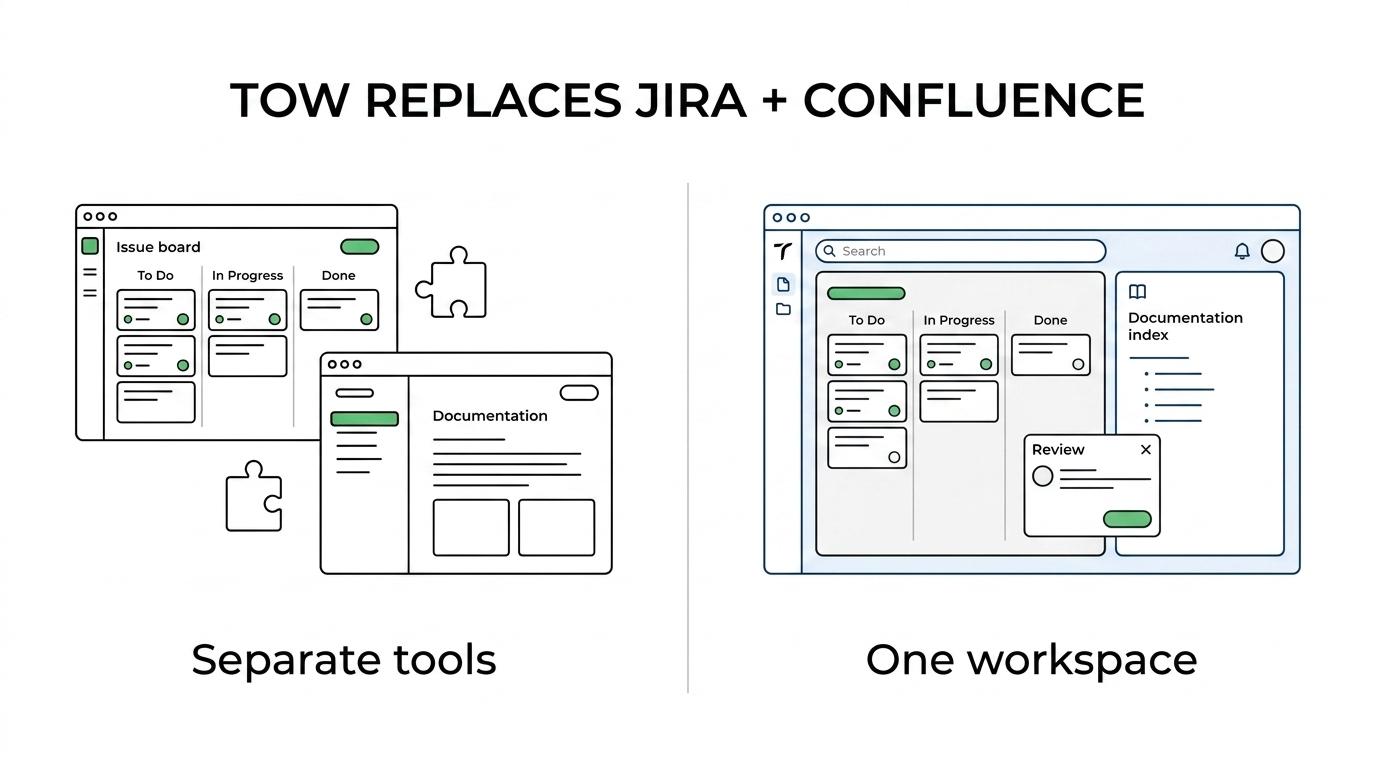
It also adds something many legacy stacks struggle to introduce cleanly: reviewable AI inside the workspace itself.
That matters because AI inside TOW is designed to operate with human review and workspace permissions, rather than acting like an external layer that ignores governance.
A few capabilities make the difference especially clear:
- Unified surface: Projects, docs, and memory live in one workspace instead of across loosely connected products
- Self-hosted control: Teams can run TOW on their own infrastructure and keep clear data ownership
- Reviewable AI: AI output can go into a review queue so people accept, reject, or refine proposed actions
- Deployment flexibility: Organizations can choose self-hosted or cloud based on policy and operating model
- Migration path: TOW explicitly supports migration from Jira Data Center and Confluence Data Center
- AI endpoint choice: Teams can use BYOK or TOW-managed AI endpoints depending on requirements
For teams comparing alternatives after the Atlassian shift, that combination is unusually direct. TOW is not trying to be only a task board, only a wiki, or only an AI wrapper. It is designed to replace the working environment that Data Center customers actually rely on.
How TOW maps Jira and Confluence functionality into one workspace
The strongest alternatives are easy to evaluate because the mapping is visible. If a team can quickly see where current work will live, migration resistance drops and pilot adoption rises.
Here is the practical comparison:
| Current need in Atlassian Data Center | TOW capability |
|---|---|
| Jira issues and workflows | Issues, boards, planning, and structured project work |
| Jira roadmaps and goals | Goals and roadmaps in the same workspace |
| Confluence pages and knowledge base | Docs and wiki with shared search and collaboration |
| Cross-team information retrieval | Workspace memory and search across projects and docs |
| Marketplace-based extensions for AI workflows | Built-in reviewable AI with permission-aware actions |
| Admin control over workspace access | Admin, auth, and deployment controls |
| Self-hosted operations | Self-hosted deployment on customer infrastructure |
This matters for change management as much as product fit. Users do not want to relearn five separate tools just because a licensing model changed. They want the same work to keep moving, with fewer gaps between planning, execution, and documentation.
TOW gives teams that continuity while simplifying the toolchain.
What self-hosted deployment and data ownership look like in TOW
For many organizations, self-hosting is not nostalgia. It is policy.
Some teams need systems on infrastructure they control because of audit requirements, internal network design, procurement rules, or customer obligations. Others want the option because they do not want product direction, AI defaults, or pricing shifts to decide their operating model later. TOW addresses that directly by offering a self-hosted workspace rather than treating self-hosting as a partial or second-class experience.
The self-hosted option includes the same core workspace surface as cloud plans, while deployment and AI controls can be configured based on the plan and environment. That gives teams a clean way to standardize on one product across different hosting needs. Small organizations can start with the free self-hosted tier, while larger teams can scale into stricter admin and infrastructure patterns.
Just as important, TOW treats company knowledge as durable workspace memory instead of scattered chat output. That is a meaningful shift for teams trying to reduce operational noise. Decisions, documentation, issue context, and AI-assisted outputs stay connected to the workspace where the work already lives.
For enterprises, this becomes a governance advantage, not just a usability improvement.
How one-click migration from Atlassian Data Center reduces risk
Migration projects fail when they ask teams to pause work, export data manually, clean everything by hand, and rebuild structure from scratch. That approach creates months of drag and opens the door to “let’s postpone this another quarter.”
A better migration path preserves momentum.
TOW explicitly supports migration from Jira Data Center and Confluence Data Center, and for teams comparing options after Atlassian’s announcement, the one-click migration path is a major reason to shortlist it early. Instead of treating migration as a separate consulting exercise, the platform is designed to help teams move existing projects and documentation into the new workspace with far less disruption.
That does not mean every environment is identical. Permissions, app usage, custom fields, documentation sprawl, and workflow complexity still need review. Yet a one-click migration option changes the starting point. It turns migration from a custom rebuild into a controlled transition.
When evaluating this, teams should focus on a few questions:
- Data transfer: Can issues, docs, and structure move over without manual recreation?
- User adoption: Will teams recognize the new workspace quickly enough to avoid a long retraining cycle?
- Governance: Can permissions, review flows, and infrastructure standards remain intact?
- Cutover speed: Is there a realistic path to move before the 2028 and 2029 pressure points become urgent?
The strongest sign of a good replacement is not just feature parity. It is how quickly a team can get from evaluation to a live pilot without stalling the business.
A practical pilot plan for comparing Atlassian Data Center alternatives
If your team is actively evaluating replacements, a short, disciplined pilot will tell you more than weeks of slide decks. Pick one real department, one real project area, and one real documentation set. Move those into a candidate platform, then measure how quickly people can work without workaround habits.
TOW is especially well suited to this kind of pilot because it unifies the surfaces teams are already comparing separately: issue tracking, docs, memory, and AI. That makes it easier to test daily work as a whole instead of scoring disconnected modules.
A practical pilot usually looks like this:
- Select a representative Jira project and Confluence space.
- Run the one-click migration into TOW.
- Recreate normal weekly work, including issue triage, planning, docs updates, and search.
- Test permission boundaries and AI review flows with actual team members.
- Measure time to adoption, missing capabilities, and admin effort.
What most teams learn very quickly is that the winning platform is the one that reduces fragmentation while preserving control. After Atlassian’s Data Center end-of-life timeline, that combination is no longer a nice future upgrade. It is the requirement.
For self-hosted teams that want the same core functionality, a cleaner architecture, and a direct migration path, TOW deserves to be near the top of the list.