

Many self-hosted teams picked Atlassian Data Center for a reason. They wanted control over infrastructure, tighter security boundaries, predictable admin policies, and a system that fit the way their organization already worked. That choice now comes with a deadline.
Atlassian has announced an end-of-life path for impacted Data Center products, with major changes starting March 30, 2026 and final end of life on March 28, 2029. For teams running Jira Software Data Center, Confluence Data Center, Jira Service Management Data Center, Crowd, or Bamboo, this is not a minor licensing update. It is a platform decision that affects budgets, workflows, compliance reviews, and how fast teams can move over the next few years.
Atlassian Data Center end-of-life timeline self-hosted teams need to know
The timeline matters because Data Center subscriptions are annual, not perpetual. According to Atlassian, impacted subscriptions and associated Marketplace apps will expire on March 28, 2029 and become read-only. That means teams cannot treat this as a problem for later. Waiting too long increases migration pressure, limits testing time, and makes it harder to sort out app dependencies.
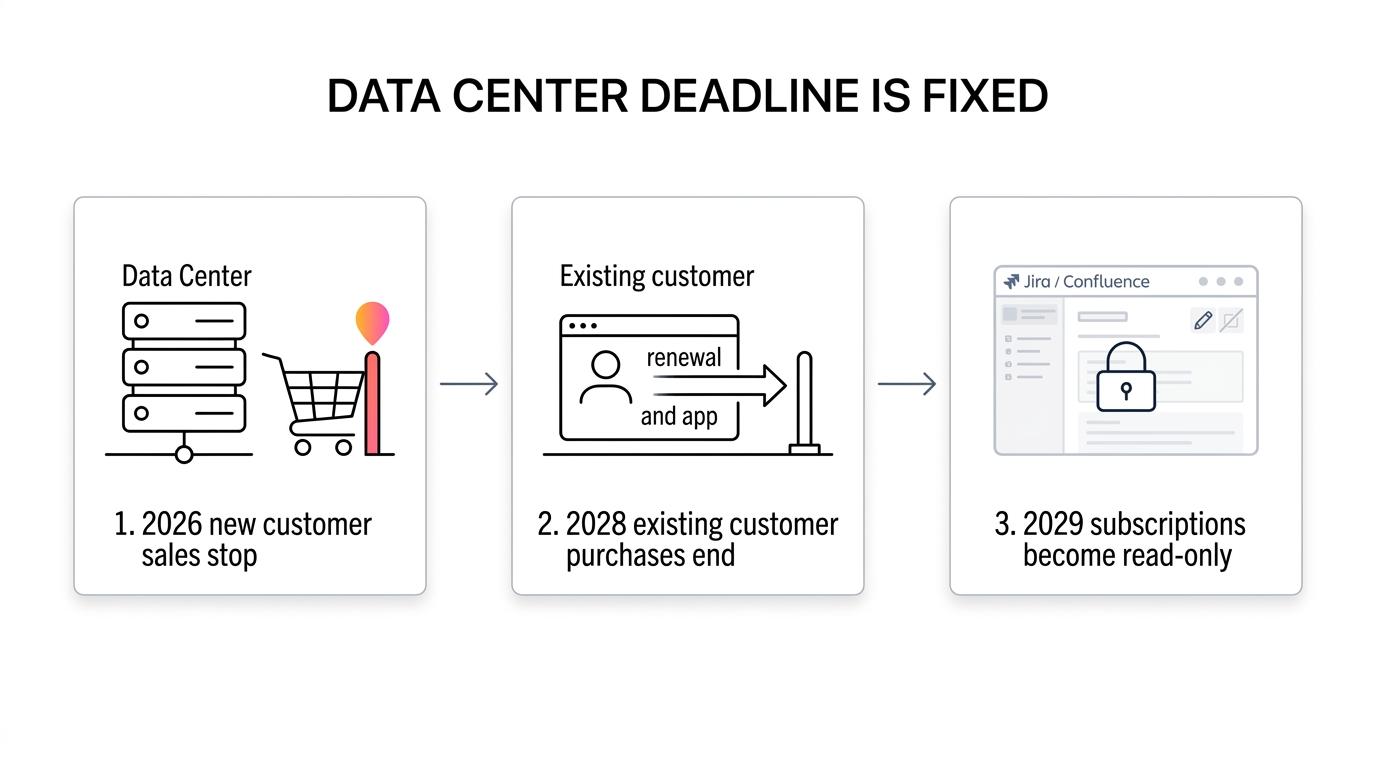
There are also important exceptions. Bitbucket Data Center is excluded from this end-of-life plan, and Jira Align Data Center is not included either. Still, most self-hosted teams are centered on Jira and Confluence. For them, the deadline is real and the window is fixed.
| Date | What changes for Data Center customers |
|---|---|
| March 30, 2026 | New customers can no longer buy new Data Center subscriptions or new Marketplace Data Center apps for impacted products |
| March 30, 2028 | Existing customers can still purchase new subscriptions, app subscriptions, and expansions until this date |
| March 28, 2029 | Impacted Data Center subscriptions reach end of life and become read-only |
This timeline changes how teams should plan. A long migration may look manageable on paper, but real environments are rarely simple. Custom workflows, permissions, old spaces, issue schemas, and app data all need review.
Why Atlassian Data Center end of life is a strategic issue, not just a migration task
A forced move away from self-hosted Atlassian is bigger than a tooling swap. Jira and Confluence often sit at the center of delivery planning, documentation, approvals, internal search, and team coordination. When they move, many adjacent systems move with them.
Atlassian is clear about its direction. The company says it is shifting its full focus to cloud and ties that shift to the 2029 end-of-life date. For teams that were counting on Data Center as a long-term home, that changes the premise. The question is no longer whether to move. The question is where to move without giving up the control that made self-hosting valuable in the first place.
The risk is not only technical. It is operational.
- Workflow disruption
- Lost documentation context
- App dependency gaps
- Permission model drift
- Admin overhead during transition
This is also why early planning pays off. Atlassian itself recommends a simple lift-and-shift path mainly for smaller teams, and points larger or more complex environments toward migration partners. Teams with more than 1,000 users, specific security and compliance needs, or many business-critical apps are already being told to treat migration as a serious project.
Why self-hosted teams should not assume Atlassian Cloud is the only path
Cloud adoption is widespread, and there is no point pretending otherwise. Forrester reported that 94% of US enterprise infrastructure decision-makers were using at least one type of cloud deployment in 2022, with most using hybrid or multicloud. The same report said 74% were adopting containers in PaaS environments across on-premises or public cloud settings.
That matters because modern infrastructure choices are more flexible than a simple cloud versus on-prem debate. Many teams want a cloud operating model in some areas and direct infrastructure control in others. They may have data residency needs, internal network requirements, customer commitments, regulated workloads, or internal policies that make full SaaS a poor fit.
So the real decision is not “Should we modernize?” It is “How do we modernize without surrendering control?” A strong replacement should let teams keep ownership of deployment, data, and admin policy while still giving them a modern product experience.
What to evaluate in an Atlassian Data Center replacement for self-hosted teams
If a replacement only handles issue tracking, it will create the same fragmentation many teams already want to reduce. Jira and Confluence are usually connected in daily work. People move from roadmap to issue, from issue to spec, from spec to decision log, and from decision log back to execution. Replacing only one layer creates friction fast.
A better evaluation starts with the core jobs the workspace must handle every day.
- Project management: issues, boards, goals, roadmaps, status tracking
- Documentation: wiki, specs, internal knowledge, long-lived company memory
- Search: one place to find tickets, pages, decisions, and context
- Admin controls: permissions, authentication, policy control, deployment options
- Collaboration: comments, notifications, shared workflows, cross-team visibility
- Migration path: import quality, time to value, low manual cleanup
The migration path deserves its own line item because it changes the full business case. A cheaper product with a painful move can cost more in staff time, delay, and rework. A platform that covers the same core needs and offers a simple import path usually wins on total effort.
Why TOW is a strong self-hosted alternative to Jira Data Center and Confluence Data Center
TOW is built for teams that want one workspace for projects, docs, company memory, and AI, with the option to run it on their own infrastructure or in the cloud. That matters right now because many Atlassian Data Center teams are not asking for more tools. They are asking for fewer disconnected systems and more control.
For Jira and Confluence users, the fit is practical. TOW covers the core functions teams depend on every day: project management, documentation, search, admin controls, and collaboration. Instead of splitting work across separate products and then stitching them together with apps and custom process, teams can work in one workspace where issues, docs, and knowledge are connected by default.
That unified model changes daily work in a useful way. A product spec is not stuck in one tool while implementation lives in another. Search does not stop at page titles or board names. Context carries across the workspace, which helps teams move faster and makes onboarding easier for new people.
There is also a control advantage. TOW can be self-hosted, which keeps deployment and data ownership with the organization. Teams that want flexibility around AI can use BYOK or TOW-managed endpoints. AI actions are reviewable and permission-aware, which is a much better match for organizations that need human review and tight access controls.
A few things stand out for self-hosted teams making this move:
- Unified workspace: projects, docs, memory, and AI in one system
- Self-hosted control: run on your infrastructure with clear data ownership
- Admin depth: auth, permissions, notifications, and governance features built in
- Practical migration: 1-click migration support helps reduce manual setup
- Room to start small: a free self-hosted tier lowers the barrier for pilot teams
This is where TOW becomes more than an alternative. It becomes a cleanup opportunity. Teams can move away from a forced platform change and come out with a simpler stack, better internal search, and a workspace that fits current operational needs.
How 1-click migration changes the Atlassian replacement decision
Migration effort often decides the winner long before feature checklists do. Teams may like the idea of a self-hosted replacement, then pull back when they picture months of exports, mapping, manual validation, and staff retraining.
That is why 1-click migration matters. It shortens the distance between “we should evaluate this” and “we can actually run this.” A cleaner migration path lets teams test with real projects, real docs, and real permission structures instead of a demo dataset that hides the hard parts.
This also improves decision quality. Rather than debate hypotheticals, teams can evaluate the new workspace against the work they already do. They can see how boards behave, how docs import, how search performs, and how admin controls map to internal policies.
A practical migration plan for self-hosted teams moving off Atlassian Data Center
The best next step is not panic. It is structure. Teams that move early can compare options on their own terms, run a pilot, and avoid a last-minute rush toward whatever seems easiest at the time.
A useful plan usually looks like this:
- Inventory current usage across Jira, Confluence, apps, permissions, and custom workflows.
- Separate must-have functions from historical clutter.
- Test a self-hosted replacement with real data, not sample projects.
- Validate admin controls, search quality, and user access before a wider rollout.
- Choose a migration path that reduces manual work and keeps rollback options open.
For many organizations, the strongest move is to treat this moment as both a migration and a reset. If the current stack is fragmented, app-heavy, or hard to govern, there is little value in rebuilding that same complexity elsewhere. A unified self-hosted workspace gives teams a chance to keep control while simplifying how work gets planned, documented, found, and reviewed.
Teams that act now have time to be selective. They can keep the benefits that made self-hosting the right choice, while moving to a platform designed for the next phase of work rather than the last one.