

If Jira is doing the issue tracking but your team still needs separate docs, search, and AI tools to keep work moving, TOW gives you a cleaner option. TOW is a unified workspace for project management, documentation, company memory, search, and reviewable AI, so your team can plan, execute, document, and retrieve context in one place.
TOW is built for teams that want Jira-like execution without giving up infrastructure control or data ownership. You can run TOW in the cloud, self-host it on your own infrastructure, or deploy it fully air-gapped, which makes it a practical Jira alternative for startups, internal platform teams, and enterprises with stricter admin and security requirements.
TOW combines Jira-style project management with docs, search, memory, and AI in one workspace
TOW gives you the project execution surface most teams expect from a Jira alternative: work items, workflows, boards, sprints, goals, roadmaps, time, and reports. The difference is that TOW connects those project objects to native docs, wiki pages, workspace memory, references, search, and AI search, chat, and agents inside the same workspace.
That reduces the gap between planning and context. Instead of managing tickets in one product, requirements in another, and institutional knowledge somewhere else, TOW keeps project work and the knowledge around it connected so your team can move from issue to document to decision trail without switching systems.
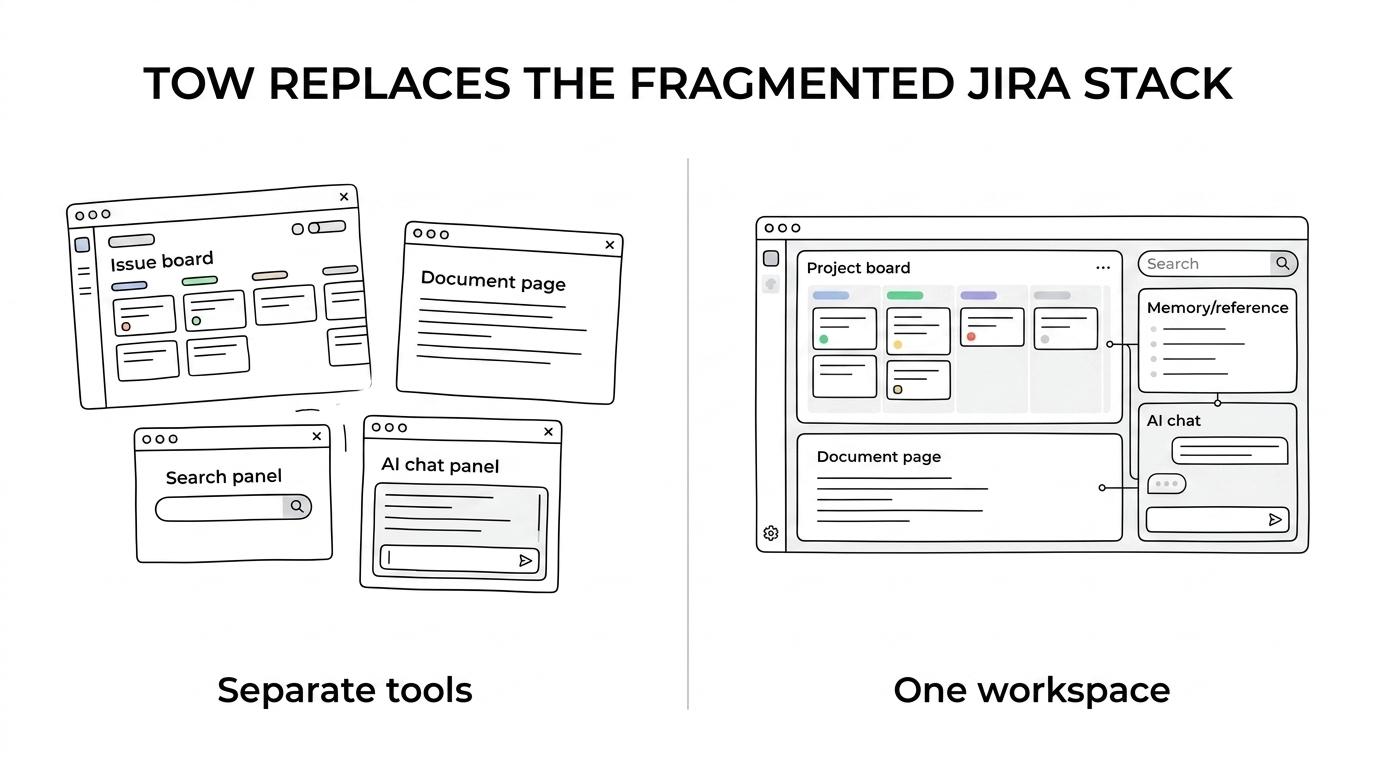
“TOW includes work items, workflows, boards, sprints, goals, roadmaps, time, reports, native docs, memory, search, references, and AI in one workspace.”
For buyers comparing tool sprawl, this matters. TOW’s own Jira comparison notes that every current product capability is included on every plan, which gives you clearer feature access when you want projects, docs, memory, and AI to work together from day one.
TOW is a self-hosted Jira alternative for teams that need control over infrastructure and data
TOW supports deployment as TOW Cloud, self-hosted, or fully air-gapped with Docker Compose. If your team cannot put core operational knowledge into a standard SaaS stack, TOW gives you a way to keep the workspace on controlled infrastructure while still using the same product for projects, documentation, and AI-assisted work.
TOW also supports BYOK or TOW-managed AI endpoints, and its AI actions are designed to be reviewable and permission-aware. That gives you a more practical path to using AI inside real operational workflows, because the AI is connected to workspace permissions and human review instead of acting as an ungoverned add-on.
“TOW supports TOW Cloud, self-hosted, and fully air-gapped deployment with Docker Compose.”
For teams with admin and auth requirements, TOW turns deployment choice into operational flexibility. You can standardize one workspace model across engineering, product, and operations without forcing every team into the same hosting posture.
TOW helps Jira and Confluence teams migrate without rebuilding how they work
A Jira alternative becomes more credible when it respects the habits your team already has. TOW includes migrations from Jira, Confluence, and Notion, so you are not starting from a blank slate if your current setup already contains active projects, documentation, and internal knowledge.
TOW also includes TQL, a query language intentionally similar to JQL. TQL supports saved ticket views, board definitions, and advanced ticket filtering, which helps Jira users keep the kind of structured issue discovery and workflow views they depend on.
“TOW includes migrations from Jira, Confluence, and Notion, and TQL is intentionally similar to JQL.”
This is especially useful if your current process depends on more than ticket boards. TOW brings project execution and adjacent knowledge together in the same workspace, so migration is not only about preserving issues, but also about improving how requirements, docs, search, and AI support the work after the move.
TOW is a strong fit for teams evaluating life after Jira Data Center
If you are planning around Atlassian’s infrastructure roadmap, timing may already be part of the buying decision. According to Atlassian’s published Data Center timeline, Jira Software Data Center, Jira Service Management Data Center, and Confluence Data Center reach end of life on March 28, 2029, and new customers could no longer purchase new Data Center subscriptions starting March 30, 2026.
TOW gives those teams a consolidated destination: one controlled workspace for projects, knowledge, and reviewable AI. Instead of replacing Jira with another standalone tracker and then solving docs, search, and AI separately, TOW lets you evaluate one product that already includes those connected capabilities.
TOW is often the right Jira alternative when your team needs one or more of these outcomes:
- Controlled deployment: You want cloud, self-hosted, or fully air-gapped options for the same workspace product.
- Integrated execution and knowledge: You want issues, boards, goals, docs, memory, and search tied together rather than spread across separate products.
- Governed AI inside operations: You want AI search, chat, and agents that are reviewable and aware of workspace permissions.
TOW may be less compelling if you only want a basic issue tracker and do not care about native docs, search, migration paths, or AI connected to your workspace.
Why TOW is different from adding more products around Jira
Many Jira environments grow into a stack. Project tracking lives in one place, documentation in another, search depends on where content sits, and AI features follow the boundaries of each product. TOW is different because it was built as one workspace where projects, docs, memory, and AI are connected by design.
That changes day-to-day work for your team. A requirement can live next to the work it creates, search can span project and knowledge context together, and AI can operate with awareness of the workspace rather than only a single application surface.
TOW also keeps pricing and rollout conversations simpler in one important way: every current product capability is included on every plan. For smaller organizations, TOW offers a free self-hosted tier, which makes it easier to evaluate the platform in a controlled environment before expanding usage.
Start with TOW if you want Jira-like execution without the fragmented stack
If your team wants a Jira alternative that covers project management, docs, search, memory, and reviewable AI in one controlled workspace, TOW is built for that job. You can run it in TOW Cloud, deploy it on your own infrastructure, or use it in a fully air-gapped environment, depending on how your organization needs to operate.
Start with the free self-hosted tier for a smaller team, or talk with TOW about a migration path from Jira and Confluence that matches your admin, hosting, and data ownership requirements.