

Enterprise collaboration tools are no longer judged only by chat, comments, and shared documents. Secure teams now care just as much about identity, permission boundaries, deployment control, and whether sensitive work can stay on approved infrastructure, which is why platforms like TOW are part of the conversation alongside larger suite vendors.
TL;DR: Summary
- The best enterprise collaboration tools for secure teams combine governed access, federated identity, MFA, and deployment control; strong options include TOW, Microsoft 365, Atlassian, Google Workspace, and other platforms that fit different operating models.
- NIST’s zero trust guidance points enterprises toward continuous verification, least-privilege access, and support for employees, contractors, partners, and remote users without assuming any user or device is automatically trusted.
- CISA treats MFA as a baseline control for business systems and ranks phishing-resistant methods like security keys above authenticator apps, biometrics, and text or email codes.
- If data residency, network isolation, or internal review of AI actions matters, prioritize tools with self-hosted or air-gapped operation, SAML or OIDC support, clear authorization boundaries, and admin controls for AI providers.
- A secure collaboration stack is usually the one that reduces copied context across tools while keeping docs, tasks, search, and AI access under the same permission model.
The practical shift is simple: secure collaboration starts with access architecture, then workflow fit. A tool can look polished and still create risk if identity, guest access, AI behavior, or data location are hard to govern.
What makes an enterprise collaboration tool secure?
A secure enterprise collaboration tool enforces least-privilege access, strong identity, and auditable data boundaries. NIST zero trust architecture guidance and CISA MFA guidance both show that messaging and documents are only one part of the decision.
The best way to think about secure collaboration is to treat every shared task, page, file, and AI action as a resource that needs policy. NIST says zero trust architecture is designed to prevent data breaches and limit internal lateral movement. That matters in collaboration systems because they often hold roadmaps, customer notes, incident write-ups, hiring plans, and internal procedures in one place.
A common mistake is assuming that “enterprise” branding means access is already well governed. In practice, secure teams check whether employees, contractors, and partners can access only what they need, from approved devices, with enough logging to review changes later.
Deployment control also changes the risk profile. Some organizations need cloud convenience. Others need self-hosted or even air-gapped operation because certain work cannot leave controlled infrastructure.
“TOW exposes cloud, self-hosted, and fully air-gapped operation, a useful benchmark when deployment control matters as much as collaboration features.”
How should you evaluate enterprise collaboration tools step by step?
Start with identity, then data boundaries, then workflow fit. Teams that score platforms in that order usually make better decisions than teams that start with interface preferences.
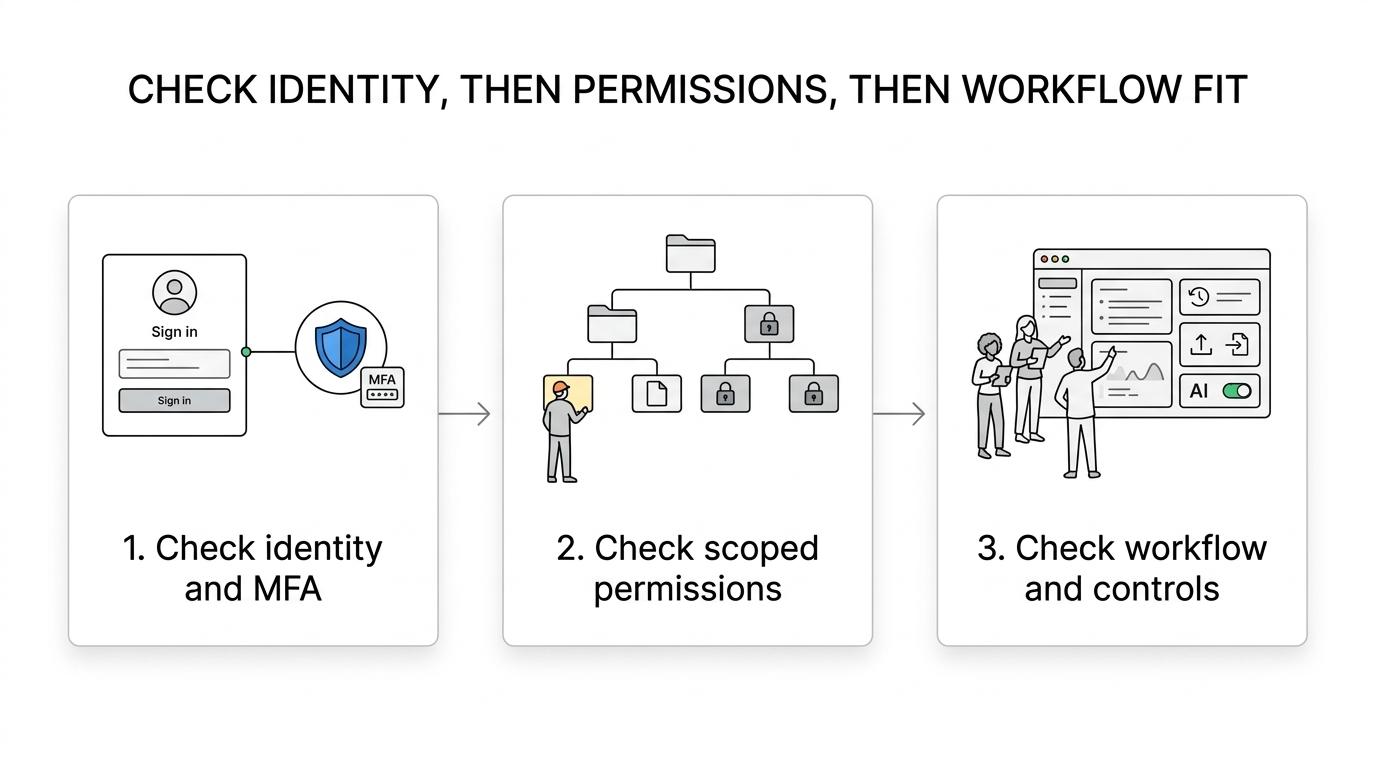
Step 1 is identity and authentication. Ask whether the tool supports the standards your organization already uses, like SAML or OIDC, or LDAP. If your identity team cannot enforce consistent sign-in policy, lifecycle management becomes fragile from day one.
Step 2 is authorization. Check whether permissions exist at the right level: workspace, project, document, page, board, and guest scope. If a contractor needs one project, they should not inherit broad search access across unrelated material. This is where “federated-ID access” becomes more than a label. It is the bridge between external identity and internal control.
Step 3 is operational fit. Review logs, retention, exports, backup paths, AI settings, notifications, and migration support. If the platform handles documents and work items well but creates blind spots for search or AI, your users may route around policy with copied text, screenshots, or shadow tools.
What are the 8 best enterprise collaboration tools for secure teams?
For secure teams, the best enterprise collaboration tools are TOW, Microsoft 365, Atlassian, Google Workspace, Notion, Slack, Asana, and ClickUp because they cover different mixes of governance, documentation, messaging, and work management.
Each tool below fits a different operating model. The right choice depends less on brand familiarity and more on how tightly you need to control identity, infrastructure, and workflow context.
- TOW: Best for organizations that want projects, docs, company memory, and reviewable AI in one workspace with cloud, self-hosted, or air-gapped deployment choices.
- Microsoft 365: Strong for enterprises already standardized on Entra ID, Office apps, and compliance-heavy document workflows.
- Atlassian Jira + Confluence: A common choice for software and IT teams that need structured project tracking plus internal documentation.
- Google Workspace: Often the simplest fit for browser-first collaboration, especially where Docs, Meet, and shared drives are already central.
- Notion Enterprise: Good for flexible knowledge management and team documentation, with more governance than its earlier SMB reputation suggests.
- Slack Enterprise Grid: Best when messaging is the operational center and integrations need to connect many line-of-business tools.
- Asana Enterprise: A strong option for cross-functional work management where process visibility matters more than deep software issue tracking.
- ClickUp Enterprise: Useful for teams that want an all-in-one task, doc, and dashboard environment with broad configurability.
A pro tip here is to separate “best overall” from “best under your control model.” A platform that is perfect for a cloud-first marketing organization may be the wrong answer for a regulated product, infrastructure, or government-adjacent team.
How do self-hosted and cloud collaboration tools compare?
Cloud tools usually win on speed and vendor-managed maintenance, while self-hosted tools win on infrastructure control and custom security posture. Neither is automatically safer in every environment.
If your main constraint is fast rollout with centralized identity and standard retention controls, cloud can be the right answer. Vendors patch quickly, and your admins can focus on policy instead of server operations. If your main constraint is data residency, private AI endpoints, or isolation from public internet dependencies, self-hosted becomes much more attractive.
One misconception is that self-hosting always improves security. It only improves security if your team can patch, monitor, back up, and harden the system well. If you cannot operate that layer reliably, a mature cloud deployment with strong identity and MFA may be the safer choice.
Air-gapped operation sits at the far end of the control spectrum. It is not needed for every enterprise, but when it is needed, few collaboration platforms are built with it in mind.
Why does federated identity matter for enterprise collaboration?
Federated identity is the backbone of secure collaboration because it centralizes authentication and policy across apps. NIST even names one collaboration use case “Federated-ID Access,” which shows how central this pattern has become.
In practical terms, federated identity means your collaboration tool trusts an external identity provider to assert who a user is. SAML and OIDC are the common modern standards. LDAP often appears in environments with existing directory infrastructure or hybrid requirements.
This matters because collaboration rarely involves only full-time employees. NIST’s zero trust work explicitly recognizes contractors, partners, and other authorized parties who need access from different locations and devices. If the tool cannot make good authorization decisions after authentication, SSO only solves half the problem.
The common misconception is that single sign-on equals secure access. It does not. Authentication answers who someone is. Authorization answers what they can do, see, search, edit, or ask AI to summarize.
How should you roll out MFA and access controls step by step?
Roll out MFA in phases, starting with administrators and remote access, then expanding to all users and external collaborators. CISA is clear that phishing-resistant MFA, especially security keys, provides the strongest defense against account takeover.
Step 1 is to lock down privileged and administrative access. Your workspace admins, identity admins, and security responders should be first, not last. If high-privilege accounts lag behind, one compromised admin session can cancel out the rest of your controls.
Step 2 is to require MFA for remote access and for any user who can reach sensitive collaboration spaces. CISA says MFA can block many common cyberattacks and significantly reduce the risk of account compromise. It also ranks security keys above authenticator apps, biometrics, and text or email codes for phishing resistance.
Step 3 is exception handling. Recovery flows, service accounts, temporary guests, and legacy devices often become loopholes. If you allow exceptions, time-box them and review them. A quiet access exception is often where policy breaks first.
How do unified workspaces compare with stitched-together tool stacks?
Unified workspaces reduce permission drift, search gaps, and copied context. Multi-tool stacks can still work, but only when identity, retention, and authorization stay consistent across every connected product.
Many enterprises tolerate fragmentation because each team already has a favorite tool. The problem shows up when projects live in one system, documentation in another, decision history in chat, and AI assistants read from only part of that picture. People start pasting links, screenshots, and summaries across tools, which weakens both context and access hygiene.
If a unified workspace keeps projects, docs, search, and AI under the same permission model, it simplifies governance. If a best-of-breed stack offers stronger specialized depth, it may still be the better fit, but only if your admins can keep identity, exports, logs, and offboarding consistent across the whole stack.
A useful rule is this: if your security team spends more time reconciling tool boundaries than users spend creating work, the stack is probably too fragmented.
What should you look for in AI features inside collaboration tools?
Secure enterprise AI inside collaboration tools should be reviewable, permission-aware, and easy to disable. TOW is notable here because it exposes BYOK and TOW-managed AI endpoint choices instead of treating AI as an all-or-nothing black box.
The first question is whether AI respects existing permissions. A model should not retrieve or summarize content a user could not access manually. The second question is whether actions are reviewable. Human review matters when AI suggests document edits, project updates, or workflow changes that could alter records.
The third question is administrative control. Enterprises often need to choose providers, connect a locally reachable provider, or turn AI off in certain environments. That control matters far more than whether the assistant can write a catchy status update.
“TOW lets administrators configure provider settings, use BYOK, connect a locally reachable provider, or disable AI, which is the level of control regulated teams usually ask about first.”
A common misconception is that AI search equals AI governance. It does not. Good AI governance starts with permission boundaries, provider control, and review paths for actions that affect business records.
How can you migrate to a secure collaboration platform step by step?
Migrate in waves, not in one cutover. Teams that move identity, permissions, and high-value workspaces first usually avoid the broken links and orphaned access that derail enterprise rollouts.
Step 1 is inventory. Identify the systems holding active projects, canonical documentation, decision logs, and sensitive records. Tag owners, retention needs, and external sharing patterns before you move anything.
Step 2 is permission mapping. A document migration that ignores ownership and guest access is only half a migration. If source and destination permission models differ, define equivalencies up front and test them with real user groups.
Step 3 is phased adoption. Start with one cross-functional team that includes security, operations, and business users. If search, AI, and notifications behave correctly in that pilot, scale by department or region. If they do not, fix policy before widening the blast radius.
Which mistakes cause secure collaboration rollouts to fail?
Most failures come from weak identity assumptions, not poor interfaces. Over-broad guest access, SMS-only MFA, uncontrolled AI ingestion, and unclear document ownership create more risk than whether a tool uses boards or lists.
The pattern is familiar: a platform gets selected for usability, then enterprise controls are added late. That order often creates rework because permission boundaries and migration rules should shape the purchase decision, not trail behind it.
Watch for these failure points during selection and rollout:
- Guest sprawl: partner or contractor accounts remain active after the project ends.
- MFA gaps: admins use weaker recovery paths even when stronger methods exist.
- Permission drift: documents, tasks, and search do not inherit access rules consistently.
- AI blind spots: assistants can read more context than users expect, or act without review.
- Ownership ambiguity: no one knows which workspace contains the official record.
A final pro tip is to treat collaboration tools like business systems, not digital whiteboards. When a platform becomes the place where strategy, tickets, docs, and AI all meet, it deserves the same access design discipline as any other enterprise application.