

If you need self-hosted collaboration software because security, control, and data ownership are not optional, TOW is built for that decision. We build The Only Workspace, a unified platform for project management, documentation, company memory, and reviewable AI that you can run on your own infrastructure or in the cloud.
TOW helps teams replace a patchwork of project tools, docs, wiki pages, and disconnected AI add-ons with one workspace that stays under your operational control. Instead of sending work across separate systems, you can keep issues, boards, goals, roadmaps, docs, search, collaboration, and AI in the same environment.
Self-hosted collaboration software that unifies projects, docs, memory, and AI
TOW self-hosted collaboration software gives your team one workspace for execution and knowledge, not one tool for tickets and another for docs. TOW combines issues, boards, goals, roadmaps, docs, wiki content, workspace memory, search, notifications, and workspace-aware AI agents so your team can plan, document, and act in one place.
“TOW combines project management, docs, workspace memory, and reviewable AI in one self-hosted workspace.”
That matters when your team needs to move quickly without giving up control. A product team can track delivery on boards and roadmaps, an operations team can document procedures in the wiki, and leadership can keep goals connected to the actual work, all inside the same deployment your organization manages.
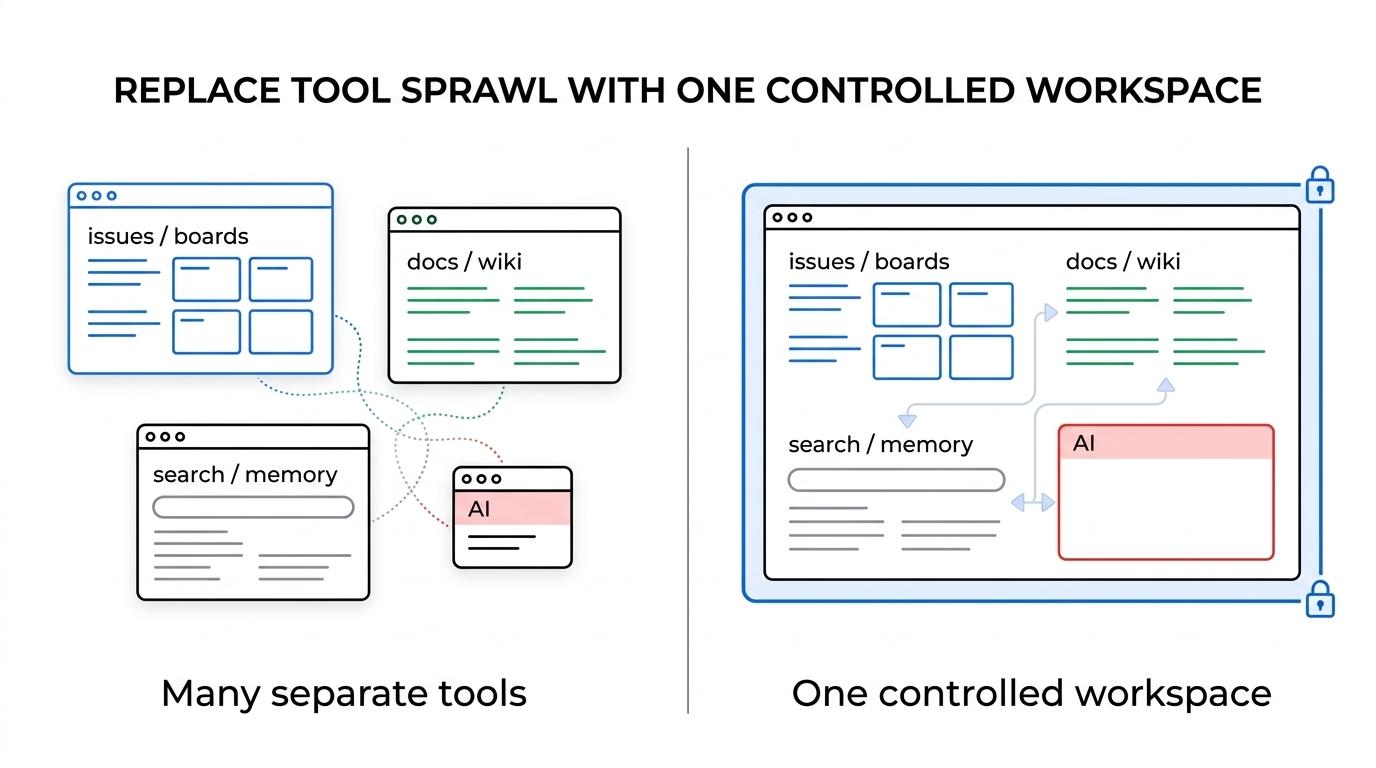
TOW is a strong fit for organizations that want the simplicity of a modern collaboration platform without handing over ownership of the full working environment. If you are trying to reduce tool sprawl while keeping admin controls, permissions, and infrastructure choices in your hands, this is where TOW stands out.
Here is what your self-hosted TOW workspace can include from day one:
- Project management: Issues, boards, goals, and roadmaps tied directly to the work your team is doing
- Docs and company memory: A wiki and documentation layer that keeps decisions, procedures, and knowledge searchable inside the same workspace
- Controlled AI workflows: Workspace-aware AI with human review, configurable providers, and the option to disable AI when needed
TOW also supports migrations from Jira, Confluence, and Notion, which helps you consolidate work and knowledge into a single workspace instead of forcing teams to rebuild everything manually.
TOW self-hosted deployment for secure teams using Docker Compose and air-gapped operation
TOW offers a self-hosted deployment that can run entirely inside an environment you control. According to TOW’s published self-hosted deployment information, the platform can be installed with Docker Compose in under 10 minutes, giving technical teams a fast path to evaluation without locking them into a managed SaaS model.
“TOW says its self-hosted workspace can be installed with Docker Compose in under 10 minutes.”
For protected environments, TOW also supports fully air-gapped operation when TOW and every configured dependency remain inside the isolated environment. That gives security-conscious organizations a practical way to run collaboration software without external network access, which is especially relevant when internal policy or customer requirements limit outbound connections.
TOW’s AI controls are also designed for real operating constraints. Administrators can configure provider settings, use BYOK options, connect a locally reachable provider, or disable AI entirely. That means you do not have to accept a one-size-fits-all AI setup just to get collaboration software your team will actually use.
“TOW supports fully air-gapped operation when TOW and configured dependencies stay inside the isolated environment.”
Just as important, TOW is clear about responsibility boundaries. When you self-host, your organization remains responsible for infrastructure, proxy and TLS, secrets, identity, backups, monitoring, updates, contracts, and incident response. That clarity helps technical buyers assess risk early instead of discovering operational gaps after deployment.
Identity-aware collaboration software for teams with strict access control and data ownership needs
Self-hosting only solves part of the problem. In regulated, sensitive, or high-trust environments, access control, identity, and backup practices matter just as much as where the software runs.
TOW fits that reality because the platform is designed to operate under your admin controls rather than bypass them. If your organization follows zero trust architecture principles or identity-based access policies, TOW gives you a collaboration layer that can sit inside the environment where your network-tier and identity-tier decisions are already enforced.
NIST guidance emphasizes validation of access policies across enterprise access entities, data sources, and computing services, while also highlighting authentication, authorization, service identities, and policy enforcement. CISA guidance recommends multi-factor authentication where possible and storing backups in an easily retrievable location that is air-gapped from the organizational network. TOW does not claim to replace those controls. TOW gives you a self-hosted workspace where those controls remain your choice and your responsibility.
“TOW lets administrators use BYOK, connect a locally reachable provider, or disable AI entirely.”
That is a meaningful difference for teams that cannot treat collaboration software as an isolated purchase. If security review, identity integration, backup design, and AI governance are part of the buying process, TOW aligns better than tools that assume vendor-managed infrastructure and vendor-managed data flow.
TOW helps startups and enterprises that need collaboration without losing operational control
TOW is built for teams worldwide, from startups to enterprises, that need integrated projects, docs, and AI with strong admin controls and clear data ownership. The common pattern is not company size. It is the need to collaborate efficiently without giving up control of infrastructure, identity decisions, or provider choices.
You are likely a strong fit for TOW self-hosted collaboration software if:
- You need one workspace: Your team wants project management, docs, search, and AI in one platform instead of stitching together multiple products
- You need control: Your organization requires self-hosting, air-gapped operation, or explicit control over AI providers and data paths
- You need flexibility: You want a platform that can support small teams with a free self-hosted tier and still scale into broader organizational use
TOW is also a practical option if you are evaluating alternatives to separate tools such as Jira, Confluence, Notion, and Linear. The goal is not just feature parity on a checklist. It is reducing friction between planning, documentation, memory, and execution so people spend less time switching contexts and more time moving work forward.
What becomes easier when your team uses TOW self-hosted
With TOW, your team can keep project context next to the work, instead of scattering it across tickets, docs, chats, and external AI tools. That makes handoffs clearer, decisions easier to trace, and onboarding faster because the workspace itself becomes part project system, part documentation system, and part working memory.
TOW self-hosted also simplifies vendor and data discussions. You can choose cloud or self-hosted, keep the complete workspace inside your own environment, and decide how AI is handled based on internal policy. For many buyers, that removes a major source of friction during approval and rollout.
The operational model is especially useful when you need to answer practical questions before purchase. Where does the workspace run? On infrastructure you control. Can it be air-gapped? Yes, when the full stack and dependencies stay inside the isolated environment. Can AI be controlled or turned off? Yes, through admin configuration, BYOK, local providers, or disabling AI.
Start with TOW on your infrastructure
If your team needs self-hosted collaboration software that combines project management, docs, company memory, and reviewable AI in one controlled workspace, TOW is built for that use case.
Start with a self-hosted TOW deployment, evaluate it inside your own environment, and see how quickly your team can move from separate tools to one operational workspace. If you are ready to centralize collaboration without giving up control, TOW is the next step.