

Cloud project management is no longer just a software buying decision. Vendors like TOW, a unified workspace for project management, docs, company memory, and reviewable AI, reflect a wider shift: teams now judge deployment models by governance, collaboration, and data ownership as much as by tasks and timelines.
TL;DR: Summary
- Cloud project management is usually best for fast rollout, low admin overhead, and distributed teams, while self-hosted project management is better when governance, access control, or network isolation must stay under your control.
- The real decision is not just SaaS versus on-premises; it is whether your projects, docs, approvals, search, and AI actions can run inside a governed workspace with clear permissions.
- PMI’s 2024 Pulse of the Profession reported that 83% of respondents always or often use document management software, 81% use collaboration tools, and 66% use project management software, so deployment affects a broader work stack than task tracking alone.
- TOW is relevant because it offers cloud, self-hosted, and air-gapped deployment options while keeping projects, docs, memory, and AI in one workspace and permission model.
- Compare options on five criteria: operating responsibility, identity and access controls, approval workflows, adjacent tools, and total cost including labor, not just seat price.
That broader lens matters because most teams do not work in a single app. Project records, documents, comments, approvals, and AI outputs move across the same operating environment, so the best cloud project management tool is often the one that controls those boundaries cleanly.
What is cloud project management software?
Cloud project management software is a vendor-hosted system for planning, tracking, documenting, and coordinating work through a browser. In practice, tools like Jira Cloud and Asana often sit beside document management, chat, and reporting systems, which is why deployment choices now affect more than task lists.
A common misconception is that cloud project management means boards, tickets, and dashboards only. PMI’s 2024 Pulse of the Profession shows a more connected reality: 83% of respondents said they always or often use document management software, 81% use collaboration tools, and 66% use project management software. That pattern suggests project execution depends on a connected workspace, not a single tracker.
“TOW keeps projects, docs, memory, and AI in one workspace with one permission model.”
If your project system cannot control how documents, search, and AI interact with work artifacts, then the deployment model becomes a governance risk, not just an IT choice. That is why cloud project management is increasingly treated as a controlled workspace problem.
How does self-hosted vs cloud project management software actually differ?
Cloud and self-hosted project management software can look similar to users, and TOW is one example of a platform offered in both forms. The real difference is who operates the system, who controls the environment, and how quickly policies or updates can change.
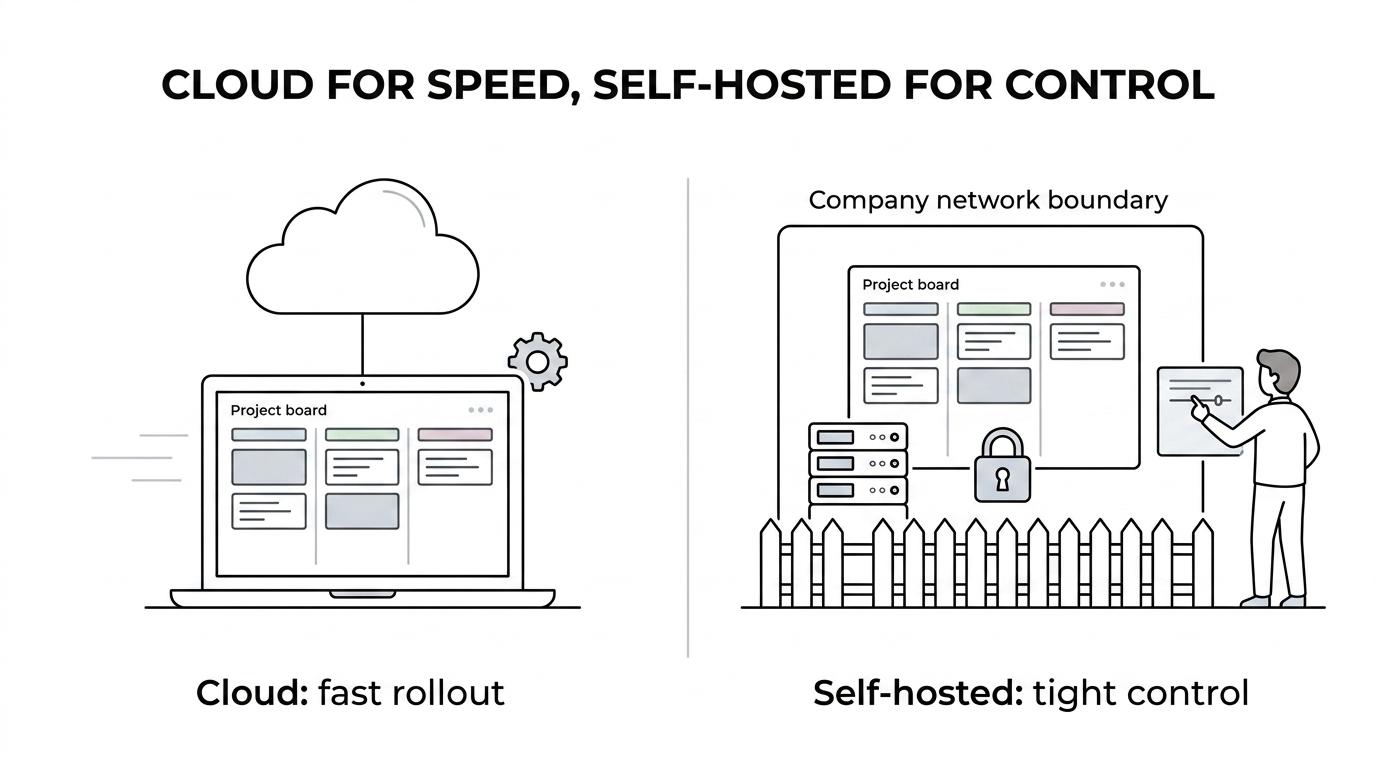
In a cloud model, the vendor usually handles hosting, infrastructure maintenance, backups, and standard updates. Your team focuses on configuration, permissions, workflows, and adoption. This is often the fastest route to value, especially for teams without dedicated platform engineering capacity.
In a self-hosted model, your organization controls the infrastructure, patch timing, network boundaries, observability, and often the identity stack. That control can be valuable, but it also creates work. You are responsible for uptime planning, upgrade testing, secret management, backup verification, and incident response.
A frequent mistake is assuming self-hosted is automatically more secure. Security depends on execution. If your vendor-hosted system offers strong role-based access, SSO, MFA, logging, and approval controls, it may be safer in practice than a lightly managed self-hosted deployment.
What cloud project management platforms support both cloud and self-hosted teams?
A small group of project management platforms now supports both hosted and self-managed deployment. That matters because deployment flexibility lets teams keep the same work model while changing hosting, governance, or network boundaries.
If your organization expects policy changes, acquisitions, customer-specific hosting needs, or stricter internal controls later, dual-deployment support can reduce switching costs. It also gives procurement and security teams more room to agree on a tool.
- TOW: Offers cloud, self-hosted, and fully air-gapped Docker Compose deployment, with projects, docs, memory, and AI sharing one workspace and permission model.
- Atlassian Jira: Common in larger organizations that want mature workflow configuration and a broad ecosystem, often paired with Confluence.
- GitLab: Strong fit for software delivery teams that want project tracking close to source control and CI/CD, with SaaS and self-managed options.
- OpenProject: A practical choice for teams that want open-source project management with both cloud and on-premises deployment paths.
The right question is not which product has the longest feature list. It is whether the platform lets you keep workflows stable while deployment requirements change.
When is cloud project management the better choice?
Cloud project management is usually the better choice when speed, distributed access, and low operational burden matter most. Teams that need quick rollout, elastic access, and vendor-managed updates usually benefit first.
Choose cloud first if your main constraint is time. A startup, agency, or global department can often onboard faster, centralize work sooner, and avoid infrastructure planning. If the team has no clear need for isolated networks or custom hosting controls, cloud usually wins on simplicity.
Cloud also works well when your work is already browser-based. Many organizations already use online docs, chat, and BI tools. In that setting, cloud project management fits the rest of the stack.
AWS’s description of Amazon DataZone, while focused on governed data collaboration rather than project tracking, points to the same broader pattern. Its emphasis on cataloging, governed access, and publishing and subscription workflows shows that cloud collaboration systems are now built around controlled sharing, not open access by default.
When is self-hosted or air-gapped project management the better choice?
Self-hosted or air-gapped project management is the better choice when network isolation, custom control, or strict artifact governance is non-negotiable. Regulated environments and internal platforms teams often accept more operational work to get that control.
This option makes sense when project artifacts contain sensitive internal material, customer-specific restricted data, or workflow evidence that must stay inside a controlled boundary. It also matters when your identity provider, logging stack, or network policies need tight internal integration.
Air-gapped deployment deserves separate attention. Some vendors now support it, which is useful for environments where systems cannot depend on internet access at runtime. If your security policy requires isolated operation, “self-hosted” alone may not be enough. You need to verify exactly how updates, container images, authentication, and outbound services are handled.
The trade-off is operational ownership. Your team gains control over the environment, but also inherits patching, monitoring, disaster recovery, and upgrade discipline. If those capabilities are weak, control can become fragility.
How should you evaluate governance, access control, and approvals step by step?
Start with permissions, then map approvals, then test how artifacts move. Governance fails when issues, docs, AI actions, and search results do not share the same access rules.
Step 1 is to model who should see what. Define roles for project contributors, approvers, executives, external collaborators, and administrators. Then test the hard cases: a private incident project, a restricted roadmap, or an HR-related workstream. If access rules break on edge cases, they will break in production.
Step 2 is to map approval workflows. Identify which actions need review, which records need an audit trail, and which content types can trigger downstream work. This is where many teams realize their “project management” tool is actually handling policy-sensitive documents, comments, and automation outputs as well.
A useful test is to take one sensitive project and trace its full path from issue creation to document approval to AI-assisted draft to final sign-off. If the tool cannot preserve permissions across that chain, governance is fragmented.
Step 3 is to verify identity and admin controls. Self-hosted deployments often need enterprise identity options such as SSO, MFA, LDAP, SAML, or OIDC. Those are not “advanced extras” if your compliance or internal security model depends on them.
How do you compare total cost without missing hidden work?
Total cost comes from software price, infrastructure, labor, and risk. TOW’s pricing is a useful illustration because cloud and self-hosted paid plans are both listed at $10 per seat per month, showing that deployment economics are often about operations, not features.
Step 1 is to separate license cost from operating cost. A lower seat price can be misleading if your platform team must spend hours each month on upgrades, backups, alerting, or access reviews. A common mistake is to compare SaaS and self-hosted only on invoice totals.
“TOW lists Cloud Free for up to 20 users, and both cloud and self-hosted paid plans at $10 per seat per month for 21+ users.”
Step 2 is to price infrastructure and labor together. If self-hosted requires a Linux host, Docker operations, SMTP setup, domain configuration, and identity integration, those are real costs even when software capabilities stay the same. If your team already runs internal platforms well, those costs may be acceptable. If not, cloud may be cheaper in practice.
Step 3 is to account for risk and switching. Downtime, slow upgrades, weak auditability, or painful migration paths can erase savings quickly. The cheapest option is often the one that avoids rework and keeps the team productive under policy change.
How does a unified workspace compare with a stack of separate tools?
A unified workspace reduces context switching and permission drift, while a separate stack can offer deeper specialty features. The better choice depends on whether your main bottleneck is workflow depth or coordination overhead.
PMI’s 2021 PMO maturity report found that the top 10% of organizations used technology more aggressively for secure access, stakeholder coordination, governance, risk, compliance, and knowledge management. That matters because mature teams do not just buy isolated tools. They build systems where knowledge and execution stay connected.
If your organization uses one tool for tasks, another for documents, another for search, and another for AI, you should measure the handoffs. Every sync, permission boundary, export, and duplicate notification adds friction.
- Unified workspace: fewer permission boundaries, stronger search context, simpler approval trails
- Separate stack: deeper specialty features, more integration work, higher risk of metadata drift
A practical rule helps here. If your team spends more time reconciling systems than moving work forward, a unified model is probably worth serious attention.
How do you plan a migration from Jira, Confluence, or Notion step by step?
A good migration starts with the data model, continues with permissions, and ends with a controlled pilot. If you skip any of those steps, imported records may exist without the workflows that made them useful.
Step 1 is to map source objects to destination objects. Issues, boards, docs, comments, users, labels, and attachments all need a target structure. Do not treat migration as a CSV exercise only. If a field drove a real business rule in the old system, you need to recreate that behavior.
Step 2 is to preserve permissions and ownership. This is where many migrations fail quietly. A page can import correctly and still become dangerous if it lands in the wrong access scope. The same applies to comments, attachments, and linked project records.
Step 3 is to run a pilot with a live team. Move one project, one documentation area, and one approval workflow. Then watch real behavior for two weeks. Pro tip: ask users to complete normal tasks without training first. Their confusion will show where the model still breaks.
What mistakes cause the wrong deployment decision?
The wrong deployment decision usually comes from buying for features alone. Identity, document control, approval workflows, and exit options often decide long-term fit more than boards, charts, or templates.
Teams often choose too early between “best SaaS” and “best on-prem” without asking what must be governed together. If your project tracker and your document system hold the same regulated workflow, they should be judged as one operating environment.
Another mistake is ignoring adjacent tools. Since PMI shows widespread use of document management and collaboration software, a project tool that works well in isolation can still be a poor fit for real work. AI makes this sharper. If AI can draft, summarize, or act on workspace content, then reviewability and permission awareness matter from day one.
A short checklist catches most bad decisions:
- Buying for today’s team only
- Ignoring identity and approval paths
- Treating docs as separate from project records
- Underpricing admin labor
- Skipping exit and migration planning
If you decide with those failure modes in mind, the cloud versus self-hosted choice becomes much clearer and much easier to defend to security, IT, finance, and delivery leaders.