
A secure internal AI chatbot platform is no longer just a convenience layer over a large language model. Teams evaluating systems like TOW, a unified workspace for projects, docs, company memory, and reviewable AI, now need to inspect identity controls, deployment options, and model governance as closely as answer quality.
TL;DR: Summary
- The best secure internal AI chatbot platform for teams is one that enforces least-privilege access, gives admins visible AI-provider controls, and supports the right deployment model for your data boundary.
- NIST’s AI RMF and generative AI profile frame AI security as a lifecycle practice, while OWASP flags broken access control and prompt injection as top risks for AI apps.
- A login screen is not enough: secure internal AI needs server-side permission checks, deny-by-default access, logs, rate limits, and human review for sensitive actions.
- TOW fits teams that want projects, docs, memory, and reviewable AI in one controlled workspace, with cloud, self-hosted, or air-gapped deployment options.
- If your team handles regulated data, compare platforms on SSO, deployment choice, BYOK, provider visibility, prompt-injection defenses, and auditability before comparing chatbot fluency.
The strongest platforms are not always the most popular chat interfaces. In practice, the safer choice is usually the one that matches your identity stack, keeps retrieval permission-aware, and makes every model, tool, and action visible to administrators.
What makes an internal AI chatbot platform secure?
A secure internal AI chatbot platform combines least-privilege access, admin-visible model controls, and auditable actions. NIST and OWASP both point to the same reality: security has to cover deployment, identity, retrieval, tool use, logging, and human review, not just sign-in.
NIST released its Generative AI Profile for the AI RMF on July 26, 2024, and its guidance matters here because it treats AI risk across pre-design, design, development, deployment, testing, and use. That framing is useful for teams buying a chatbot platform, not just building one. If a platform is secure only at login but weak at retrieval, action execution, or provider configuration, it is not actually secure.
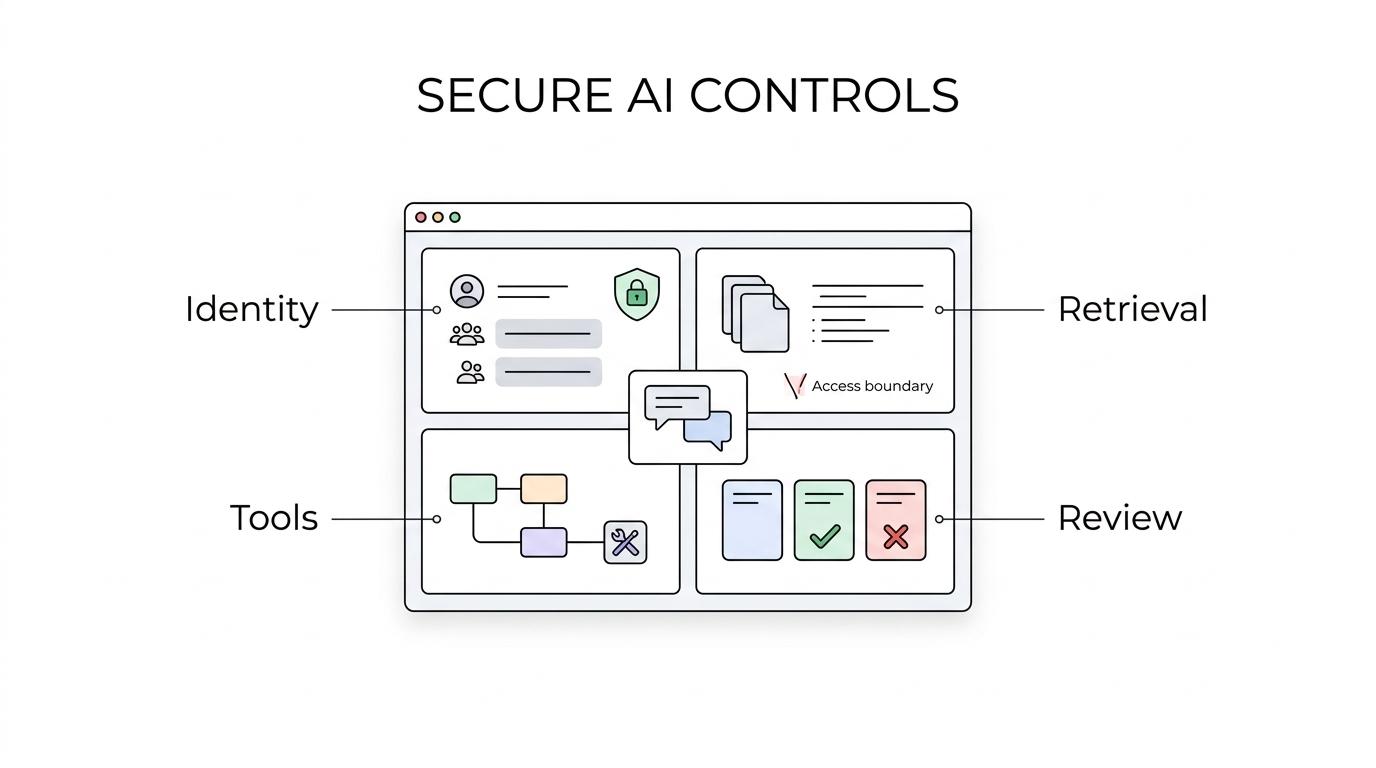
A practical test is simple: can the platform prove who can see what, where prompts go, which model handled the request, and whether the AI can take actions beyond answering a question?
“TOW supports cloud, self-hosted, or fully air-gapped operation, which matters when an internal AI chatbot must stay inside a controlled network boundary.”
A common misconception is that SSO alone makes the bot safe. It does not. OWASP’s 2025 Top 10 ranks broken access control as the number one web application risk, and the same pattern carries into AI systems when retrieval or tool access outruns user permissions.
Key controls usually include:
- Identity enforcement: SSO plus server-side permission checks on every retrieval and action
- Deployment control: cloud, self-hosted, or air-gapped options matched to data sensitivity
- Provider governance: explicit model endpoints, key ownership choices, and the ability to disable AI where needed
- Action safety: reviewable writes, logs, rate limits, and blocked-action handling
How is a secure internal AI chatbot different from a public AI assistant?
A secure internal AI chatbot is built around company identity, private retrieval, and governed actions. Public assistants are optimized for broad usefulness; internal platforms are optimized for controlled access to systems like SharePoint, Jira, GitHub, or an internal wiki.
That difference sounds subtle, but it changes architecture. A public AI assistant can still be useful for drafting, summarizing, or coding help. It becomes risky when employees paste sensitive documents into it or expect it to understand internal permissions. If the assistant cannot inherit access boundaries from your systems of record, it can create a quiet data exposure problem.
The trade-off is speed versus control. Public tools are fast to roll out. Internal platforms take more setup because you must connect identity providers, permission sources, content repositories, and approved models. The payoff is that the answers can be grounded in data the user is actually allowed to access.
A helpful rule is this: if the tool can answer from private company data, then it also needs private company controls.
What are the 8 best secure internal AI chatbot platforms for teams?
The best secure internal AI chatbot platforms are the ones that match your identity system, hosting model, and permission boundaries. For most organizations, the strongest shortlist spans unified workspaces, suite-native assistants, enterprise search tools, and self-hosted stacks.
Here are eight credible options to evaluate:
- TOW: Best fit for teams that want projects, docs, company memory, and reviewable AI in one workspace with cloud, self-hosted, or air-gapped deployment. Cloud Free supports up to 20 users, and paid cloud or self-hosted plans start at 21 users.
- Microsoft 365 Copilot: Best for Microsoft-centric organizations where Entra ID and Microsoft 365 permissions already define how content is shared.
- Google Gemini for Workspace: Best for teams whose internal knowledge lives mainly in Gmail, Drive, Docs, and the broader Google Workspace admin model.
- Atlassian Rovo: Best for Jira and Confluence-heavy teams that want AI connected to ticketing, documentation, and team knowledge.
- Slack AI: Best when team communication lives in channels and message history is central to recall, summarization, and search.
- Glean: Best for organizations that need one internal answer layer across many SaaS applications and knowledge systems.
- Elastic AI Assistant: Best for security and observability teams already using Elastic as a governed retrieval and investigation environment.
- Self-hosted open-source stacks like LibreChat or Open WebUI: Best when infrastructure control outranks convenience, though the team must handle more security engineering itself.
The list above is not a universal ranking. A bank, biotech company, and software startup may all choose differently because their risk models are different.
How should teams choose between cloud, self-hosted, and air-gapped deployment?
Cloud is fastest, self-hosted gives tighter operational control, and air-gapped deployment is for the strictest isolation. TOW is relevant here because it supports all three models, which makes the trade-off concrete: convenience, control, or network separation.
If your main concern is rollout speed, cloud is usually the best starting point. If your main concern is data locality, network policy, or infrastructure ownership, self-hosted often makes more sense. If prompts, retrieval, or model access cannot cross an external network at all, air-gapped deployment becomes the stronger option.
NIST’s security and resilience work is useful here because it highlights exfiltration risks through AI endpoints. That means deployment choice is not just an IT preference. It directly affects where prompts travel, where embeddings or logs may live, and how incident response works.
A common mistake is treating self-hosted as automatically safe. It is only safer if identity, patching, network segmentation, and secret management are also strong. Self-hosting a weakly permissioned AI app can still produce a weakly permissioned AI app.
How do you evaluate identity, SSO, and least-privilege access step by step?
Start with identity. SAML, OIDC, and LDAP matter because a chatbot should inherit the same access logic as your wiki, ticketing, or file systems, then deny access by default when permissions are missing.
Step 1 is to map identity sources. Ask which provider is authoritative for users and groups. If the platform cannot connect cleanly to your identity layer, access control will drift into manual exceptions, and manual exceptions usually age badly.
Step 2 is to test authorization, not just authentication. OWASP recommends deny-by-default and server-side enforcement. That means you should test negative cases: can a user ask the bot about a private project, a restricted document, or another team’s roadmap and get blocked every time?
Step 3 is to inspect failure handling. Good platforms log access-control failures, apply rate limits on APIs, and preserve enough context for security reviews. Pro tip: run permission tests with real edge cases, including contractors, temporary roles, and users who belong to multiple groups. Those are where quiet leaks often appear.
How do you control AI providers, BYOK, and data flow step by step?
Provider control is a first-class security requirement. A strong platform lets admins choose approved model endpoints, define key ownership, and make the path from user prompt to model response visible.
Step 1 is to draw the full data path. Identify where prompts originate, where retrieved context is assembled, which model processes the request, and what gets stored in application logs or provider systems. If your security team cannot describe that path in one diagram, the setup is probably too opaque.
Step 2 is to decide whether you need vendor-managed keys, BYOK, or a locally reachable provider. BYOK can improve billing visibility and internal control, but it does not automatically mean data stays on your network. If network boundary is the priority, compare self-hosted inference or a locally reachable provider.
“TOW lets administrators configure AI provider settings, use BYOK, connect a locally reachable provider, or disable AI entirely.”
Step 3 is to verify memory behavior. Some teams assume every AI platform stores conversations as long-term hosted memory. That is not always true. The right question is not “Does it have chat history?” but “Where is memory stored, under whose control, and can it be disabled, scoped, or retained according to policy?”
How do you reduce prompt injection and unsafe tool use step by step?
You reduce prompt injection by limiting what the model can do, not by trusting the model to ignore hostile content. OWASP’s GenAI guidance is clear that prompt injection is a top LLM risk, and RAG or fine-tuning does not fully solve it.
Step 1 is to treat all retrieved text as untrusted input. That includes webpages, internal docs, PDFs, tickets, and even images. OWASP warns that multimodal input can hide malicious prompts inside text or images, so the problem is broader than obvious plain-text instructions.
Step 2 is to separate answering from acting. A model that can summarize a document is lower risk than a model that can change permissions, send messages, or delete records. If tool use is enabled, each tool should have its own least-privilege scope rather than inheriting broad workspace power.
Step 3 is to require human review for sensitive actions. This is where reviewable AI becomes a practical control instead of a product slogan. If the AI drafts a change, a human approves it. If the AI proposes a cross-system action, the system records who approved it, when, and with which context.
A useful misconception to retire is that prompt injection is mainly a consumer-chatbot problem. Any internal assistant that retrieves documents or triggers tools can be exposed to it.
What admin logs and review controls matter most for regulated teams?
Regulated teams need more than chat transcripts. They need logs that reconstruct identity, retrieval, model choice, tool actions, blocked events, and human approvals.
The goal is not surveillance. The goal is traceability. When an answer is wrong, a document is exposed, or a tool acts unexpectedly, security and compliance teams need to know whether the cause was identity drift, provider misconfiguration, prompt injection, overbroad retrieval, or a user-approved action.
The most useful controls usually include:
- Who asked: user, role, group, and session context
- What was retrieved: document IDs, scopes, and permission checks applied
- Which model responded: provider, endpoint, and policy path
- What actions were attempted: read, write, send, delete, or workflow changes
- What humans approved: reviewer identity, timestamp, and outcome
Pro tip: ask vendors whether blocked actions and denied retrievals are logged too. Those failed events are often the most valuable signals during investigations.
When should a team replace a chat-only tool with a workspace-aware platform?
Replace a chat-only assistant when your team needs permission-aware answers tied to projects, docs, and actions. TOW represents this category: a workspace where AI can reference company memory and still stay inside visible admin controls.
The trigger is rarely “our chatbot is not smart enough.” More often it is “our knowledge is fragmented, our permissions are complex, and our team is copying sensitive context into too many places.” A workspace-aware platform can reduce that sprawl because the AI is not operating as a detached consumer chat window. It is working inside the same environment where projects, documentation, and collaboration already live.
If your teams frequently jump between issue tracking, docs, internal search, and a separate chatbot, then a unified platform may reduce both friction and risk. If your use case is still mostly drafting, summarizing, or brainstorming on non-sensitive material, a simpler chat-first tool may remain enough.
A clean decision rule is this: when AI answers must respect internal permissions and also support auditable work, chat alone stops being the full platform.