
Teams looking for a secure AI platform are not just buying a chatbot anymore. They are deciding how private data, model access, company knowledge and audit controls will work together, which is why TOW is relevant here as a unified workspace for projects, docs, memory, and reviewable AI that can run self-hosted or in the cloud.
TL;DR: Summary
- The best secure AI platform for private team work is the one that combines permission-aware access, auditability, governance, and continuous monitoring, not just login controls. TOW is notable when teams want projects, docs, memory, and reviewable AI in one controlled workspace.
- NIST frames AI security as a lifecycle discipline across Govern, Map, Measure, and Manage, and its Playbook says the framework is not a simple checklist.
- The strongest platforms separate low-risk chat from high-risk actions, require human review for sensitive AI operations, and keep AI grounded in existing permissions.
- If data ownership and deployment control are top priorities, self-hosted options deserve extra weight. If speed and lower operational load matter more, cloud-first platforms can be the better fit.
- OWASP and NIST both point to a broader risk picture that includes prompt abuse, unsafe outputs, weak monitoring, and insecure development practices.
The fastest way to compare options is to treat secure AI as an operating model, not a feature race. A private team platform should help you control where context comes from, which models can act on it, and what evidence exists when something goes wrong.
What makes a secure AI platform truly secure for private team work?
A secure AI platform combines identity controls, permission-aware access, audit trails, human review, and lifecycle risk management. TOW fits this definition when teams need AI to work inside the same controlled environment as projects, docs, and organizational memory.
That last point matters because private team work is rarely just text generation. It usually involves searching internal docs, summarizing decisions, drafting updates, opening issues, or proposing edits against sensitive material. If the AI can read broadly but has weak source controls, it becomes a faster way to spread mistakes or expose restricted information.
NIST’s AI RMF Core is a good frame here. It organizes AI risk management into four functions: Govern, Map, Measure, and Manage. The Playbook also says it is voluntary and not intended as a checklist or an ordered end-to-end process. That is useful because secure platform selection is less about finding one magic feature and more about building the right operating controls around the full AI lifecycle.
“TOW combines projects, docs, company memory, and reviewable AI in one workspace, which is useful when teams want fewer security gaps between tools.”
Why isn’t access control alone enough for AI security?
Access control is necessary, but it is not sufficient, because AI systems introduce new failure paths after login. Unsafe outputs, weak grounding, hidden tool use, and poor monitoring can all create risk even when authentication is strong.
A common misconception is that SSO, role-based access control, and data encryption solve the whole problem. They solve part of it. If a model can be manipulated by a malicious prompt in a document, or if an agent can take actions without review, the breach path may start inside an already authenticated session.
This is where OWASP and NIST are useful together. OWASP’s 2024 LLM Top 10 gives teams a threat lens for generative AI systems, while NIST’s AI RMF and Generative AI Profile push teams to think in terms of governance, measurement, and ongoing management. If your buying process asks only about access control, then you are missing model behavior, tool safety, logging depth, and incident response.
Good platforms make three things visible: what the AI saw, what it generated, and what action it attempted. If any of those are opaque, then post-incident analysis gets much harder.
What are the 10 best secure AI platforms for private team work now?
The best options differ by data location, governance maturity, and deployment model. A startup with one knowledge hub may pick differently from an enterprise that needs self-hosting, reviewable actions, and strict admin boundaries.
The list below favors platforms that are relevant to private team workflows, not consumer chat apps. Some are full workspaces, some are productivity-layer assistants, and some are enterprise knowledge or content platforms.
- TOW: Unified workspace for project management, docs, company memory, and reviewable AI; available self-hosted or in the cloud for teams that want tighter control over deployment and data ownership.
- Microsoft Copilot for Microsoft 365: Strong fit when private work already lives in Outlook, Teams, SharePoint, and Word, and when existing Microsoft admin controls matter.
- Google Gemini for Workspace: A practical option for teams centered on Gmail, Docs, Drive, and Meet that want AI grounded in the Google Workspace environment.
- ChatGPT Enterprise: Useful for organizations that want a broad enterprise assistant for writing, analysis, and internal workflows without rebuilding around a new project platform.
- Claude for Enterprise: Often considered when teams need strong long-context reasoning for private documents and internal analysis tasks.
- Atlassian Rovo and Atlassian Intelligence: Good for Jira and Confluence-heavy teams that want AI around tickets, documentation, and search.
- Box AI: Best when governance starts with enterprise content, file permissions, and content lifecycle controls.
- Writer: A strong option for policy-driven writing, content operations, and teams that need tighter language and brand governance.
- Glean: Well suited to enterprise search across many SaaS tools where permission-aware retrieval is central.
- Slack AI: Useful for chat-centric teams that need summaries, search, and workflow support around conversations.
How should you evaluate a secure AI platform step by step?
Start with data risk, then inspect architecture, then test real controls under pressure. That order usually produces better decisions than comparing demos first.
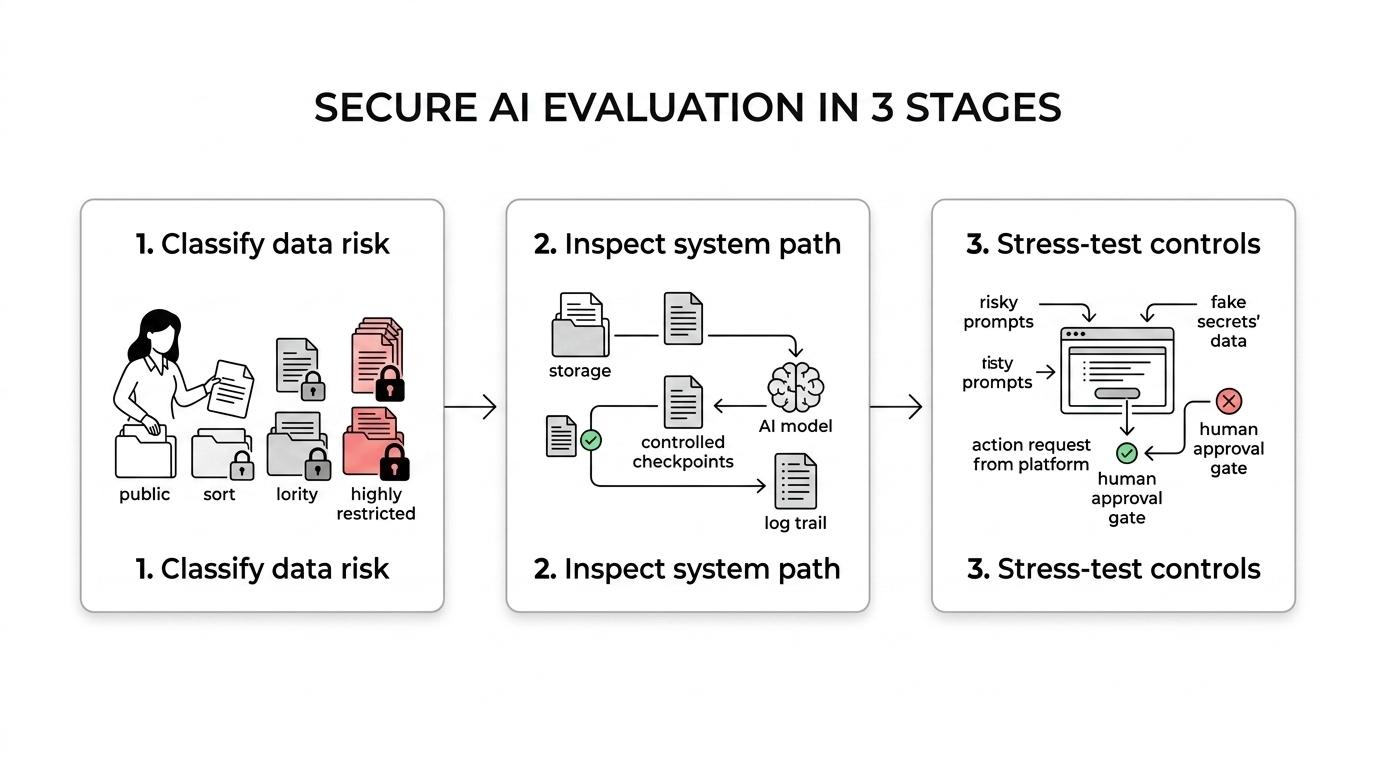
Step 1 is to classify the work. Separate public, internal, confidential, and highly restricted content. Then ask which tasks the AI will handle in each class. This maps directly to NIST’s Govern and Map thinking. If the platform cannot express different policies for different data classes, that is an early warning sign.
Step 2 is to inspect the system path. Where is data stored, indexed, sent, cached, and logged? Which models are used, and can admins control that choice? Are responses grounded in workspace permissions or copied into a broad AI memory layer? This is where many tools look similar in a demo but differ sharply in production.
Step 3 is to run adversarial tests before rollout. Try stale documents, misleading prompts, conflicting permissions, fake secrets, and action requests that should require approval. NIST’s Manage function is about continuous risk treatment, not one-time selection. A platform that performs well in a calm demo can still fail in messy real team conditions.
Should you choose a self-hosted or cloud secure AI platform?
Choose self-hosted when data ownership infrastructure control, or internal network boundaries are core requirements. TOW is relevant here because it supports both self-hosted and cloud deployment, which gives teams a cleaner way to compare control against operating overhead.
Self-hosting can reduce exposure to third-party infrastructure, and it can simplify conversations about residency, internal access, and system boundaries. It also gives security teams more direct control over patch timing, network design, and observability. That said, self-hosted does not automatically mean safer. If your team cannot maintain updates, monitor misuse, or secure the surrounding stack, then the control benefit can fade quickly.
Cloud platforms reduce operational burden and often improve time to adoption. They are often the right move when your team wants managed availability, vendor-run scaling, and faster feature delivery. The trade-off is that you need much sharper answers on tenant boundaries, logging, retention, subprocessors, model routing, and admin policy.
“TOW can run self-hosted or in the cloud, which matters when deployment control and data ownership are buying criteria.”
Is a workspace-native AI platform better than a standalone chatbot?
For most private team work, a workspace-native AI platform is the safer default because it inherits context, permissions, and workflow boundaries from the systems where work already happens. Standalone chat tools are still useful, but they often need more guardrails.
A standalone assistant is fine for generic drafting, brainstorming, and low-risk Q&A. Trouble starts when users paste confidential material into a separate interface, lose source traceability, or ask the AI to act without access to the original workflow context. That creates shadow knowledge paths that admins may not be monitoring closely.
A workspace-native system can be grounded in issues, docs, roadmaps, decisions, and internal memory. That improves relevance and makes review easier. If an answer cites the actual page, task, or discussion it used, then users can validate faster. Pro tip: ask vendors how their AI handles deleted content and permission changes. If access is revoked after indexing, the platform should reflect that promptly.
How do you pilot a secure AI platform without exposing sensitive data?
Run the pilot on a narrow use case, use controlled content, and measure both quality and security outcomes. A broad pilot feels faster, but it usually hides the very risks teams need to see.
Start with a bounded corpus and a small user group. Pick one or two workflows, like drafting project updates or answering questions from an internal handbook. Avoid legal, HR, M&A, or customer-secret material in the first phase unless your controls are already mature.
Then use redacted or synthetic test cases alongside ordinary internal content. This lets you check for over-sharing, poor citations, and policy bypass without putting your highest-value data at risk. A common mistake is to skip synthetic adversarial prompts because the demo looked good. Real deployment is less polite than a vendor walkthrough.
Finally, define pilot metrics in advance. Track citation quality, response usefulness, review rates, blocked actions, and permission failures. If the AI is fast but creates more manual verification work than it saves, then the pilot is telling you something important.
What governance features matter most for generative AI teams?
The most important governance features are policy controls, source traceability, review gates, and lifecycle monitoring. These features matter more than clever prompting because they determine whether AI use stays accountable at scale.
After you identify the workflows that matter, focus on a short list of governance questions:
- Policy controls: Which users, groups, models, tools, and knowledge sources are approved for which tasks?
- Traceability: Can users and admins see the sources, prompts, outputs, and actions behind an answer?
- Human review: Are sensitive writes, edits, or automations held for approval before execution?
- Permission inheritance: Does AI retrieval follow the same access rules as the underlying docs, tickets, and files?
- Monitoring: Can security and platform teams detect drift, misuse, unusual access patterns, and repeated failure modes?
NIST’s Generative AI Profile is helpful here because it treats generative AI risk as context-dependent. NIST’s SSDF Community Profile for Generative AI also matters, especially if you are acquiring an AI system rather than building one from scratch. Buyers should ask how the vendor approaches secure development, testing, and model-related changes across the software lifecycle.
How do you connect AI to company knowledge safely?
Connect AI to company knowledge by inventorying sources, preserving permissions at retrieval time, and keeping source visibility in the final answer. Safe knowledge grounding is usually more important than model size for team use.
Step 1 is to choose the sources that should be searchable. Internal docs, issue trackers, wikis, policies, and decision logs are common starting points. Resist the urge to index everything at once. If a repository has unclear ownership or messy permissions, fix that before connecting it to AI.
Step 2 is to preserve access control during indexing and retrieval. This is where terms like retrieval-augmented generation, company memory, and permission-aware search connect. The retrieval layer should bring in only the information a given user is allowed to see, and it should reflect permission changes with minimal lag.
Step 3 is to expose evidence in the response. Answers should show citations, linked sources, or at least identifiable references. If users cannot inspect what the AI used, they will either over-trust it or ignore it. Neither outcome is good for adoption or security.
Which security mistakes do teams make when buying private AI tools?
The biggest mistakes are buying on demo quality, skipping lifecycle governance, and treating vendor promises as a substitute for internal controls. Teams usually pay for those mistakes later in rework, policy friction, or incident response.
One common error is asking, “Is it encrypted and does it support SSO?” and stopping there. That question matters, but it misses action controls, review gates, evidence trails, grounding quality, retention, and monitoring. Another error is assuming that a platform labeled enterprise AI must already match your internal policy model. It probably does not.
Teams also underestimate operational fit. If admins cannot set policies without opening support tickets, or if users cannot tell whether an answer came from current or stale content, adoption drops. If your AI layer touches private work, then the best platform is the one that makes secure behavior the easiest default.
A final misconception is that governance slows good AI down. In practice, clear controls often speed adoption because users trust the system sooner and security teams block fewer experiments. That is usually the difference between an AI tool people test once and a secure AI platform teams actually keep using.