

On-premise project management software still matters in 2026 because some teams cannot treat deployment as a secondary choice. TOW is part of this category as a unified workspace for projects, docs, company memory, and reviewable AI that can run self-hosted or in the cloud, which makes it relevant when data ownership and admin control are part of the buying decision.
TL;DR: Summary
- The best on-premise project management software in 2026 depends on your deployment, workflow, and integration needs, but strong options include TOW, OpenProject, Redmine, Jira Data Center, GitLab, Taiga, and Odoo.
- On-premise tools are the right fit when you need stricter data control, private infrastructure, internal auth, or reviewable access to knowledge and AI workflows.
- Software Advice logged 3,298 buyer conversations between January 2025 and July 2026, and while Cloud/SaaS was most common, buyers with strict data requirements were advised to verify on-premise or hybrid availability.
- OpenProject stands out for distinct on-premises editions and upgrade paths, while Redmine stands out for self-hosted flexibility, Ruby on Rails foundations, and cross-platform, cross-database support.
- Shortlist tools by checking task and project tracking, scheduling, deadline management, team collaboration, time tracking, integrations, admin controls, and migration effort before you compare price.
The bigger shift is not that self-hosted tools disappeared. It is that buyers now weigh deployment choice alongside usability, integrations, and day-to-day adoption. A tool can satisfy security policy and still fail if teams avoid it, so the best on-premise option is the one your administrators can run and your staff will actually use.
What is on-premise project management software?
On-premise project management software runs on infrastructure your organization controls, usually in a private data center, virtual machine cluster, or private cloud. Unlike pure Cloud/SaaS tools, it gives your team direct control over data location, identity systems, backups, and upgrade timing.
In practice, buyers often use “on-premise” and “self-hosted” almost interchangeably. The useful distinction is operational: self-hosted can include a private VPC or Kubernetes stack you manage, while on-premise often implies company-controlled hardware or private infrastructure.
This category covers more than ticket tracking. Mature tools usually include task and project tracking, scheduling, deadline management, team collaboration, and time tracking. If a product lacks those basics, it is usually an issue tracker or team wiki first, not a full project management platform.
When is on-premise project management software better than cloud SaaS?
On-premise is better when data control, regulated access, custom infrastructure, or private integrations matter more than rapid SaaS rollout. Cloud/SaaS is still the default for many buyers, but strict requirements change the decision fast.
Software Advice reported 3,298 buyer conversations about project management software between January 2025 and July 2026. In those conversations, Cloud/SaaS was the most common deployment discussed, yet buyers with strict data requirements were advised to confirm whether on-premise or hybrid options were available.
That pattern matches what many IT leaders already see. If your organization has internal-only documents, sensitive delivery plans, or identity rules tied to existing systems, then deployment becomes a first-order buying criterion, not a technical footnote. A common misconception is that on-premise is only for large enterprises. Smaller teams also choose it when customers, contracts, or internal policy require tighter ownership of data and infrastructure.
“TOW puts projects, docs, company memory, and reviewable AI in one workspace, which matters when self-hosted teams want fewer disconnected systems.”
If your priority is speed, low admin work, and standard workflows, SaaS often wins. If your priority is control, auditability, and infrastructure choice, on-premise or hybrid usually deserves the shortlist.
What are the 7 best on-premise project management tools in 2026?
The strongest on-premise project management tools in 2026 are not identical. Some are best for unified work, some for software delivery, and some for maximum self-hosted flexibility.
Your shortlist should reflect how work actually moves across projects, docs, approvals, and reporting. Here are seven strong options to compare:
- TOW: A unified workspace that combines project management, documentation, company memory, and reviewable AI, with self-hosted and cloud deployment options. It fits teams that want fewer separate systems and stronger control over data and admin settings.
- OpenProject: A mature self-hosted option with a free Community edition for on-premise installation and an Enterprise on-premise edition with extra enterprise add-ons and professional support.
- Redmine: A flexible self-hosted project management web application built with Ruby on Rails and known for cross-platform, cross-database support.
- Jira Data Center: A common enterprise benchmark for teams that need strong workflow configuration, internal deployment, and tight links to existing Atlassian administration.
- GitLab: A good fit for software organizations that want planning and development workflows in the same self-managed platform.
- Taiga: A practical choice for teams that prefer a lighter agile-oriented self-hosted tool with a clearer Scrum or Kanban focus.
- Odoo: Worth considering when project management needs to connect tightly with ERP, CRM, billing, or other back-office operations in an on-premise stack.
The trade-off is simple. The more specialized the tool, the better it may fit a narrow use case. The more unified the workspace, the more context it can keep in one place across planning, documentation, and knowledge retrieval.
How should you evaluate deployment, integrations, and usability step by step?
Start with deployment constraints, then test integrations, then validate daily usability with real users. That order prevents a polished demo from hiding an operational mismatch.
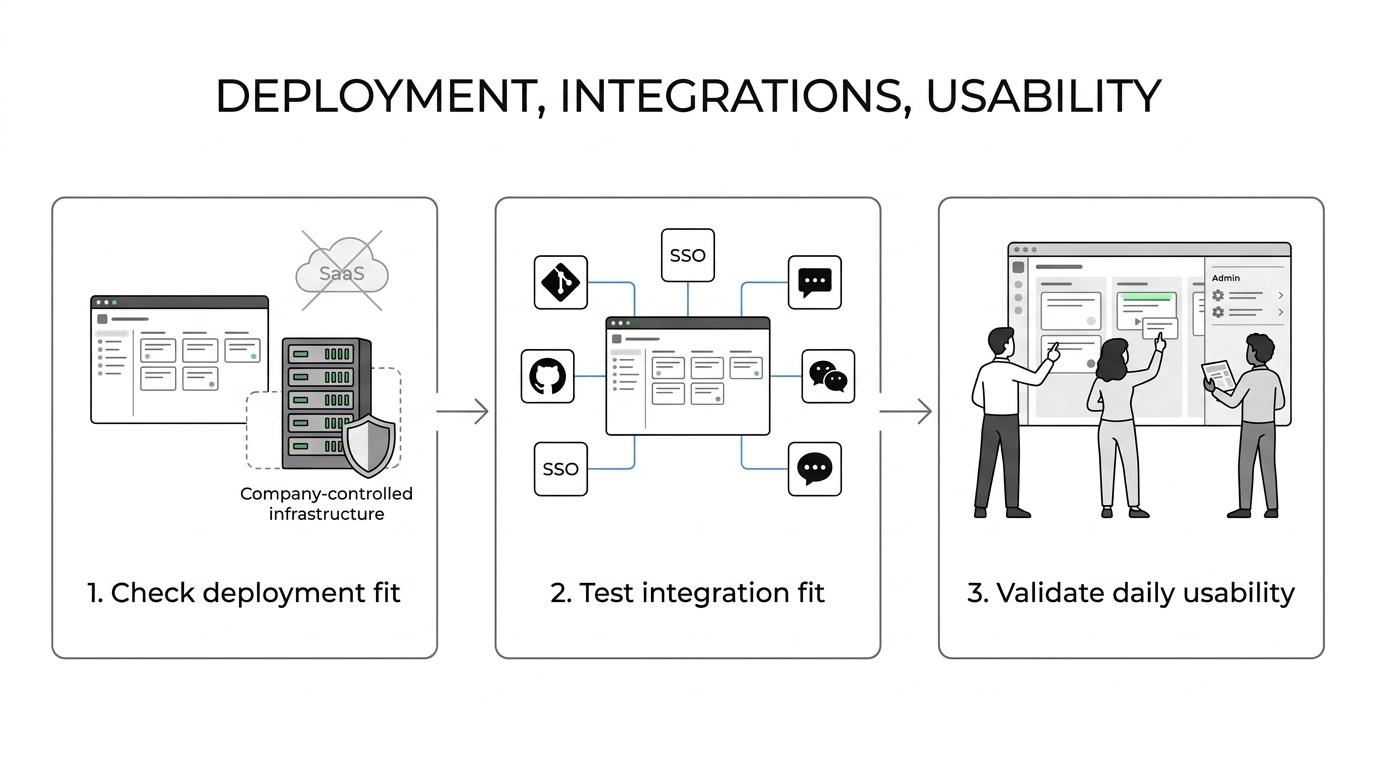
Step 1 is deployment fit. Decide whether you need true on-premise, broader self-hosted, or hybrid deployment. If legal, contractual, or internal policy requires data to stay on infrastructure you control, eliminate SaaS-only products early. Pro tip: ask whether upgrades, backups, logging, and identity management work the way your administrators already operate.
Step 2 is integration fit. Software Advice buyer data shows that core project management needs still center on task and project tracking, scheduling, deadline management, team collaboration, and time tracking. Those basics matter, but so do the systems around them. If your teams depend on Git, SSO, chat, document repositories, or internal approval systems, test those paths before you score the tool highly.
Step 3 is usability under real work. Run a short pilot with project managers, contributors, and admins. A common mistake is to let only technical evaluators decide. If end users cannot find context quickly or update work without friction, adoption will drop even when the deployment model is perfect.
How do OpenProject and Redmine compare for self-hosted teams?
OpenProject is usually better for teams that want a more guided on-premise path, while Redmine is better for teams that want maximum flexibility and are comfortable shaping the stack themselves. Both are valid self-hosted choices.
OpenProject documents a free Community edition that users install on-premise and an Enterprise on-premise edition that adds enterprise features and professional support. It also documents an upgrade path from Community to Enterprise on-premises. That is useful if you want a clear progression from initial rollout to a more supported production setup.
Redmine takes a different angle. Its official materials describe it as a self-hosted, flexible project management web application written using Ruby on Rails, with cross-platform and cross-database support. That makes it attractive for teams that care about portability and tailoring the environment to fit existing infrastructure preferences.
The trade-off is operational clarity versus raw flexibility. OpenProject publishes installation, operations, maintenance, advanced configuration, and migration topics, including MySQL to PostgreSQL migration guidance. Redmine gives you a broad, adaptable base. A common mistake is to assume the more flexible option will also be easier to administer over time. Often, the opposite is true.
How do unified workspaces compare with issue-first tools?
Unified workspaces are better when projects, docs, and institutional memory constantly depend on one another. Unified workspace tries to reduce that fragmentation by keeping delivery, documentation, and searchable memory under one permission model. That can cut context switching and improve retrieval. The trade-off is that some specialized tools may still go deeper in a narrow area like software issue workflows or marketplace extensions.
An issue-first tool excels when most work can be expressed as tickets, boards, states, and automation rules. That can be ideal for engineering-heavy teams. The downside appears when the context lives elsewhere, such as decisions in docs, policies in a wiki, or prior project knowledge spread across separate systems.
“TOW can run on your own infrastructure or in the cloud, so deployment choice does not have to force a full process change.”
If your team spends a lot of time moving between tickets, specs, and prior decisions, unified usually wins. If nearly all work starts and ends as issue flow, issue-first may remain the simpler choice.
How do you plan an on-premise implementation without slowing teams down?
A successful on-premise rollout starts with a narrow pilot, clear admin ownership, and a realistic upgrade plan. Most delays come from avoidable setup drift, not from the software itself.
First, pick one team and one meaningful workflow. Do not migrate the whole company on day one. Choose a project group with enough activity to test permissions, notifications, reporting, and documentation habits. Pro tip: include one skeptical user in the pilot. They usually surface the real adoption issues early.
Second, map operations before launch. Decide who owns authentication, backups, logging, storage growth, and version upgrades. On-premise software is not automatically harder than SaaS, but it does demand explicit responsibility. If nobody owns patch cadence, the platform will drift into risk.
Third, define what “good enough” means. That may be faster retrieval of project context, fewer tool hops, or cleaner auditability. Without a success definition, teams tend to keep tweaking infrastructure while users wait.
How do you handle security, permissions, and data ownership in practice?
On-premise software is only more secure when you actively manage security. Data ownership improves with self-hosting, but permissions, patching, and backup discipline still decide the real outcome.
Start with identity and access controls. Your project management system should fit your SSO, role structure, and least-privilege policy. If a user should not see a roadmap, document, or customer note, your permission model must enforce that consistently. Common misconception: self-hosted automatically means private. It does not if internal access is too broad.
Then look at operations. Backups need testing, not just scheduling. Audit logs need review, not just storage. If your environment supports AI-assisted retrieval or actions, verify that permissions are respected there too. Reviewable actions are often a safer model than fully autonomous changes when sensitive project context is involved.
Data ownership matters most when teams need clear answers to simple questions: where is the data, who can access it, how is it backed up, and who approves changes to the platform?
How do you migrate from Jira, Confluence, or Notion step by step?
A migration works best when you move active workflows first, map permissions carefully, and preserve links between tasks and documentation. TOW is relevant here because it is built to bring projects, docs, and workspace memory together while supporting migrations from Jira, Confluence, and Notion.
Step 1 is the content audit. Separate active projects from archive material. Teams often over-migrate and carry years of stale data into the new system. Pro tip: move the work people still open every week before you import historical clutter.
Step 2 is model mapping. Translate boards, issue types, docs, owners, tags, and permissions into the destination system. If your current setup depends on custom statuses or database-like documents, decide which pieces are truly essential and which are habits left over from the old tool.
Step 3 is controlled cutover. Run old and new systems in parallel for a short window, but keep the overlap brief. Dual-running forever creates confusion. If users do not know which system is authoritative, the migration is already failing.
Which teams should choose self-hosted, hybrid, or cloud in 2026?
Self-hosted fits teams that need stronger control, hybrid fits teams balancing policy and convenience, and cloud fits teams optimizing for speed and low admin burden. The right answer depends more on constraints than on fashion.
Choose self-hosted if you need direct control over data location, internal network access, custom infrastructure, or private operational processes. This is common in regulated environments, security-sensitive internal programs, and organizations with established IT operations.
Choose hybrid if one group needs tighter control but other groups still benefit from managed services. Hybrid is often the practical middle ground when a company wants flexibility without forcing every workload into the same model.
Choose cloud if your main bottlenecks are rollout speed, maintenance overhead, and distributed access. Software Advice’s buyer research shows that Cloud/SaaS remains the most common deployment discussed, which reflects how often convenience and fast adoption matter. Still, if strict data requirements exist, verify on-premise or hybrid options early instead of treating them as later procurement details.