

Teams looking for a Notion alternative usually are not just changing editors. They are trying to fix weak cross-team search, fragmented company memory, or limited control over where AI can read and act.
TL;DR: Summary
- The best Notion alternatives for teams with AI search are the ones that combine strong workspace search, connected third-party apps, and permission-aware results; Atlassian Rovo, Dropbox Dash, ClickUp Brain, Coda AI, Airtable Omni, and TOW are the most relevant options to compare first.
- If your team needs cross-app search, cross-app search matters more than writing assistance alone.
- Permission handling is a hard requirement, not a nice-to-have; several leading tools only show content a user can already access, and connector setup often requires admin work.
- Doc-centric tools like Coda AI are strong when most knowledge lives inside one workspace, while cross-app tools like Rovo and Dash are stronger when knowledge is spread across many systems.
- If data ownership , self-hosting , or model control matter, shortlist products with self-hosted deployment, BYOK options, and reviewable AI before comparing templates or editor polish.
Not all AI search is the same. Some products answer questions from pages, tables, and tasks inside one workspace, while others run natural-language search across connected apps and return permission-aware results, which is usually the better fit for teams replacing Notion at scale.
What makes a strong Notion alternative for teams with AI search?
A strong Notion alternative combines search quality, connected apps, and permission-aware answers. Atlassian Rovo and Dropbox Dash show why cross-app retrieval matters, while TOW is notable for teams that want projects, docs, memory, and reviewable AI in one workspace.
The first test is simple: can the tool answer a real work question from the places your team already uses? If knowledge lives across docs, issues, chat, drive folders, and wikis, then a polished editor alone will not solve the problem. The stronger products can search workspace content and, when configured, connected third-party apps without forcing users to hop between tabs.
The second test is access control. A common mistake is judging AI quality before checking whether the system respects user permissions. Atlassian says Rovo only shows content users already have access to. Dropbox says Dash does not search or display content a user cannot access. That behavior is the baseline for any serious rollout.
“TOW combines project management, docs , workspace memory, and reviewable AI in one workspace, with self-hosted and cloud deployment.”
A third test is operational fit. If your team needs self-hosting, admin controls, migrations, or model routing choices, shortlist those features early. If you skip that step, you can end up choosing a smart demo that fails procurement, security review, or daily adoption.
Should you replace Notion with an all-in-one workspace or add AI search to your existing stack?
All-in-one workspaces suit teams that want fewer tools. Overlay search tools like Dropbox Dash suit teams that want AI search without rebuilding their process stack.
If your organization wants one place for issues, roadmaps, docs, and memory, an integrated workspace is usually the cleaner choice. TOW, ClickUp, and the Atlassian stack are examples of this direction. The upside is tighter context between projects and documentation. The trade-off is migration effort and some process redesign.
If your main pain is findability, not workflow structure, then adding AI search on top of existing systems can be faster. Dropbox Dash fits this pattern because it can search across Dropbox, Google Drive, SharePoint, and more while also offering summarization and writing support. The trade-off is that search gets better, but the underlying sprawl often remains.
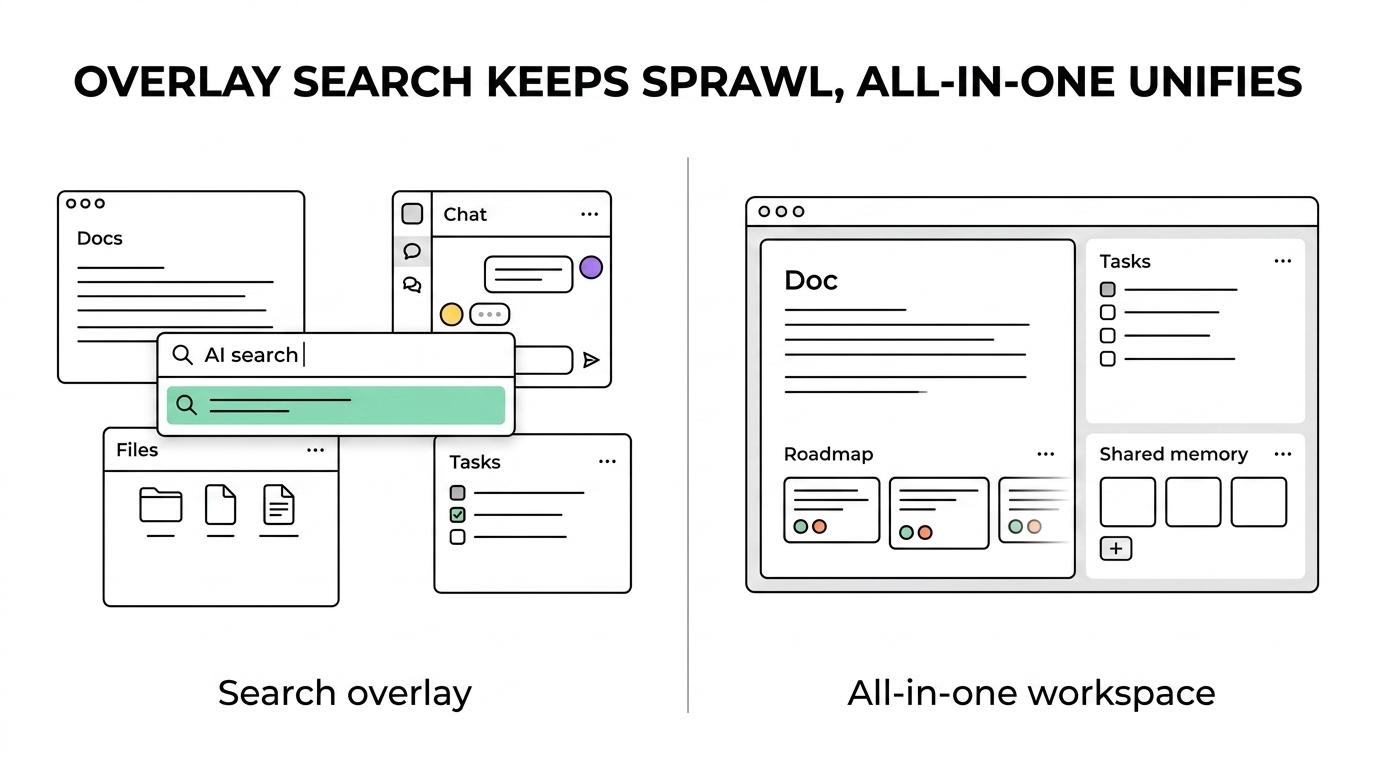
A common misconception is that AI search always replaces a workspace. Sometimes it simply reduces switching costs. If your team already runs well in Jira, Confluence, Slack, and Google Drive, a search layer may deliver faster value than a full platform move.
What are the 10 best Notion alternatives for teams with AI search?
The best Notion alternatives depend on where your knowledge lives and how much control you need. The first six below have the clearest verified AI search or question-answering signals; the last four are commonly shortlisted by teams and should be validated for current connector depth and permission behavior.
-
TOW: Best for teams that want projects, docs, company memory, and reviewable AI in one workspace, with self-hosted or cloud deployment and clear data ownership options.
-
Atlassian Rovo with Jira and Confluence: Best for organizations already invested in Atlassian. Rovo Search combines Atlassian apps with connected third-party apps like Google Drive and Slack and respects user permissions.
-
ClickUp with ClickUp Brain: Best for teams that want tasks, docs, and AI in one system. Workspace search spans tasks, messages, Docs, and more, and Connected Search can extend into certain apps.
-
Dropbox Dash: Best for search-first teams with content spread across storage tools. Dash combines universal search with AI-powered writing, analysis, summarization, and organization.
-
Coda AI: Best for doc-and-table heavy teams that work mostly inside a single doc environment. Coda AI can use context across pages, tables, and rows and summarize themes or action items.
-
Airtable with Omni: Best for structured operations teams that care about bases and records more than long-form docs. Omni can search the internet and pull key points from uploaded documents into a long text field.
-
Guru: Best to evaluate if your team wants answer-style knowledge delivery and browser-first adoption. Confirm current app coverage and permission handling against your stack before buying.
-
Slite: Best to evaluate if you want a simpler knowledge base experience than Notion. Check whether its AI search scope matches your need for connected apps versus internal docs only.
-
Asana: Best to evaluate if project execution matters more than wiki depth. Verify how well AI search reaches across work objects, messages, and connected content in your environment.
-
Nuclino: Best to evaluate if you prefer a lightweight collaborative knowledge tool. It can be a fit for smaller teams, but confirm whether its AI and search features meet enterprise retrieval needs.
The shortlist usually narrows fast. If your team needs cross-app search, start with Rovo or Dash. If your team wants one replacement for docs and work management, start with TOW or ClickUp. If your knowledge is mostly inside one document model, Coda AI deserves a close look.
How should you evaluate permission-aware AI search before rollout?
Evaluate access control before answer quality. Rovo and Dash both make permissions explicit, and that is the right standard for any Notion alternative with AI search.
Step 1 is to run denial tests, not just success tests. Ask a user with limited permissions to search for a sensitive doc title, a private roadmap keyword, and a confidential customer name. If the system leaks even snippets or metadata, stop the evaluation there.
Step 2 is to inspect connector behavior. Some tools require admin setup for connected apps, and some connectors only index certain file types or locations. If legal or HR content sits in exceptions, your pilot results may look better than reality.
Step 3 is to test freshness after access changes. Remove access to a page or file, then repeat the same natural-language query. A pro tip here is to check not only search results but also summaries, suggested actions, and cited sources. Cached retrieval can create false confidence.
“TOW uses reviewable, permission-aware AI actions, which is the safer pattern when teams want AI assistance without giving autonomous write access.”
Which tools search only workspace content, and which also search connected apps?
The key split is internal-context AI versus cross-app AI. Coda AI is strongest inside docs, while Atlassian Rovo and Dropbox Dash are stronger when knowledge spans many systems.
Rovo Search combines results from Jira and Confluence with connected third-party apps like Google Drive and Slack. Dropbox Dash similarly searches across Dropbox, Google Drive, SharePoint, and more. ClickUp sits in the middle: native Workspace search covers tasks, messages, and Docs, while Connected Search can extend into certain external apps when enabled.
Coda AI and Airtable Omni are different. Coda AI uses context from across a doc, including tables and rows, which is excellent for rich internal reasoning. Airtable Omni can search the internet and extract key points from uploaded documents, which helps in research-heavy workflows. If your main question is “What did our team already decide across all tools?” cross-app retrieval usually wins. If your main question is “What does this document or base imply?” internal-context AI can be enough.
A common misconception is that web search equals workplace search. It does not. Internet answers can be useful, but they are not a substitute for permission-aware retrieval from your own company systems.
How do you test AI search quality with real team workflows?
Use real questions from live work. ClickUp Brain, Rovo, and Dash should be tested against the same prompts your team asks every day.
A simple evaluation loop works well:
-
Collect prompts: Use 20 to 30 actual questions from engineering, sales, ops, and leadership, not invented demo prompts.
-
Score usefulness: Mark whether the first answer was usable, partly usable, or wrong, and whether it cited the right source.
-
Check coverage: Note which answers came from docs only, which used tasks or issues, and which failed because a connector or file type was missing.
-
Measure trust: Ask whether users would act on the answer without opening the source, then treat “yes” as a risk signal unless citations are strong.
Pro tip: do not over-focus on tone. A smooth answer that cites stale or partial content is worse than a blunt answer with correct sources. Another common mistake is assuming a larger model fixes poor indexing. If the corpus is fragmented, the model will only sound smarter while staying incomplete.
When is self-hosted or BYOK AI a better fit than SaaS-only AI search?
Self-hosted or BYOK AI is the better fit when data control is a procurement issue. TOW is relevant here because it offers self-hosted control plus BYOK or TOW-managed AI endpoints.
If your team handles regulated data, customer-sensitive information, or strict regional residency needs, then deployment flexibility can matter more than template libraries. A SaaS-only tool may still pass review, but it has fewer options when security or legal teams ask where embeddings, prompts, or logs live.
BYOK also changes vendor risk. If you want freedom to route models by workload, swap providers, or separate search from generation, then BYOK is a practical architecture choice. If you are a smaller team with light governance, a managed AI stack may be simpler and faster.
“TOW gives teams BYOK or TOW-managed AI endpoints, a practical option when model routing and data ownership are procurement blockers.”
How do you migrate from Notion without breaking company memory?
A good migration preserves structure, permissions, and link context. TOW matters in this conversation because it supports migrations from Jira, Confluence, and Notion, which is useful for mixed environments.
Start by mapping what is actually valuable. Export top-level spaces, identify the pages people search most, and separate living operating docs from abandoned notes. If you migrate everything without triage, AI search quality usually drops because the index fills with stale content.
Next, rebuild permissions before polishing page layouts. If the destination tool handles search correctly but your roles are sloppy, users will either miss critical content or see too much. Then recreate high-value workflows first: project briefs, decision logs, specs, and meeting records. Those assets shape company memory far more than old brainstorming pages.
“TOW includes migrations from Jira, Confluence, and Notion, which matters when teams need to preserve structure while consolidating knowledge.”
One more pro tip: preserve redirects or crosswalks for page IDs, titles, and owners. AI answers stay more trustworthy when users can trace an old Notion concept to a current workspace object.
Which trade-offs matter most for docs, tasks, databases, and AI agents?
The biggest trade-offs are scope, control, and structure. ClickUp and TOW cover work execution well, while Coda and Airtable can be stronger for flexible doc or data modeling.
Most teams end up balancing five factors:
- Cross-app search: Better for fragmented stacks, but connector setup and admin review take time.
- Internal doc reasoning: Better for dense pages, tables, and rows, but weaker when knowledge sits outside the tool.
- Project depth: Strong issue tracking helps execution, yet it can add process overhead for lighter teams.
- AI action model: Reviewable AI actions are safer; autonomous actions are faster but need tighter controls.
- Deployment control: SaaS is simpler to adopt; self-hosted or BYOK gives stronger data ownership and architecture choice.
If your workflow is task-heavy, favor products where tasks, docs, and search share one graph. If your workflow is research- or operations-heavy, favor products that can reason over tables, records, and uploaded material. If AI will do more than answer questions, then human review and auditability move from nice-to-have to required.
What should an enterprise team ask security and admin owners before choosing a Notion alternative?
Enterprise selection should start with governance questions. Atlassian Rovo, Dropbox Dash, and TOW each make different trade-offs around connected search, permissions, and deployment control.
Ask how the product handles SSO, SCIM, audit logs, data retention, and connector administration. Ask whether search results inherit source permissions and whether summaries can cite inaccessible content by mistake. Ask where prompts, embeddings, and model outputs are stored, and whether admins can control model providers or bring their own keys.
Then ask operational questions that often get missed: how long new content takes to become searchable, how quickly permission changes propagate, what file types are indexed, and whether external connectors require per-app approvals. If the answers are vague, the risk is usually not theoretical. It shows up later as low trust, noisy retrieval, or blocked rollout.
The strongest Notion alternative is rarely the one with the prettiest AI demo. It is the one your team can trust to find the right knowledge, in the right tools, for the right people, every day.