
A secure team workspace should do more than lock things down. It should help people move faster without forcing them to work around the system.
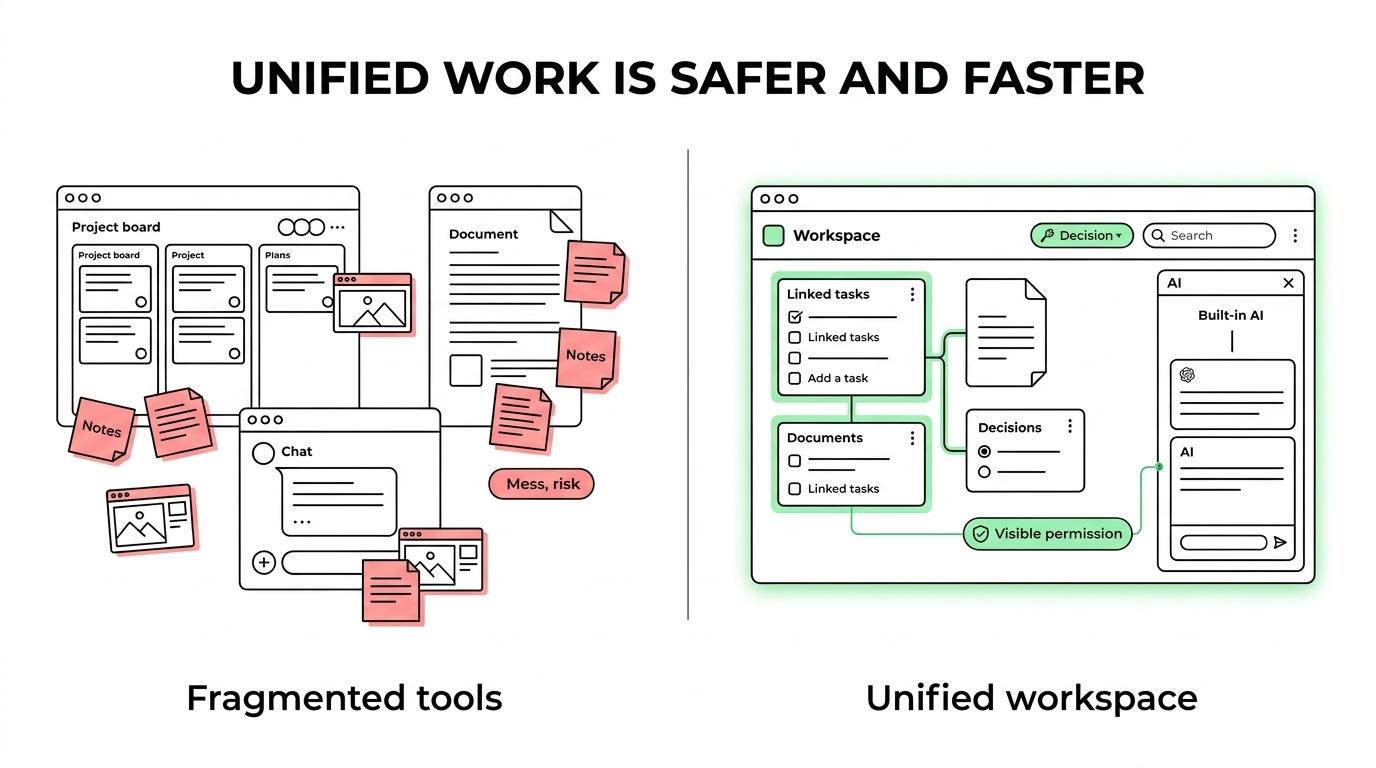
That sounds obvious, yet many teams still live with a split setup: project work in one tool, documentation in another, chat in a third, and AI scattered across browser tabs and bots. Security then becomes an overlay on top of fragmentation. Permissions drift. Context disappears into chat history. Sensitive work gets copied into places with weaker controls because the “approved” system is slower than the unofficial one.
The better model is simpler to describe and harder to build well: keep work, knowledge, permissions, and AI in one workspace, then apply strong identity controls and human review where it matters. When that balance is right, security stops feeling like resistance and starts acting like structure.
Secure team workspace design should reduce friction, not add it
A useful workspace makes the safe path the easy path. If people need five tools to answer a simple project question, they will fill the gaps with screenshots, pasted notes, and direct messages. Each shortcut creates a new place for sensitive information to live, often without clear retention, audit history, or access control.
A secure workspace fixes that by connecting tasks, docs, decisions, and search in one operating environment. Someone reading a roadmap should be able to open the linked specification. Someone reviewing a decision should be able to see the related ticket history. Someone asking AI for a summary should be working from permission-aware context, not from whatever the model happens to retrieve from a disconnected source.
This is where usefulness becomes a security feature.
NIST’s zero trust guidance points in the same direction. Access should be denied by default, then granted with the least privilege needed for a specific task. That approach works best when the system actually knows what the task, resource, and user context are. A workspace that keeps projects and knowledge linked together makes those policy decisions far more practical.
Security controls in a team workspace need to support daily execution
Security controls are often discussed as a separate layer. In practice, they shape how work happens every day. If identity, permissions, and records are clumsy, teams slow down. If they are built into normal workflows, teams gain both speed and control.
Recent breach reporting shows why this matters. Verizon’s 2026 DBIR found that, in its SMB dataset, exploitation of vulnerabilities accounted for 26% of initial access, credential abuse 13%, and phishing 9%. The same dataset reported human element factors in 45% of breaches and third parties in 55%. A secure team workspace cannot solve every threat, but it can shrink the blast radius of common failures by reducing access sprawl and keeping reviewable records.
The most useful workspaces combine security and usability in concrete ways.
| Workspace capability | Security value | Practical value for teams |
|---|---|---|
| Role-based access with least privilege | Limits unnecessary exposure | People see only the projects and docs they need |
| Phishing-resistant MFA | Reduces account takeover risk | Stronger protection without relying on passwords alone |
| Explicit project and document permissions | Prevents broad default access | Easier client work, contractor access, and internal partitioning |
| Linked docs, tickets, and decisions | Creates auditable context | Less time spent reconstructing why something changed |
| Reviewable AI actions | Keeps humans in control of sensitive outputs | Faster drafting and analysis without silent automation |
| Search across work and knowledge | Reduces shadow copies of information | Answers are easier to find in approved systems |
| Deployment choice and data ownership | Supports policy and regulatory needs | Teams can fit the workspace to their environment |
A team does not need every advanced control on day one. It does need a system that can mature with it.
Team workspace permissions and identity controls reduce access sprawl
Least privilege sounds strict, but its practical benefit is clarity. A designer should not need to wonder whether they can see finance documents. A contractor should not land in a workspace with broad historical access because “it was easier to invite them that way.” Good permissions remove ambiguity.
CISA recommends limiting user permissions to what is needed to perform the job and restricting access by factors like role, work hours, location, device, and position. NIST also calls out user location, work arrangements, device type, and device ownership as policy inputs. That means a secure team workspace should not treat every login as equal. Access decisions should reflect who the person is, what they need, and the conditions around the request.
A practical permission model usually starts with explicit membership and narrows from there. This matters for internal teams, external partners, and AI agents alike. A workspace-aware assistant should not see more than the person using it can see.
When evaluating permission design, these are good signs:
- Access scope: Project and document permissions can be granted explicitly, not inherited through vague defaults
- Identity controls: MFA, SSO, and account lifecycle management exist at the workspace level
- Contextual policy: Access can reflect role, device, or location instead of relying only on a password
- Auditability: Teams can review who accessed what and when
- Revocation speed: Offboarding removes access quickly across projects, docs, and AI features
If those basics are missing, the workspace may look polished while quietly expanding risk.
Team workspace knowledge should become durable, reviewable context
A lot of operational risk comes from information decay. A decision happens in chat, a follow-up lands in a ticket, a customer caveat sits in someone’s notes, and six weeks later nobody is fully sure what was agreed.
That is not only inefficient. It is unsafe.
When important facts live in scattered, informal channels, people make decisions from partial context. Permissions also become harder to manage because sensitive knowledge spreads into side systems that were never meant to act as a source of record. The answer is not to ban chat. The answer is to turn key decisions, risks, and reference material into durable workspace context.
This is one reason unified workspaces are getting more attention. TOW, for example, describes a model that combines project execution, docs, company memory, and reviewable AI in one workspace. Its documentation also makes a useful distinction: important facts should become durable, reviewable context instead of disappearing into chat history. That principle applies well beyond any one product.
A useful secure workspace helps teams keep knowledge in forms that can be searched, reviewed, permissioned, and linked back to the work that created it.
- Shared docs beside tickets
- Searchable decisions
- Risks tied to projects
- Workspace memory with permissions
- Snapshots of changing context
- Fewer orphaned chat threads
This is how a workspace becomes institutional memory instead of a collection of temporary conversations.
Reviewable AI in a secure team workspace keeps speed without blind trust
AI adds value quickly inside team workspaces. It can summarize a long issue thread, draft a requirements page, identify open risks, or pull together status updates across projects. The problem begins when AI outputs are treated as final records or when the model can act across the workspace without clear review.
That is why reviewable AI matters. If AI can create or modify tickets, memory entries, roadmap changes, or document summaries, a person should be able to inspect the result before it becomes canonical. Human review is not a drag on productivity. It is a control point that protects quality, security, and accountability.
This is also becoming more urgent from a risk standpoint. IBM reported in 2026 that one in four malicious breaches in its study were AI-enabled, with an average cost of $6 million for those incidents. A team workspace does not need to reject AI to respond to that trend. It needs AI that operates inside permission boundaries, produces visible actions, and keeps people in the loop.
A strong pattern looks like this:
- Permission-aware retrieval only uses content the current user can access
- Review before commit keeps sensitive changes draft until a person approves them
- Recorded actions: AI-generated outputs can be traced back to prompts, sources, and approvals
- Scoped automation: Agents act within project boundaries instead of roaming across the workspace
That approach gives teams a way to use AI where it helps most, while keeping the workspace governable.
Deployment options and data ownership shape trust in a team workspace
Security is not only about features inside the app. It also depends on where the workspace runs, who controls the data path, and how backup and recovery are handled.
For some teams, cloud delivery is the right fit. For others, controlled infrastructure, private networking, or full self-hosted options may be required by policy, customer commitments, or internal risk posture. A useful secure team workspace should support those choices without creating a second-class experience for teams that need more control.
This is where deployment flexibility becomes genuinely practical. TOW presents both cloud and self-hosted options, including controlled infrastructure and air-gapped Docker Compose deployment. That matters for organizations that want a unified workspace but cannot route sensitive work through a generic SaaS stack.
Backups also belong in this conversation. CISA recommends the 3-2-1 approach: three copies of data, on at least two media, with one offsite. Teams choosing a workspace should ask how project data, docs, memory, and audit records fit into backup and recovery practices. If that answer is vague, the security story is incomplete.
Useful team workspace signals to look for before rollout
A secure team workspace should feel coherent the first week, not only after months of customization. People should be able to open a project, read the current plan, find the related documentation, review past decisions, and use AI assistance without leaving the permission model behind.
That is the real test. Not whether the workspace has a long checklist of controls, but whether those controls support normal work instead of interrupting it.
A few practical questions can expose the difference quickly:
- Can teams work in one place: Projects, docs, decisions, and search are linked instead of split across disconnected tools
- Can access be narrowed cleanly: External collaborators, new hires, and internal teams get only what they need
- Can AI be trusted operationally: Outputs are reviewable, scoped, and visible before they become part of the record
- Can the system fit the organization: Cloud, self-hosted, and admin controls match actual policy needs
If the answers are yes, the workspace is doing more than protecting information. It is helping teams keep work clear, durable, and under control while they move.