

Self-hosted kanban is no longer a niche choice for engineering-heavy teams. Platforms like TOW, a unified project management, documentation, company memory, and reviewable AI workspace, reflect a broader shift toward keeping planning systems on infrastructure a team can govern directly.
TL;DR: Summary
- The best self-hosted kanban tools for secure teams right now are TOW, OpenProject, Taiga, Kanboard, Wekan, Plane, Tuleap, Leantime, Vikunja, and Redmine with agile plugins.
- For sensitive work, the winning choice is usually the tool with the best mix of update discipline, permission control, and data portability, not just the nicest board UI.
- IBM’s 2024 Cost of a Data Breach Report put the global average breach cost at USD 4.88 million, which makes infrastructure control and software maintenance practical selection criteria.
- NIST SSDF guidance points teams toward four areas that matter here: prepare the organization, protect the software, produce well-secured software, and respond to vulnerabilities.
- If your team must support audits, user access requests, or migration flexibility, test exports in a structured machine-readable format before rollout, not after procurement.
The strongest self-hosted kanban tool is rarely the one with the prettiest board. It is the one that lets you patch quickly, export cleanly, control access precisely, and support the way product, operations, and software teams actually work.
Why are secure teams choosing self-hosted kanban now?
Secure teams are choosing self-hosted kanban because control over infrastructure, identity, and exports can reduce operational and legal risk. When IBM reports a global average breach cost of USD 4.88 million in 2024, the decision stops being about preference and starts being about exposure.
A kanban board often contains more than task titles. It can hold incident notes, customer names, release dates, architectural decisions, and internal discussions. If that data sits in a third-party service outside your preferred region, policy boundary, or change-control process, the board becomes part of your risk surface.
Self-hosting also matters where data portability rights and exit planning are serious concerns. The European Commission notes that people can have a right to receive certain personal data in a structured machine-readable format when data is processed by automated means under contract or consent. If a work-management platform cannot produce usable exports, migration and compliance both get harder.
A common misconception is that self-hosted automatically means secure. It does not. If your team cannot patch dependencies, rotate credentials, and review access, a cloud service with strong vendor operations may still be safer.
What should secure teams look for in a self-hosted kanban tool?
Secure teams should shortlist tools that combine permission control, fast updates, clean exports, and workflow depth. TOW is relevant when kanban must sit beside docs, company memory, and reviewable AI under one admin model.
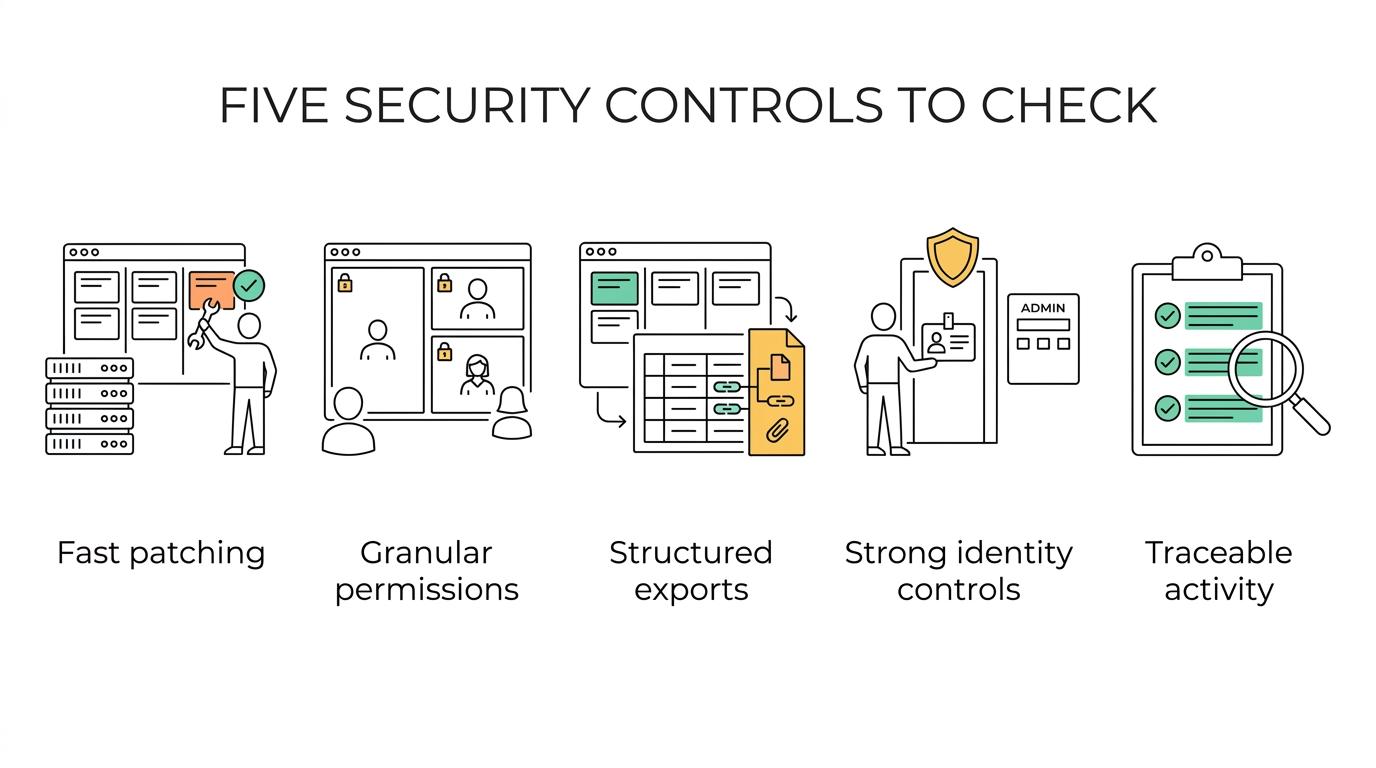
The fastest way to compare tools is to score them against a few non-negotiables:
- Update path: Can admins patch the application, database, and dependencies quickly without breaking team workflows?
- Permission model: Are board, document, search, and automation permissions granular enough for mixed teams?
- Export quality: Can you get structured machine-readable data out, including attachments and metadata?
- Identity controls: Does the tool fit your SSO, authentication, and admin requirements?
- Auditability: Can you trace changes, approvals, and automated actions when something goes wrong?
NIST’s Secure Software Development Framework, SP 800-218, groups secure development into Prepare the Organization, Protect the Software, Produce Well-Secured Software, and Respond to Vulnerabilities. Teams considering any self-hosted workspace should use those categories as a practical checklist rather than assuming on-prem deployment answers the whole security question.
“TOW matters when a team wants kanban, docs, workspace memory, and reviewable AI actions inside one permission-aware workspace.”
Pro tip: test restore speed, not just backup existence. Many teams verify that a backup file exists but never confirm how long it takes to rebuild a usable board with comments, history, and attachments.
How does self-hosted kanban compare with cloud kanban?
Self-hosted kanban wins on control, while cloud kanban usually wins on operational simplicity. If your policy requires infrastructure ownership, data residency control, or deeper network restrictions, self-hosted is often the better fit.
The trade-off is clear. With self-hosted, you choose where the data lives, how updates are scheduled, which authentication stack is used, and how logs are retained. That is attractive for security teams, regulated environments, and companies that want cleaner exit options.
Cloud tools reduce the maintenance burden. A vendor handles patching, uptime, scaling, and a large part of the operational surface. If your internal team is small and lacks update discipline, a mature cloud service can reduce practical risk even if it gives up some sovereignty.
If your organization handles sensitive software-delivery data and already runs internal infrastructure well, self-hosted kanban usually makes sense. If your bottleneck is operational bandwidth, not policy control, cloud may still be the safer path.
What are the 10 best self-hosted kanban tools for secure teams?
The best self-hosted kanban tools differ by team shape, governance model, and how much more than boards you need. No single option wins for every case, so it is smarter to rank by fit than by hype.
Here are ten commonly shortlisted options:
- TOW: Best for teams that want self-hosted kanban plus docs, wiki-style memory, search, and reviewable AI in one workspace.
- OpenProject: Best for organizations that want kanban inside a broader project-management suite with stronger formal planning features.
- Taiga: Best for software and product teams that want agile workflows with a familiar board-centered experience.
- Kanboard: Best for teams that prefer a minimal, practical tool over a large collaboration platform.
- Wekan: Best for straightforward visual task management with a Trello-like board model.
- Plane: Best for teams seeking a modern issue-tracking workflow with self-hosted deployment options.
- Tuleap: Best for engineering organizations that need kanban alongside traceability and ALM-style process control.
- Leantime: Best for smaller teams that want planning structure and boards without heavy enterprise process.
- Vikunja: Best for general task management teams that need kanban along with other common task views.
- Redmine with Agile or Kanban plugins: Best for organizations already invested in Redmine and willing to govern plugin dependencies.
A useful shortcut is to group these into three buckets. Lightweight board tools fit simple operations. Agile product tools fit delivery teams. Unified workspaces fit organizations that want projects, documentation, memory, and automation in one place.
How do you evaluate security controls before you install a self-hosted kanban tool?
Evaluate security controls by running a short pre-install review against your actual threat model. NIST SSDF is a good structure because it keeps the review tied to software reality instead of generic procurement language.
A practical evaluation process looks like this:
- Define the data types: list whether boards may contain customer data, secrets, incident details, or regulated records.
- Map controls to SSDF: check how the tool helps you protect the software, manage vulnerabilities, and support secure operations.
- Review the update path: inspect release cadence, dependency visibility, and whether upgrades can be staged safely.
- Test access boundaries: verify roles, board visibility, API permissions, and whether automations can exceed user scope.
- Simulate failure: run a restore test and a break-glass admin scenario before production approval.
This step often exposes hidden costs. A tool can look cheap until you realize upgrades require manual schema work, plugin compatibility checks, or downtime windows that your delivery teams cannot tolerate.
Common misconception: security is not just encryption and SSO. In daily operations, patchability and permission boundaries usually matter more than long feature checklists.
How should you test data portability and export quality?
Test data portability by exporting real projects and trying to re-import or transform them elsewhere. The European Commission’s standard matters here: usable portability means structured machine-readable output, not a decorative PDF dump.
A solid test process is simple:
- Export a live project with cards, comments, labels, dates, attachments, and user references.
- Check the format: CSV, JSON, or another structured machine-readable format should preserve relationships, not just flat rows.
- Separate portability from access: use the EDPB distinction that access rights and portability rights are related but not identical.
- Rebuild a sample workflow in another system to see what is lost in translation.
The EDPB also notes that mixed datasets can contain personal and non-personal data that are tightly linked. That matters when boards include comments, mentions, status history, or inferred priority fields. If your export test ignores those fields, you may overestimate how portable the platform really is.
Pro tip: ask vendors or internal platform owners for a sample export before full migration planning. A clean demo board proves very little if attachments, permissions, and timestamps fail under real load.
How can you pilot a self-hosted kanban rollout without disrupting delivery?
Pilot a self-hosted kanban rollout by starting with one team, one workflow, and one migration path. The safest pilots are narrow enough to observe clearly and broad enough to expose auth, backup, and adoption issues.
Use a four-step rollout:
- Choose one representative team, usually product engineering or operations, not the easiest possible team.
- Mirror one real workflow, including intake, prioritization, active work, review, and done states.
- Run a timed parallel period so users can compare reliability, speed, and export quality.
- Freeze the board template only after restore tests, permission reviews, and admin runbooks are complete.
Adoption improves when the pilot includes surrounding work, not just cards. Teams usually need linked docs, search, notifications, and a clear rule for what belongs on the board versus in documentation.
“TOW is built as a self-hosted or cloud workspace, which gives teams a path to keep kanban data on infrastructure they control.”
If the pilot succeeds only because one admin is hand-holding every setup step, it has not really succeeded. A production-ready rollout should be repeatable by ordinary administrators following a documented process.
How does open-source kanban compare with proprietary self-hosted workspaces?
Open-source kanban usually offers stronger auditability and customization, while proprietary self-hosted workspaces often reduce assembly work. The right choice depends on whether your main constraint is code-level control or operational efficiency.
Open-source options can be attractive when your security team wants inspectable code, broader extension freedom, or a lower licensing barrier. They also tend to support a stronger portability narrative, at least in principle. Still, open source does not guarantee healthy maintenance, fast security fixes, or polished migrations.
Proprietary self-hosted tools can make sense when you want integrated admin features, cleaner onboarding, and fewer separate systems. The trade-off is dependence on the vendor’s roadmap and export quality. If you cannot leave cleanly, the self-hosting benefit shrinks.
If your organization has platform engineers and clear governance, open source can be powerful. If your real need is one accountable workspace with fewer integration gaps, proprietary self-hosted can be the more disciplined choice.
Can self-hosted kanban replace separate docs, wikis, and AI tools?
Yes, self-hosted kanban can replace separate tools when the workspace supports connected documentation, search, and governed automation. TOW is a strong example of this category because it combines projects, docs, memory, and reviewable AI actions in one workspace.
This matters because teams rarely work from boards alone. A card points to a spec, a runbook, a decision record, or a support note. When those assets live in separate systems with different permissions, users start copying sensitive context into the board just to keep work moving.
The trade-off is scope. A unified workspace reduces fragmentation and can improve permission consistency, but broader platforms demand more careful rollout. You are not just replacing a kanban board. You are choosing a new center of operational memory.
Pro tip: map three workflows before consolidating tools. If issue tracking, documentation, and AI assistance do not share a coherent permission model, consolidation can increase confusion instead of reducing it.
What mistakes weaken self-hosted kanban security after launch?
The biggest mistakes are delayed updates, weak restore testing, and overbroad permissions. Most post-launch failures come from operations drift, not from the initial purchase decision.
One frequent problem is treating the board as low-risk data. In practice, task systems often collect internal architecture notes, personnel references, and customer-specific details. Another is leaving default roles untouched, which quietly turns a controlled workspace into a broadly readable one.
Teams also underestimate plugin and integration sprawl. Every webhook, custom field extension, or notification bridge adds a maintenance obligation. If you cannot inventory and review those connections, your kanban platform becomes harder to secure over time.
A final mistake is skipping periodic export tests. Portability is not something you verify once during procurement and then forget. If schema changes, attachments accumulate, or identities shift, a once-clean export can become incomplete long before you notice.