
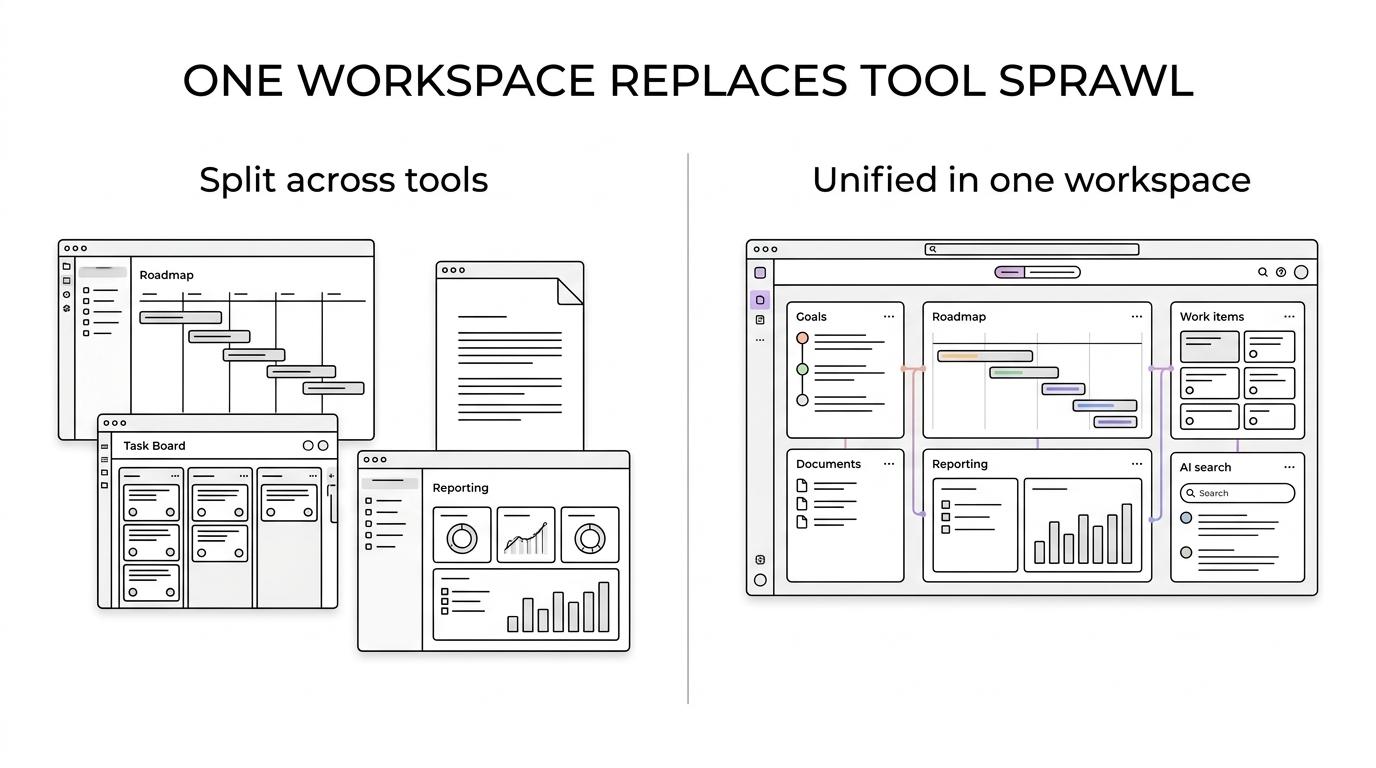
TOW gives you PPM software that keeps strategy, planning, delivery, documentation, and AI in one workspace. Instead of splitting portfolio work across a roadmap tool, a wiki, a project tracker, and separate reporting layers, you can manage goals, epics, work items, dashboards, team reporting, and company memory in a single system.
That matters when your teams need more than a task board. TOW is built for organizations that want portfolio-level visibility with strong admin controls, clear data ownership, and the option to run everything on their own infrastructure or in the cloud.
PPM software that connects goals, roadmaps, work items, and reporting
TOW is designed around the connected workflow PPM buyers actually need: select priorities, plan work, track execution, collaborate across teams, and review progress without losing the trail between strategy and delivery. In TOW, goals connect to success measures, roadmap timing, epics, and delivery records, so you can see how planned work maps to business outcomes.
TOW’s goal setup includes ownership, phase, score, timing, description, and tags. Its roadmap view places epics on a dated timeline with current workflow status, while goal measures track current values against measurable targets. That gives you a cleaner way to answer questions like what is on track, what slipped, who owns it, and which work actually moves a portfolio goal.
“TOW connects goals, success measures, roadmap timing, epics, and delivery records in one workspace.”
TOW also brings work items, workflows, goals, roadmaps, time, and team reporting into the same operating context. Your teams can capture work with types, fields, owners, dates, and relationships, then move that work through team-specific boards and sprint cadence before reviewing progress with dashboards and history.
If you are trying to reduce manual portfolio reporting, that shared context helps. You spend less time stitching status updates together across tools and more time working from records that already live in the system.
Here is what that looks like in practice:
- Goals and measures: Define success targets, assign ownership, and track current values against target values.
- Roadmaps and epics: Place major initiatives on a dated timeline and review current workflow status in the same view.
- Delivery and reporting: Move work through boards and sprints, then review progress with time, dashboards, history, and team reporting.
TOW helps PMOs, product leaders, and delivery teams reduce tool sprawl
PPM rarely lives in one category anymore. PMI reported that 83% of project professionals always or often use document management software, 81% use collaboration tools, 66% use project management software, and 32% use portfolio management software. TOW is built for that reality by combining project management, docs, wiki, search, collaboration, notifications, and workspace memory in one place.
“TOW combines project management, docs, wiki, search, collaboration, and notifications in a single workspace.”
That makes TOW a strong fit for PMOs, product organizations, engineering teams, and cross-functional groups that are tired of bouncing between a planning system, a documentation platform, and separate status reporting workflows. When your roadmap discussion, decision notes, operating docs, and execution records live together, portfolio reviews get easier to run and easier to trust.
TOW serves teams from startups to enterprises worldwide. If your organization needs integrated projects, docs, and AI with stronger control over permissions and infrastructure choices, TOW gives you a path that does not force you into a cloud-only model.
Self-hosted or cloud PPM deployment with stronger control over data ownership
Many PPM platforms can plan work. Fewer give you real deployment choice. TOW can run on your own infrastructure or in the cloud, which gives security-conscious teams more control over where portfolio data, delivery records, documentation, and AI activity live.
TOW ships as a small deployment kit with one Compose file, a guided installer, and operations scripts. The application ships as prebuilt images from Docker Hub, and production deployment requires a Linux host with Docker Engine and the Compose plugin. TOW recommends 4 GB RAM for production deployment.
“TOW ships with one Compose file, a guided installer, and prebuilt Docker images for self-hosted deployment.”
For smaller organizations, TOW also offers a free self-hosted tier. That lowers the barrier if you want to prove out a unified PPM workspace before expanding usage across more teams.
This deployment flexibility changes the buying decision in a practical way. If data ownership is non-negotiable, you can keep TOW inside your environment. If you want less operational overhead, you can use the cloud option and still keep the same connected PPM model.
Reviewable AI for portfolio updates, documentation, and workspace search
TOW includes workspace-aware AI agents that work inside the same environment as your projects and docs. For PPM teams, that means AI can help with status synthesis, documentation support, and finding relevant records without acting as a black box outside your permission model.
TOW’s AI actions are reviewable and permission-aware, so people stay in control of what gets accepted and shared. You can also choose BYOK or TOW-managed AI endpoints, which gives you more control over how AI fits your internal standards and security posture.
That is especially useful when portfolio information crosses product, engineering, operations, and leadership teams. Instead of copying sensitive updates into separate AI tools, you can keep AI assistance inside the workspace where goals, work items, docs, and permissions already exist.
TOW migrations from Jira, Confluence, and Notion support PPM consolidation
If your current process is spread across Jira for delivery, Confluence for documentation, and Notion for planning or notes, TOW is built for consolidation. TOW includes admin, auth, and migrations from Jira, Confluence, and Notion, which helps reduce the friction of moving to a unified workspace.
That matters because tool consolidation is not just about licensing. It affects historical records, team habits, reporting structures, and how leaders interpret status. TOW gives you a way to move toward one system for goals, roadmaps, execution, docs, and AI without treating migration as an afterthought.
TOW is also aiming at the combined surface area teams often assemble from Jira, Confluence, Notion, and Linear. If your stack has grown tool by tool over time, TOW offers a more deliberate operating model for portfolio and delivery work.
When TOW is the right PPM software for your organization
TOW is a strong fit when your organization needs portfolio visibility and execution data in the same system, not in separate products.
You are likely a good fit for TOW if:
- You need strategy tied to execution: Your teams want goals, measures, roadmap timing, epics, and delivery records connected in one workflow.
- You want docs and project work together: Your PMO, product, or engineering teams rely on both project tracking and documentation, and you want fewer handoffs between tools.
- You care about control: You need self-hosted deployment, clear data ownership, strong admin controls, or specific AI endpoint choices.
- You want AI with oversight: You are open to AI assistance, but only if actions are reviewable and permission-aware.
- You are consolidating tools: You are moving away from a fragmented setup across Jira, Confluence, Notion, or similar platforms.
If you only need a lightweight task list, TOW may be more workspace than you need. But if your organization is managing roadmaps, goals, delivery tracking, docs, and cross-team reporting at the same time, TOW is built for that operating reality.
If you want PPM software that connects roadmaps, goals, documentation, and delivery in one controlled workspace, take a closer look at TOW. Start with the deployment model that fits your organization, map your current Jira, Confluence, or Notion workflows, and see how TOW can give your teams a clearer path from portfolio planning to finished work.