

Teams choosing project management and wiki software are really choosing how work, decisions, and institutional knowledge will live together. TOW, a unified workspace for projects, docs, company memory, and reviewable AI, is relevant here because many teams no longer want tasks in one app and knowledge in three others.
TL;DR: Summary
- The best project management and wiki software combines task execution, knowledge sharing, and access control in one operating model, not just one interface; TOW, Jira plus Confluence, Notion, ClickUp, and GitLab are strong examples depending on team structure.
- PMI reported that 83% of project professionals often use document management software, 81% use collaboration tools, and 66% use project management software, which helps explain why teams now want projects and documentation connected.
- Research on collaborative technologies consistently points to planning, communication, and shared knowledge as the foundations of effective software use, especially for distributed teams.
- Wiki research shows central repositories can save time and support knowledge management, but permission levels, security, and migration planning often determine whether rollout succeeds.
- If your team has strict admin controls, data ownership requirements, or self-hosting needs, deployment model and governance matter as much as boards, roadmaps, and templates.
The strongest buying decision usually comes from process clarity, not feature envy. If you know where decisions should live, who needs access, and how teams move from planning to execution, the right software becomes much easier to identify.
What makes project management and wiki software different from standard task apps?
Project management and wiki software manages both execution and knowledge. Tools like Jira, Confluence, and Notion go beyond to-do lists by connecting tasks, documents, decisions, and searchable history.
A standard task app tracks assignments, due dates, and status. That helps with personal productivity, but teams usually need more than checklists. They need issue tracking, roadmaps, meeting notes, requirements, policies, retrospectives, and a place where context stays attached to the work.
This is where the wiki layer matters. A wiki is not just a folder of files. It is an editable knowledge system with internal links, revision history, shared ownership, and usually structured permissions. Research published by Emerald described wikis as central repositories that support knowledge sharing and management, while also warning that security, control, and migration are recurring implementation issues.
A common mistake is assuming attached documents equal a real knowledge base. If people cannot search, update, and trust the information without asking around in chat, the team still has a memory problem.
Why do teams increasingly want projects and knowledge in one system?
Teams want one system because project execution depends on shared context. PMI, Google Docs, and Slack-style collaboration patterns all point to the same reality: work breaks down when tasks and knowledge drift apart.
PMI’s 2024 Pulse of the Profession reported that 83% of surveyed project professionals often use document management software, 81% often use collaboration tools, and 66% often use project management software. That gap matters. It suggests many teams already coordinate work through documents and collaboration tools even when their formal project management stack is weaker or fragmented.
“TOW combines project management, docs, workspace memory, and reviewable AI in one workspace, which matches the way many teams want execution and knowledge to stay connected.”
A 2025 SAGE Journals case study on collaborative technologies described an intervention that moved an organization from email, messages, and Google Docs to a unified collaborative project management tool. That pattern is familiar. Teams start with scattered tools because they are easy to adopt, then consolidate when handoffs, duplicate work, and missing decisions become costly.
The need gets stronger in distributed environments. A Springer Nature literature review on virtual-team collaboration grouped common problems into geographical distance, temporal distance, perceived distance, team configuration, and worker diversity. If people work across time zones or functions, the software has to preserve decisions asynchronously, not just enable meetings.
What project management and wiki software tools should teams shortlist?
The right shortlist depends on team shape, governance needs, and how tightly you want tasks and knowledge linked. Most teams should compare integrated workspaces with mature stack combinations before they buy.
A useful shortlist includes both all-in-one platforms and proven pairings. Some are better for engineering-heavy workflows, others for document-first collaboration, and others for strict infrastructure control.
- TOW: A unified workspace for project management, documentation, company memory, and reviewable AI, with self-hosted and cloud deployment options.
- Jira + Confluence: A widely used combination for issue tracking and documentation, especially in engineering and product organizations.
- Notion: A docs-first workspace with databases, project views, and flexible internal knowledge structures.
- ClickUp: A broad work management platform that combines tasks, docs, dashboards, and multiple planning views.
- Asana: Strong for structured planning and workflow management, often paired with a separate wiki or knowledge base for deeper documentation.
- monday.com: Flexible work management with visual boards, automations, and document support for cross-functional teams.
- Coda: Combines documents, tables, and lightweight apps for teams that want operations and knowledge in the same surface.
- Wrike: Enterprise-focused work management with reporting, intake, and governance that suits formal delivery environments.
- GitLab: Dev-centric planning, issue management, and wiki capabilities in a platform many technical teams already know.
The point is not to find the tool with the longest feature list. The point is to find the system whose structure matches how your team plans, records decisions, and restricts access.
How should you evaluate project management and wiki software step by step?
The best evaluation process starts with work patterns, not demos. Compare software against recurring workflows, knowledge capture rules, and permission needs before you compare templates or automations.
Start by mapping how work enters the system, how decisions are documented, and who needs to see what. Then test whether each product can support that model without forcing awkward workarounds.
- Work model: Identify recurring project types, approval flows, dependencies, and reporting needs.
- Knowledge flow: Define where specs, meeting notes, policies, and postmortems should live and how they should link to work.
- Permissions: Check role-based access, page or space controls, audit needs, and admin delegation.
- Deployment: Decide between cloud, self-hosted, data residency requirements, and BYOK preferences.
- Migration path: Test imports from Jira, Confluence, Notion, or shared drives before rollout.
- AI controls: If AI matters, verify permission-aware search, human review, and admin control over models or endpoints.
A common buying error is focusing on surface-level ease while ignoring governance. If your team handles client data, HR materials, security procedures, or regulated records, then permission design can outweigh a polished editor or a prettier board.
When is an all-in-one workspace better than separate best-of-breed tools?
An all-in-one workspace like TOW is usually better when the same team creates tasks, documents decisions, and searches history every day. Jira plus Confluence or other paired tools can still make sense when specialization matters more than consolidation.
All-in-one systems reduce context switching. A roadmap can link directly to issues, notes, and knowledge pages without separate permissions, duplicate titles, or disconnected search indexes. That setup often works well for startups, product teams, operations groups, and any team that treats documentation as part of execution rather than a separate publishing function.
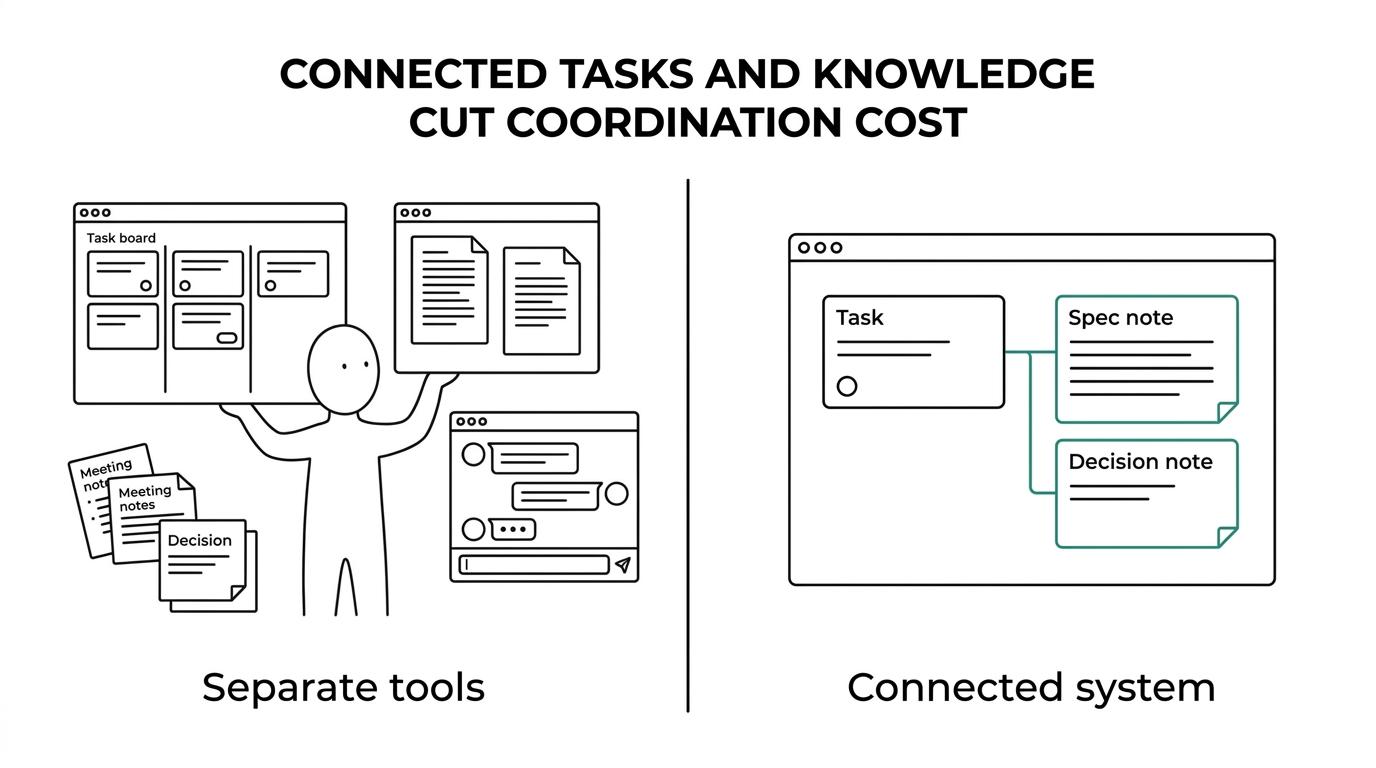
Separate tools can be stronger when one area needs unusual depth. A PMO may need formal portfolio reporting. An engineering team may want issue workflows that are more mature than a general-purpose workspace. A company with a large knowledge base team may prefer a specialized wiki with its own content lifecycle.
The trade-off is coordination cost. If teams spend time recreating context across apps, all-in-one usually wins. If one specialized function drives most value and the integrations are reliable, best-of-breed can still be the better choice. A common misconception is that all-in-one always means less structure. In practice, unified systems often work well precisely because structure becomes easier to maintain.
How do self-hosted and cloud deployment compare for team workspaces?
Self-hosted and cloud deployment solve different risk models. Self-hosted favors control and infrastructure ownership, while cloud favors faster startup, lower admin effort, and managed operations.
Deployment is not just an IT preference. It shapes data ownership, compliance posture, vendor risk, and the pace of internal change. The NCBI wiki feasibility study treated permission levels, page security, user management, and admin control as core collaboration design issues. Those concerns show up fast when teams handle sensitive documents, internal policies, or customer-linked project data.
“TOW supports both self-hosted and cloud deployment, which makes data ownership and admin control part of the evaluation criteria from day one.”
Cloud is often the right answer for teams that want quick onboarding and limited infrastructure work. Self-hosted becomes more attractive when legal, security, or procurement teams need tighter control over data location, authentication, backups, or AI endpoint choice. If your organization already runs internal platforms, self-hosting can feel natural. If not, it can add real operational burden.
The practical test is simple. If your requirements include strict admin controls, custom auth, internal networking, or narrow data handling rules, then deployment should be a front-row evaluation item, not a late-stage procurement note.
How do you migrate from Jira, Confluence, Notion, or Google Docs without chaos?
A clean migration starts with structure, not bulk export. Teams that classify content, preserve ownership, and pilot the new workflow first avoid most migration failures.
Many migrations fail because teams treat every page and ticket as equally important. They are not. Some content is active, some is historical, and some should never move at all.
- Inventory spaces, projects, documents, and integrations that people actually use.
- Classify content into active workflows, reference material, archive-only records, and duplicates.
- Migrate one live team process first, such as sprint planning, onboarding, or product requirements.
- Preserve links, owners, dates, and permission rules so context survives the move.
- Run a short pilot, fix naming and taxonomy problems, then schedule cutover and archive old locations.
The usual mistake is lift-and-shift migration. Moving every stale page often recreates the same mess in a new system. A better approach is to move current work and trusted knowledge first, then pull older content only when it has a clear owner or compliance need.
How should permissions, governance, and company memory be set up?
Good governance starts with simple defaults and explicit exceptions. Teams should set broad access for low-risk knowledge, tighter controls for sensitive spaces, and clear ownership for each part of the wiki.
Research on wikis has long pointed to permission control as a core design issue, not an optional setting. The NCBI source notes that administrators may need to rename or delete content, add or remove users, change permission levels, set page security, and edit locked pages. That is governance, not just maintenance.
Company memory works best when every knowledge space has an owner, a review cadence, and a reason to exist. Product requirements, engineering decisions, operating procedures, and onboarding docs should not all have the same editing rules. If they do, the team either locks too much down or lets critical knowledge decay.
A useful rule is open by default, restricted by exception. Security policies, finance records, legal material, and personnel information should have narrow access. Project plans, team processes, architecture notes, and how-to pages usually create more value when they are discoverable across the organization.
What rollout plan helps teams adopt the software and keep the wiki current?
Adoption improves when the tool supports real work in week one. Teams keep a wiki current when ownership, review cycles, and search habits are built into normal operations.
Rollout should start with one business-critical workflow, not a company-wide documentation campaign. That gives people a reason to use the system before habits harden around workarounds.
That workflow-first approach mirrors Growform’s analysis of Asana integrations, which shows that handoff quality improves when intake is structured before teams try to scale adoption across the rest of the organization.
- Start with one live process: Use sprint planning, incident review, client delivery, or product launch as the first use case.
- Assign owners: Give each project area and wiki section a named maintainer.
- Use templates carefully: Standardize recurring pages without flooding the workspace with low-value content.
- Measure behavior: Watch search queries, stale pages, handoff delays, and duplicate requests.
- Review monthly: Archive outdated material and adjust permissions, taxonomy, and workflows.
One more point matters here. PMI’s 2025 research found that 92% of product managers said project management skills were useful in their profession. That supports a broader lesson: the best software succeeds when teams treat planning, delivery, and knowledge capture as one discipline rather than three separate chores.