

If your team wants self-hosted sprint planning software without splitting work across five separate tools, TOW gives you one workspace for planning, documentation, company memory, and AI. You can run TOW on your own infrastructure or in the cloud, while keeping sprint planning, project execution, and delivery context connected.
TOW is built for organizations that need integrated projects, docs, and AI with strong admin controls and clear data ownership. Instead of managing sprints in one product, specs in another, and AI somewhere else entirely, you can plan, document, search, review, and ship from a single workspace and permission model.
Self-hosted sprint planning software with boards, workflows, goals, and reports
TOW is not just a board for sprint ceremonies. TOW’s project management workspace includes work items, boards, workflows, sprints, goals, roadmaps, and reports, so you can move from backlog planning to delivery reporting without rebuilding context in another system.
For product, engineering, and operational teams, that means fewer handoffs and a clearer view of what is planned, what is blocked, and what is moving toward release.
Your team can use TOW to manage the core sprint planning work in one place:
- Sprint setup: Create and manage sprints alongside work items, priorities, and workflows.
- Execution visibility: Track work on boards while keeping goals and roadmaps tied to day-to-day delivery.
- Reporting context: Review reports in the same workspace where the work and decisions already live.
Because TOW keeps sprint artifacts and related documentation in the same workspace, planning conversations do not get lost between a project tool and a separate wiki. You can go from issue to sprint to roadmap to report with the same permissions, the same search surface, and the same source of truth.
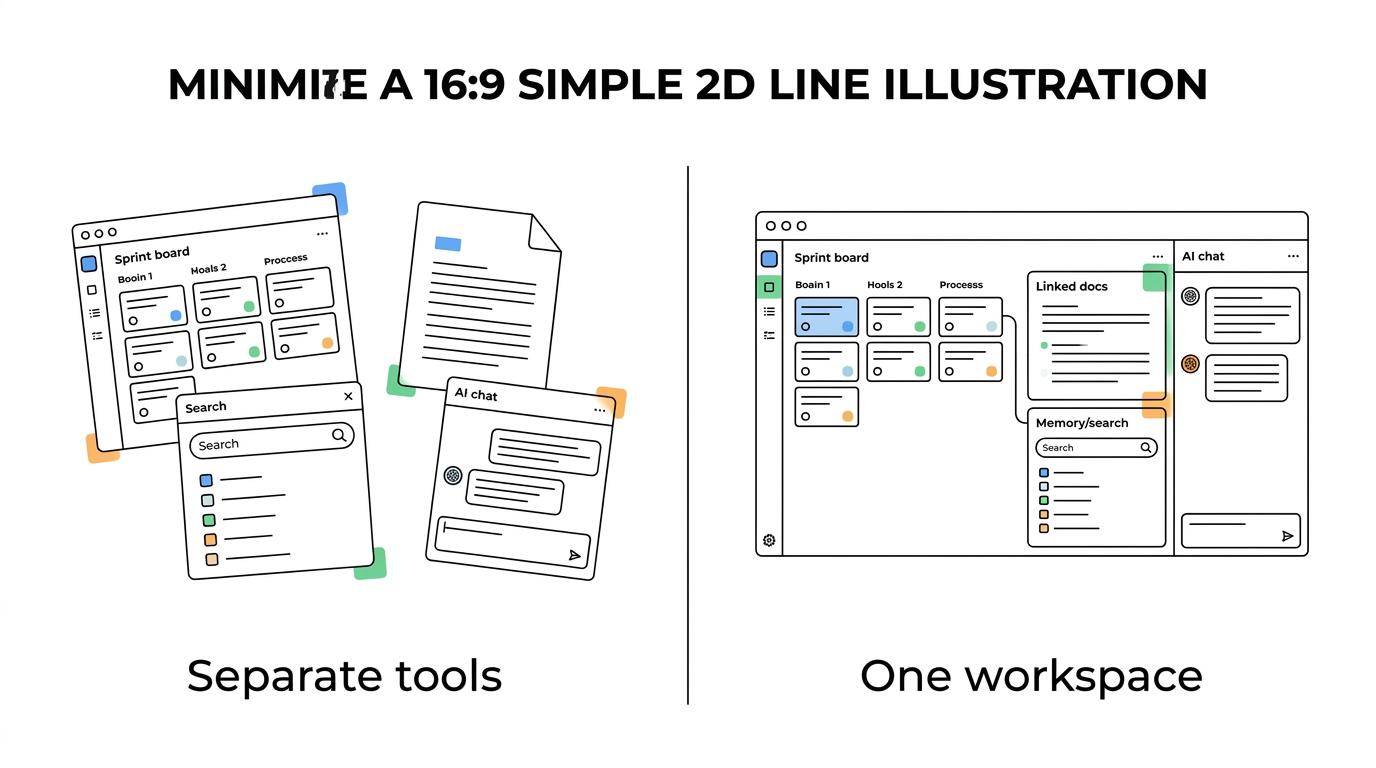
“TOW brings sprints, boards, workflows, goals, roadmaps, and reports into one workspace.”
That matters when your team is trying to answer practical questions fast: what should go into the next sprint, what changed since grooming, which goal this work supports, and what the team already decided last cycle. TOW makes those answers easier to find because the workspace is designed to hold both the work and the memory around the work.
TOW self-hosted sprint planning on your infrastructure with Docker Compose
For teams choosing self-hosted sprint planning software, deployment and control matter as much as features. TOW’s self-hosted workspace is documented for Docker Compose deployment, and TOW says the complete workspace can be deployed in under 10 minutes.
That is useful if you want a sprint planning system that fits existing infrastructure workflows instead of forcing a long setup project first. Docker Compose is designed to define and run multi-container applications from a single YAML configuration, which aligns well with teams managing production, staging, development, testing, or CI environments.
“TOW says its complete self-hosted workspace can be deployed with Docker Compose in under 10 minutes.”
TOW also says its stack can run fully air-gapped without external network access. If your environment requires isolated operation, TOW says the application, data services, authentication, storage, and any enabled AI provider can stay inside that isolated environment.
This gives you a realistic path when your buying decision depends on where the software runs, how tightly it can be controlled, and whether external dependencies are acceptable. TOW is a strong fit when sprint planning has to live inside your infrastructure boundary, not outside it.
TOW connects sprint planning, docs, workspace memory, and reviewable AI
Sprint planning breaks down when key details live outside the planning tool. TOW solves that by combining docs and wiki content, workspace memory, search, collaboration, and notifications with the sprint planning system itself.
TOW’s workspace-aware AI agents can work inside that same environment, and AI actions are designed to be reviewable and permission-aware. For your team, that means AI can help with drafting, summarizing, and navigating workspace context without bypassing human review or ignoring access controls.
If AI is part of your evaluation, TOW gives you deployment flexibility there too. You can use your own AI with BYOK-style control or choose TOW-managed AI endpoints, depending on how much control you want over models and infrastructure.
That setup is especially useful when your team wants AI help during sprint planning but does not want to copy backlog items, specs, and internal knowledge into a disconnected assistant. TOW keeps planning data, docs, and AI interactions in the same workspace, which makes outputs more relevant and easier to review.
TOW also includes admin, authentication, and migrations from Jira, Confluence, and Notion. That lowers switching friction for teams that want a self-hosted workspace with sprint planning built in, but do not want to abandon years of existing project and documentation history to get there.
Self-hosted sprint planning pricing with a free tier and no feature-tier tradeoff
TOW makes pricing easier to evaluate because self-hosted plans are based on deployment, seat count, and AI choice, not on stripping out product capabilities. TOW’s free self-hosted tier is available for teams with up to 20 users.
For teams with 21 or more users, TOW lists self-hosted pricing at $10 per seat per month with your own AI, or $15 per seat per month with TOW AI. TOW also says every current product capability is included on every plan, which helps you evaluate the real workspace instead of a limited edition.
“TOW offers free self-hosting for up to 20 users, with paid self-hosted plans starting at $10 per seat per month.”
That pricing structure matters if you are comparing self-hosted sprint planning software and trying to avoid hidden costs around reporting, docs, admin, or AI access. With TOW, the buying question becomes whether the deployment and AI option fit your environment, not whether a critical planning capability is locked behind a higher feature tier.
When TOW is the right fit for self-hosted sprint planning
TOW is a strong choice when you need more than a sprint board and less tool sprawl around it.
You are likely a good fit if:
- You need self-hosting for real reasons: infrastructure control, data ownership, internal auth requirements, or isolated environments.
- You want planning and execution connected: sprints, boards, workflows, goals, roadmaps, and reports should live together.
- You do not want docs and AI disconnected from delivery: your team needs documentation, memory, and reviewable AI in the same workspace.
- You want a practical migration path: Jira, Confluence, or Notion already hold important project context that still needs to be usable.
TOW is especially relevant for teams that have outgrown a patchwork of point tools but are not willing to trade control for convenience. The workspace is designed to bring planning, knowledge, and AI together while still giving you deployment options that match startup, enterprise, and regulated environments alike.
If you are evaluating self-hosted sprint planning software, start with TOW and see how your team would plan, document, and execute in one workspace. Choose the free self-hosted tier for up to 20 users or review the self-hosted options for larger teams and AI requirements.