
If you need on-premise wiki software because your documentation contains sensitive decisions, operational runbooks, internal policies, or customer-specific knowledge, TOW gives you a workspace you can run on your own infrastructure. TOW combines wiki and docs, project management, company memory, and reviewable AI in one product, so your team does not have to split critical knowledge across separate systems.
TOW runs in TOW Cloud or on controlled infrastructure, including isolated environments, and is built for teams that care about admin control and clear data ownership. Built in Germany by security professionals with more than 20 years of critical-security experience, TOW is designed for security-first organizations, from startups to enterprises and public services.
On-premise wiki software that keeps documentation connected to real work
TOW’s docs-and-wiki area is designed as a working wiki, not a content silo. Your team can connect pages through explicit references and backlinks, keep context close to the work, and search across the workspace instead of bouncing between a wiki, a task tracker, and scattered notes.
“TOW turns docs into a working wiki with explicit references and backlinks, instead of another isolated content silo.”
Because TOW also includes issues, boards, goals, roadmaps, notifications, and collaboration, your documentation stays tied to execution. For engineering, product, operations, and internal platform teams, that means fewer stale pages and fewer gaps between what the wiki says and what the team is actually doing.
Self-hosted wiki deployment for isolated and single-tenant environments
TOW can run on controlled infrastructure or as a fully isolated Docker Compose deployment. That gives your team a practical deployment path when you want a multi-container application defined in one place, with services, dependencies, environment variables, volumes, and networks managed together instead of pieced across ad hoc scripts.
“TOW supports controlled infrastructure and fully isolated Docker Compose deployment for teams that need tighter operational boundaries.”
TOW also describes its workspace model as private and single-tenant, which gives you a clearer boundary around data, authentication, and operations. If your security team reviews external connections, requires dedicated secure paths, or wants backup isolation aligned with CISA-style recommendations, TOW gives you the control to implement those policies in your own environment.
Document-level wiki permissions that support least-privilege access
TOW lets you apply document-level access to explicit members and teams, so sensitive pages do not have to be visible to the whole company just because they live in the wiki. That is especially useful when you want knowledge to stay discoverable for the right people without turning your documentation platform into an all-or-nothing system.
“TOW applies document-level access to explicit members and teams, helping security-first organizations keep wiki visibility tightly governed.”
TOW’s access model fits the way many security programs already think about least privilege and role-based access control. Instead of managing access page by page for every individual, you can structure permissions around team membership and organizational roles, which is more practical as your workspace grows.
TOW also includes concrete self-hosted safeguards. The platform requires a long random APP_SECRET before first boot, rejects the default placeholder at startup, and uses HTTP-only, same-site lax session cookies. Those details help reduce avoidable misconfiguration risk from the start.
Reviewable AI inside your on-premise wiki, without losing control
Many self-hosted wiki tools stop at pages, folders, and permissions. TOW adds workspace-aware AI agents with human review, so your team can use AI for summaries, drafting, and knowledge retrieval without giving an opaque system unchecked access or action rights.
TOW makes that practical by keeping AI permission-aware and reviewable inside the same workspace that holds your docs, projects, and company memory. You can choose BYOK or TOW-managed AI endpoints, which gives your organization flexibility over how AI is routed while keeping governance tied to the workspace itself.
TOW combines wiki, projects, search, and memory in one workspace
TOW is useful for teams that want more than an internal wiki. The product brings together docs and wiki, issues, boards, goals, roadmaps, search, collaboration, notifications, admin controls, authentication, and migrations, so your operational knowledge and your execution system live together.
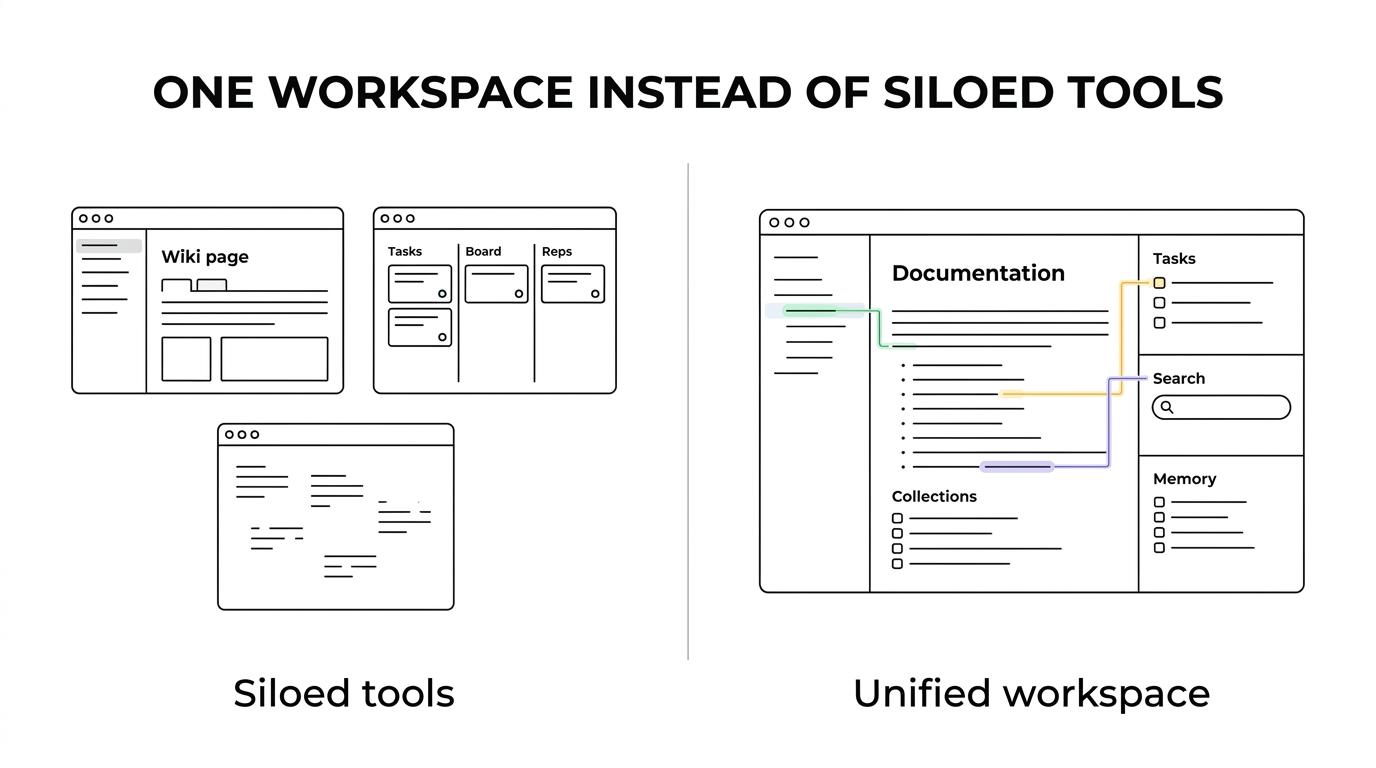
That combination reduces the usual drift between documentation and delivery. When a roadmap changes, an issue is updated, or a process is revised, the same workspace can hold the page, the task, the discussion, and the AI-assisted summary that helps your team find the latest version faster.
Migration from Jira, Confluence, and Notion without fragmenting company memory
TOW includes migrations from Jira, Confluence, and Notion, which matters if your current setup spreads knowledge across separate products. Instead of replacing one wiki with another and keeping work somewhere else, TOW gives you a path toward one workspace for documentation, planning, and execution.
For growing organizations, that can reduce tool overlap and context switching. TOW is aiming for parity with Jira, Confluence, Notion, and Linear while giving security-first teams a deployment model centered on controlled infrastructure and data ownership.
When TOW is the right fit for on-premise wiki software
TOW is a strong fit when your requirements look like this:
- Controlled deployment: You want the wiki on your infrastructure, in a private single-tenant workspace, or in a fully isolated deployment.
- Tighter permissions: You need document access assigned to explicit members and teams, with admin controls that support least-privilege operations.
- Docs tied to execution: You want wiki pages connected to issues, boards, goals, and roadmaps, not stored in a separate knowledge silo.
- Governed AI use: You want AI inside the workspace, but only with permission-aware behavior and human review.
- Migration without sprawl: You are moving off Jira, Confluence, or Notion and want one place for work, docs, and company memory.
TOW is especially relevant for security-first engineering teams, internal platform groups, public services, and organizations that handle sensitive internal or customer information. Smaller organizations can start with TOW’s free self-hosted tier, while larger teams can plan around stricter infrastructure, approval, and governance requirements.
Why security-first teams choose TOW for controlled wiki deployments
TOW was built in Germany by security professionals with more than 20 years of critical-security experience, and the platform is built for air-gapped high-end security environments and public services. That background shows up in concrete product choices such as controlled deployment options, single-tenant workspaces, reviewable AI, required secret configuration, and document-level permissions.
You are not just choosing a wiki. With TOW, you are choosing a workspace that helps your team capture knowledge, connect it to work, and keep access under tighter control.
If you want on-premise wiki software that keeps documentation, projects, memory, and AI inside a governed workspace, talk to TOW about your deployment needs or start with the free self-hosted tier to evaluate it in your own environment.