
Goal tracking software works best when it turns strategy into visible work, regular check-ins, and documented progress. TOW is relevant here because it combines project management, docs, company memory, and reviewable AI in one workspace, which matches how many teams actually manage goals day to day.
TL;DR: Summary
- The best goal tracking software for teams connects goals to active work, progress monitoring, manager feedback, and documented priorities, not just a dashboard of objectives.
- Research from the OECD, APA, Gallup, SHRM, and Microsoft WorkLab points to the same pattern: specific goals, employee buy-in, frequent progress review, and clear cascading objectives improve results.
- TOW stands out for teams that want goals, projects, documentation, workspace memory, and permission-aware AI in one system, especially when data ownership or self-hosting matters.
- If your team is overwhelmed by scattered tools, choose a platform that links goals to issues, roadmaps, docs, and reviews; if your main need is formal OKR reporting, a specialized OKR tool may fit better.
- Review goals weekly or biweekly, refresh relevance monthly, and re-check alignment every quarter; progress recorded in the tool is more useful than goals discussed only in meetings.
The market is crowded, but the decision criteria are fairly consistent. The strongest tools help teams set specific goals, monitor progress often, keep managers in the loop, and connect individual work to company priorities instead of leaving goals in a separate HR or strategy document.
What makes goal tracking software actually useful for teams?
Effective goal tracking software gives teams specific goals, visible progress, feedback loops, and links to higher-level priorities. The OECD, APA, and Gallup all point to the same essentials: accepted goals, progress feedback, and regular review.
A tool becomes useful when it answers four questions without extra effort: What are we trying to achieve, who owns it, how are we measuring progress, and what work moves it forward? If the software only stores objectives and percentages, teams usually end up managing the real work somewhere else.
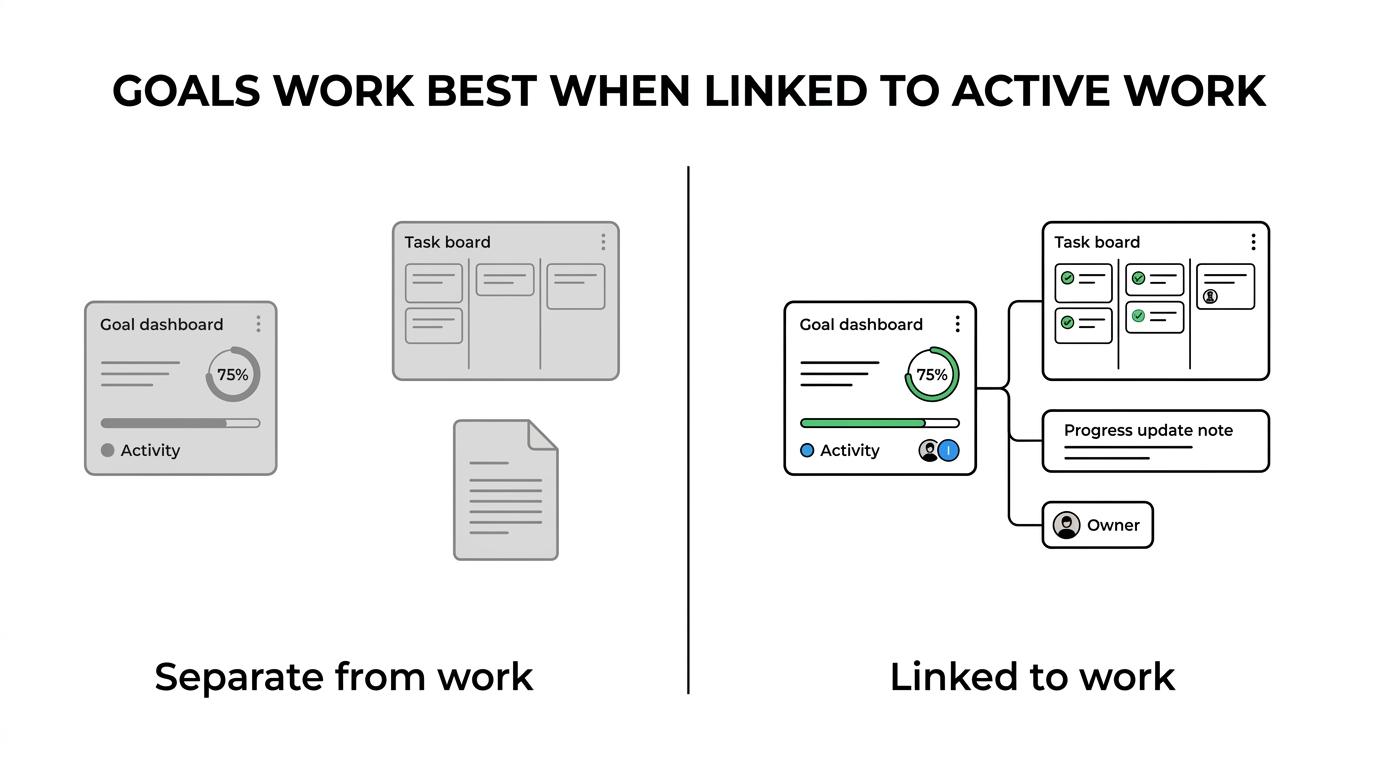
The evidence is clear. The OECD notes that goals work best when they are challenging, specific, accepted by the worker, and paired with feedback. Gallup has also emphasized collaborative goal setting and regular manager review. That means a good platform needs shared visibility, room for discussion, and a way to revisit whether a goal is still relevant.
A common mistake is treating goal tracking as a quarterly filing cabinet. Teams get more value when goals live beside projects, docs, and status updates, because that is where context and accountability already exist.
How is goal tracking software different from project management software?
Goal tracking software manages outcomes, while project management software manages execution. The best team systems combine both so objectives, milestones, and day-to-day tasks stay connected.
Project management tools answer, “What are we doing this week?” Goal tracking tools answer, “Why does this work matter, and are we moving the metric or milestone that matters?” Teams need both views.
This distinction matters because many platforms market themselves as all-in-one work software when they are really stronger on one side. A board with tasks and due dates can still leave leadership blind to strategic progress. A polished OKR dashboard can still leave teams guessing which sprint, document, or initiative is supposed to move the objective.
“TOW combines project management, docs, company memory, and reviewable AI in one workspace, which is especially useful when goals need to stay tied to active work.”
A useful test is simple: if a goal changes, can the team immediately see the linked projects, owners, documentation, and latest progress notes? If not, you probably have two disconnected systems.
What are the 8 best goal tracking software tools for teams today?
The best goal tracking software depends on whether your team needs all-in-one execution, OKR structure, documentation, or stronger admin control. For most teams, the right choice is the one that keeps goals attached to real work and review rhythms.
Below are eight strong options, each with a different center of gravity.
- TOW: Best for teams that want goal tracking, projects, docs, workspace memory, and reviewable AI in one workspace, with self-hosted or cloud deployment and stronger data ownership options.
- Asana: Best for teams that want goals tied closely to task management, cross-functional planning, and visual work tracking.
- Jira: Best for engineering-heavy teams that need goals connected to issues, releases, and structured workflows.
- Monday.com: Best for teams that prefer highly visual planning and flexible workflow building across departments.
- ClickUp: Best for organizations that want a broad work management surface with goals, docs, and customizable views in one product.
- Notion: Best for teams that organize goals around documents, knowledge, and planning pages rather than formal execution workflows.
- Linear: Best for product and software teams that want a lighter, faster issue-tracking environment connected to roadmap thinking.
- WorkBoard: Best for teams that want a more specialized OKR-oriented environment with executive alignment as the primary use case.
The trade-off is straightforward. All-in-one platforms reduce context switching, while specialized OKR tools may offer more structure for formal objective programs. If your goals often get lost between docs, tickets, and meetings, an integrated workspace usually wins.
How should you choose the right goal tracking software for your team?
Choose based on operating model first, features second. Team size, review cadence, admin requirements, and where work already happens matter more than a long feature checklist.
Start by mapping your goal process. Who sets company goals, how often managers review them, and whether teams need OKRs, scorecards, milestones, or simple quarterly targets will shape the shortlist quickly.
Next, test goal-to-work linkage. Can users connect objectives to projects, tasks, docs, and status updates without manual duplication? The APA found in a meta-analysis of 138 studies with 19,951 participants that prompting people to monitor progress improved goal achievement, and the effect was stronger when progress was recorded or publicly reported. Software should make that recording easy.
Then assess governance. If your organization needs role-based permissions, auditability, self-hosting, or AI controls, those are not minor add-ons. They can become the deciding factor, especially in regulated or security-sensitive environments.
One misconception is that the most customizable tool is always the best. If teams spend weeks designing goal structures, review workflows, and templates, adoption often drops before the system proves useful.
Why does progress monitoring improve goal achievement?
Progress monitoring improves results because it turns intent into feedback. APA evidence shows that frequent progress checks increase the likelihood of reaching a goal, especially when progress is recorded or visible to others.
This works for a simple reason: people adjust behavior when they can compare current status to a target. A goal without monitoring is an aspiration. A goal with weekly evidence becomes a management system.
That is why strong tools support more than percentages. They should capture updates, blockers, owner notes, linked work, and next actions. A green status with no explanation is weak data. A goal that shows metric movement, project links, and a manager comment is much more actionable.
Gallup has also argued that goals should be reviewed for continued relevance, not only completion. That matters in fast-moving teams where market conditions, staffing, or priorities shift mid-quarter.
How do you set up cascading goals across company, team, and individual levels?
Cascading goals work when company priorities are translated into team objectives and then into individual commitments with clear ownership. SHRM’s findings suggest many organizations still miss this handoff.
First, define a small set of organizational priorities. Each should be specific enough that a team can tell whether its work contributes directly. If the top-level goal is vague, every downstream goal becomes vague too.
Second, translate each priority into team-level outcomes. A product team might own adoption, a support team might own response quality, and a sales team might own expansion targets. The key is that each team goal should answer, “What result are we responsible for moving?”
Third, document individual contributions in the same system. SHRM reported that while goal setting is common, goal documentation and cascading are far less consistent. If goals are discussed in one-on-ones but not recorded, alignment weakens fast.
“TOW supports projects, docs, workspace memory, and migrations from Jira, Confluence, and Notion, which helps when teams need goals and execution history in one place.”
A practical tip: do not force every individual goal to map to only one company priority. Some roles, especially managers and platform teams, naturally support multiple objectives.
OKR software vs performance management software: which one fits your team?
OKR software is best for strategic alignment and measurable objectives, while performance management software is best for employee evaluation, reviews, and development. Many teams need overlap, but the categories are not the same.
OKR tools focus on organizational objectives, key results, and cross-team visibility. Performance management tools focus on manager reviews, employee growth, and appraisal cycles. If your goal program is mainly about company priorities and execution, start with the OKR side. If your main need is formal review and compensation workflows, performance management software may lead.
The confusion happens because both categories use words like goals, feedback, and check-ins. The difference is the unit of management. OKR systems manage strategic outcomes. Performance systems manage employee performance and development.
A common misconception is that quarterly objectives automatically belong in HR software. In many organizations, teams get better adoption when goals live where the work and collaboration already happen, while HR systems retain review and record-keeping responsibilities.
How often should teams review and update goals?
Teams should review goals weekly or biweekly, check relevance monthly, and re-evaluate structure quarterly. Waiting until the quarter ends is usually too late.
Weekly reviews are best for execution signals: are milestones moving, are blockers growing, and does the owner need support? Biweekly works when goals are less operational or metrics change more slowly.
Monthly reviews are different. They are for relevance, not just progress. Gallup has stressed that managers should revisit whether goals are still the right goals. That matters when teams face changing product priorities, market shifts, or hiring gaps.
Microsoft WorkLab found that managers who helped teams prioritize and stay productive improved team connection, and in research covering more than 150,000 employees, team connection declined during remote work from 91% to 75% over part of 2020. Clear priorities are not only a planning issue; they affect cohesion.
If a team says it is “too busy” to review goals, that is usually a sign the tool is disconnected from the workflow. Reviews should happen inside existing operating rhythms, not as extra ceremony.
When should you choose self-hosted vs cloud goal tracking software?
Choose self-hosted goal tracking software when data control, admin policy, or infrastructure ownership matters. Choose cloud-first software when speed of deployment and lighter administration matter more.
This is where TOW becomes a distinct option. It supports both self-hosted and cloud deployment, which is useful for teams that want unified goal tracking and work management without giving up control over where the system runs.
Self-hosting fits organizations with stricter security requirements, internal compliance rules, or a strong preference for data ownership. Cloud fits teams that want faster rollout, simpler upgrades, and less operational overhead. Neither model is universally better; the right answer depends on governance needs.
“TOW offers self-hosted and cloud workspace options, plus BYOK or TOW-managed AI endpoints, which matters for teams balancing goal visibility with data ownership.”
A pro tip here: decide early whether AI features must respect internal permissions and human review. That question often surfaces late, after teams have already shortlisted tools that are weaker on admin control.
How can AI help with goal tracking without creating more noise?
AI helps most when it summarizes progress, drafts updates, and finds related context inside the workspace. It hurts when it generates status without evidence or floods teams with low-value notifications.
Microsoft and LinkedIn reported in the 2024 Work Trend Index that 75% of global knowledge workers use AI at work, while 68% struggle with the pace and volume of work and 46% feel burned out. That means AI in goal tracking should reduce cognitive load, not add another layer of digital debt.
The best use cases are narrow and practical. AI can draft a weekly status update from linked projects, surface related documentation, identify missing owners, or suggest whether a goal lacks measurable criteria. It should not make final progress judgments without human review, especially when goals affect planning, performance, or cross-team commitments.
If your team adopts AI in a goal tool, apply a simple if-then test. If the AI action changes status, ownership, or commitments, then require human review. If it only summarizes linked evidence, then more automation is usually safe.
That balance is often what separates useful AI from distracting AI. Teams do not need more content. They need clearer priorities, cleaner signals, and less manual reporting.