

Your product docs should not live in a separate system from the work they explain. TOW, The Only Workspace, gives product teams technical documentation software that combines docs, project management, company memory, and reviewable AI in one workspace you can run in the cloud or on your own infrastructure.
That means your PRDs, technical specs, architecture decisions, runbooks, release notes, and internal wiki pages can stay connected to issues, boards, goals, and roadmaps. Instead of maintaining one tool for documentation, another for tickets, another for planning, and another for AI, TOW brings them together with search, collaboration, notifications, admin controls, and clear data ownership.
TOW technical documentation software keeps product docs tied to delivery
Product documentation is most useful when it stays close to the decisions, tickets, and roadmap items that created it. TOW puts documentation in the same workspace as project work, so your team can move from a roadmap item to its requirements, implementation notes, and follow-up tasks without losing context.
That matters because the cost of missing knowledge is measurable. An APQC survey of 982 full-time knowledge workers found respondents estimate spending 2.8 hours each week looking for or requesting needed information. TOW reduces that search burden by keeping docs, tickets, search, and workspace memory in one system your team already uses.
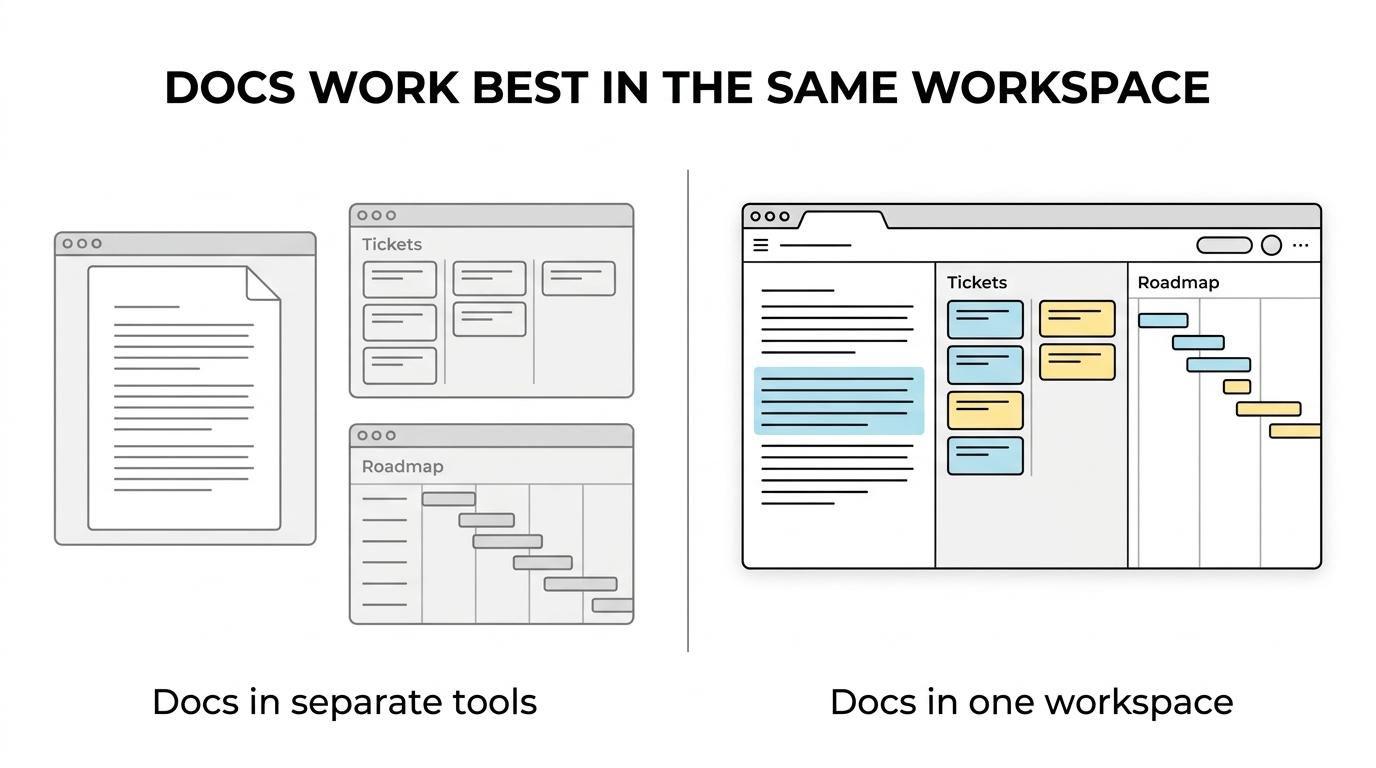
“TOW combines roadmaps, docs, tickets, and AI in one workspace, with cloud and self-hosted deployment options.”
TOW is a strong fit when you want documentation to support planning, implementation, maintenance, and cross-functional handoffs instead of becoming a disconnected wiki that slowly drifts out of date.
Documentation software for PRDs, specs, architecture decisions, runbooks, and internal wiki pages
TOW helps product managers, engineers, technical leads, and operations teams document the work they revisit every week. Because TOW includes docs and project management together, you can connect product planning to engineering detail instead of treating documentation as an afterthought.
Product teams commonly use TOW technical documentation software for content like this:
- PRDs and feature specifications
- Architecture notes and decision records
- API references and implementation details
- Release notes and rollout plans
- Runbooks, onboarding guides, and internal wiki pages
TOW docs support Markdown import, which makes it practical to bring existing technical notes, design writeups, and knowledge-base content into the workspace without rewriting everything from scratch.
“TOW supports Markdown import, so existing technical knowledge can move into one searchable workspace.”
That is especially useful when your knowledge is spread across Confluence pages, Notion docs, repository markdown files, and internal handbooks that people struggle to find when they need them.
Self-hosted or cloud technical documentation software with clear data ownership
Some product teams want a straightforward cloud rollout. Others need technical documentation software on their own infrastructure because the material includes sensitive architecture, customer-specific implementation details, or operational procedures. TOW supports both cloud deployment and self-hosted deployment, so your documentation model can match your security, procurement, and ownership requirements.
TOW also lets document access differ from project access through space and document-level permissions. You can keep broad product planning visible while limiting incident playbooks, security notes, or vendor-specific material to the right audience.
“TOW gives product teams space and document-level access controls, plus SSO, MFA, and LDAP/SAML/OIDC support through its bundled identity provider.”
For authentication and admin workflows, TOW ships with a bundled identity provider that supports SSO, MFA, and LDAP/SAML/OIDC options. TOW turns those controls into a practical benefit by making it easier to bring documentation under the same access policies your organization already relies on.
Reviewable AI for technical documentation workflows with human oversight
AI can help product teams summarize history, surface old decisions, and draft updates faster. It becomes a problem when it ignores permissions or makes changes without review. TOW includes workspace-aware AI agents with human review, so your team can use AI assistance without losing oversight of what gets suggested or changed.
TOW also supports BYOK or TOW-managed AI endpoints. That gives you a clearer path to align model access with internal policy, cost preferences, or infrastructure choices instead of forcing every team into one AI setup.
Because TOW uses permission-aware AI actions inside the workspace, the information surfaced to a user can stay aligned with what that person is allowed to access. That matters when product, engineering, support, and leadership all rely on the same documentation system.
Deployment, migration, and pricing that make TOW practical to adopt
Technical documentation software should be easy to evaluate in real conditions. TOW ships as a small deployment kit with one Compose file, a guided installer, and operations scripts, and it supports local evaluation at localhost:8080. TOW turns that deployment simplicity into a faster proof process for teams that want hands-on validation before a wider rollout.
TOW also includes admin, authentication, and migrations from Jira, Confluence, and Notion. If your team is consolidating scattered tools, TOW helps reduce the manual work of rebuilding projects and documentation in a new environment.
For smaller teams, TOW offers a cloud free plan that supports up to 20 users. The paid cloud plan is priced at $10 per seat per month, and TOW also offers a free self-hosted tier for small organizations, giving you a clearer way to test fit before expanding.
When TOW is the right technical documentation software for your product team
TOW is a strong choice when your team wants documentation to improve delivery, not sit beside it. It is built for organizations that need projects, docs, company memory, and AI in one workspace with real admin controls.
TOW is especially relevant if you need any of the following:
- One workspace for docs, tickets, goals, boards, and roadmaps
- Self-hosted control or a cloud option with clearer data ownership
- AI assistance that is reviewable and permission-aware
- Document permissions that do not have to mirror project permissions
- Migration paths from Jira, Confluence, or Notion
If you only need a lightweight public help center with no internal project workflow, your needs may be simpler. If your challenge is fragmented documentation, slow knowledge retrieval, and too many disconnected tools, TOW matches that problem directly.
Start with your current documentation and evaluate TOW in the environment you prefer
You do not need to rebuild your documentation process from zero to see whether TOW fits. Start in the cloud or run TOW on your own infrastructure, import existing Markdown content, and test how your docs, tickets, roadmaps, and AI work together in one workspace.
If your product team wants technical documentation software with stronger governance, clearer ownership, and less time lost searching for information, start with TOW’s free option for up to 20 users or set up a self-hosted evaluation. That is the fastest way to see your documentation in the same place your team already plans, builds, and decides.